
使用Powershell列出DNS区域属性GUI中的名称服务器
使用Powershell列出DNS区域属性GUI中的名称服务器
提问于 2020-04-17 04:46:21
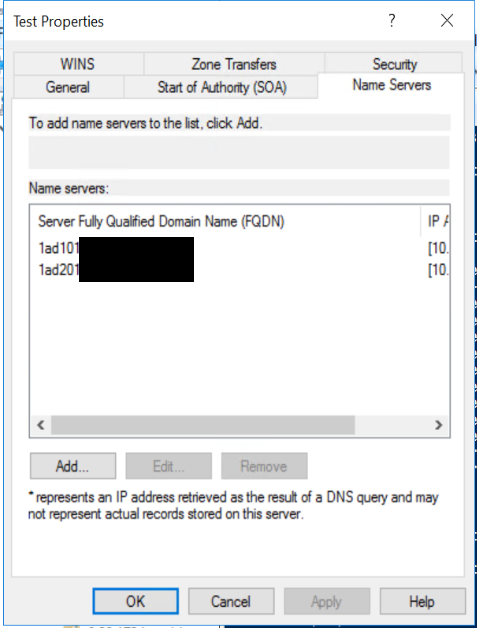
我已经阅读了所有DNS powershell cmdlet的清单,并且不敢相信我没有找到一种读取下面列表的编程方法。我是错过了它,还是有一种.NET方法可以让我也找不到呢?
回答 2
Server Fault用户
发布于 2020-04-24 00:18:52
Get-DnsServerResourceRecord -ComputerName <DNS Server You Are Querying> -ZoneName <Forward Lookup Zone Name> -RRType NS
您正在查看的域的属性中的名称serves类型将在正向查找区域中填充为NS名称记录。这些是该域的名称服务器。在上面的PS命令中查询NS资源记录将给出这些记录。要更改它们,您可以使用Set-DnsServerResourceRecord cmdlet。
DNS服务器cmdlet位于DNSServer powershell模块中。
您可以使用Import-Module -Name DNSServer cmd导入该命令。
您可以通过键入get-command -Module DNSServer命令查看与该模块关联的所有命令。
Server Fault用户
发布于 2022-09-04 23:16:03
    `#
    # Import the required PowerShell modules
    #

    Import-Module DNSServer -ErrorAction Ignore


    if (-not (Get-Module DNSServer)) {
        throw 'The Windows Feature "DNS Server Tools" is not installed. `
            (On server SKU run "Install-WindowsFeature -Name RSAT-DNS-Server", on client SKU install RSAT client)
    }
Get-DnsServerResourceRecord -ZoneName "contoso.com" -RRType "NS" -Node页面原文内容由Server Fault提供。腾讯云小微IT领域专用引擎提供翻译支持
原文链接:
https://serverfault.com/questions/1012696
复制相关文章
相似问题
腾讯云开发者

Copyright © 2013 - 2026 Tencent Cloud. All Rights Reserved. 腾讯云 版权所有
深圳市腾讯计算机系统有限公司 ICP备案/许可证号:粤B2-20090059  粤公网安备44030502008569号
腾讯云计算(北京)有限责任公司 京ICP证150476号 | 京ICP备11018762号