
Debian 11上的持久静态路由
我正在尝试建立一个测试实验室,如下所示:
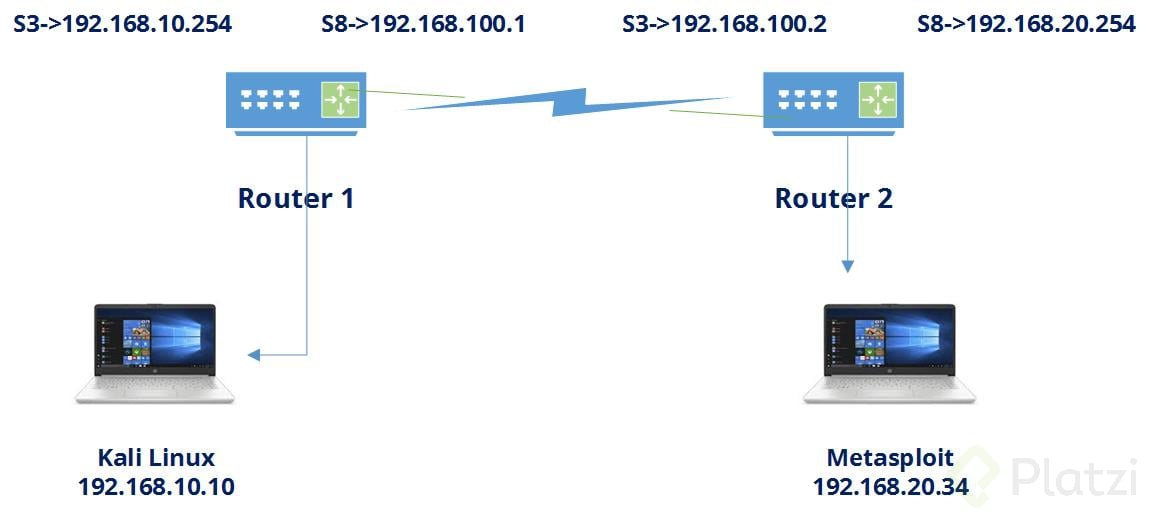
不是Metasploit,而是Metasploit。
我运行的是VirtualBox,路由器是两个VM,运行Debian 11。每个路由器有两个接口:
~# ls /sys/class/net/
enp0s3    enp0s8    lo
用于路由器1
~# cat /etc/network/interfaces
[...]
# The primary network interface
auto enp0s3
iface enp0s3 inet static
        address 192.168.10.254
        netmask 255.255.255.0
auto enp0s8
iface enp0s8 inet static
        address 192.168.100.1
        netmask 255.255.255.0
用于路由器2
~# cat /etc/network/interfaces
[...]
# The primary network interface
auto enp0s3
iface enp0s3 inet static
        address 192.168.100.2
        netmask 255.255.255.0
auto enp0s8
iface enp0s8 inet static
        address 192.168.20.254
        netmask 255.255.255.0
我尝试添加路由器1的路由
~# ip route add 192.168.20.0/24 via 192.168.100.2 dev enp0s8对于路由器2
~# ip route add 192.168.10.0/24 via 192.168.100.1 dev enp0s3路由器1的ip route show
169.254.0.0/16 dev enp0s3 scope link metric 1000
192.168.10.0/24 dev enp0s3 proto kernel scope link src 192.168.10.254
192.168.20.0/24 via 192.168.100.2 dev enp0s8
192.168.100.0/24 dev enp0s8 proto kernel scope link src 192.168.100.1路由器2的ip route show
169.254.0.0/16 dev enp0s3 scope link metric 1000
192.168.10.0/24 via 192.168.100.1 dev enp0s3
192.168.20.0/24 dev enp0s3 proto kernel scope link src 192.168.20.254
192.168.100.0/24 dev enp0s8 proto kernel scope link src 192.168.100.2
后来,我发现这样做并不是持久的,所以我尝试了所有这些。
https://www.mybluelinux.com/debian-permanent-static-routes/
当我通过systemctl restart networking或/etc/init.d/networking restart重新启动网络服务时,输出是
Jobs for networking.service failed because the control process exited with error code.
See "systemctl status networking.service" and "journal -xe" for details.
systemctl status networking.service输出:
Loaded: loaded (/lib/systemd/system/networking.service; enabled; vendor preset: enabled)
Active: failed (Result: exit-code)
Process: 478 ExecStart=/sbin/ifup -a --read-enviroment (code=exited, status=1/FAILURE)


router1 systemd[1]: Starting Raise network interfaces...
router1 ifup[499]: RTNETLINK answers: File existis
router1 ifup[478]: ifup: failed to bring up enp0s8
router1 systemd[1]: networking.service: Main process exited, code=exited, status=1/FAILURE
router1 systemd[1]: networking.service: Failed with result 'exit-code'.
router1 systemd[1]: Failed to start Raise network interfaces.
journalctl -u networking.service输出:
--Boot blabla hash blabla
router1 systemd[1]: Starting Raise network interfaces...
router1 ifup[499]: RTNETLINK answers: No such process
router1 ifup[478]: ifup: failed to bring up enp0s8
router1 systemd[1]: networking.service: Main process exited, code=exited, status=1/FAILURE
router1 systemd[1]: networking.service: Failed with result 'exit-code'.
router1 systemd[1]: Failed to start Raise network interfaces.
--Boot blabla other hash blabla
router1 systemd[1]: Starting Raise network interfaces...
router1 ifup[499]: RTNETLINK answers: File existis
router1 ifup[478]: ifup: failed to bring up enp0s8
router1 systemd[1]: networking.service: Main process exited, code=exited, status=1/FAILURE
router1 systemd[1]: networking.service: Failed with result 'exit-code'.
router1 systemd[1]: Failed to start Raise network interfaces.路由器1的cat /etc/network/interfaces:
# This file describes the network interfaces available on your system
# and how to activate them. For more information, see interfaces(5).

source /etc/network/interfaces.d/*

# The loopback network interface
auto lo
iface lo inet loopback

# The primary network interface
auto enp0s3
iface enp0s3 inet static
        address 192.168.10.254
        netmask 255.255.255.0
auto enp0s8
iface enp0s8 inet static
        address 192.168.100.1
        netmask 255.255.255.0
#       gateway 192.168.10.254
        up ip route del 192.168.20.0/24 via 192.168.100.2 dev enp0s8
        up ip route add 192.168.20.0/24 via 192.168.100.2 dev enp0s8
然后,如果我试图重新启动系统,则在启动时会引发“启动失败的网络接口”错误。
这就是我迷路的地方。有什么想法吗?
回答 1
Unix & Linux用户
发布于 2022-07-24 16:24:37
你有两个向上命令。把它改成
post-up ip route add...
post-down ip route del...
重新启动网络服务或重新启动。
https://unix.stackexchange.com/questions/711094
复制相似问题
腾讯云开发者

Copyright © 2013 - 2026 Tencent Cloud. All Rights Reserved. 腾讯云 版权所有
深圳市腾讯计算机系统有限公司 ICP备案/许可证号:粤B2-20090059  粤公网安备44030502008569号
腾讯云计算(北京)有限责任公司 京ICP证150476号 | 京ICP备11018762号