
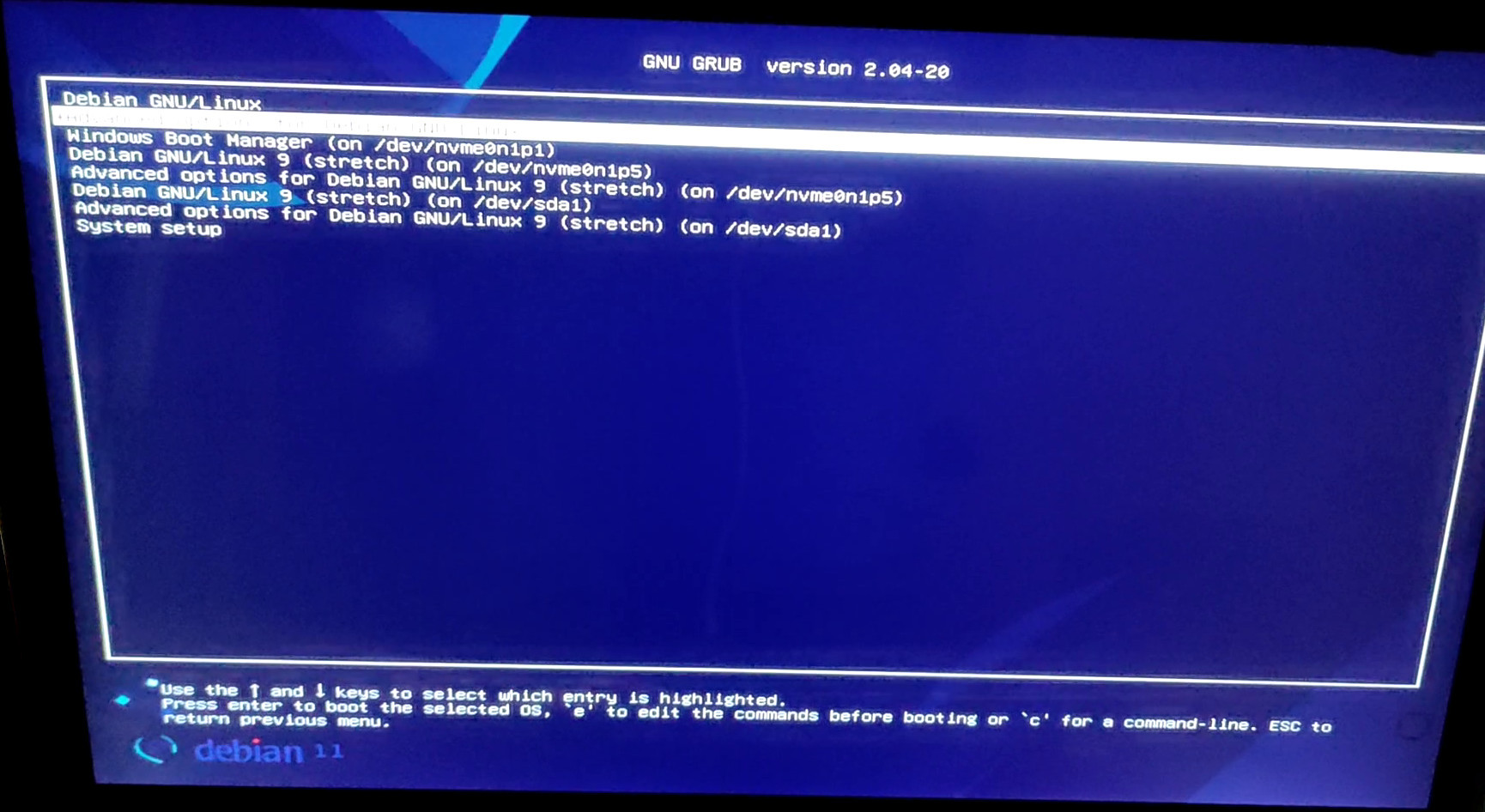
克隆OS之后,GRUB总是从源sda1分区启动,即使选择了另一个分区来启动。
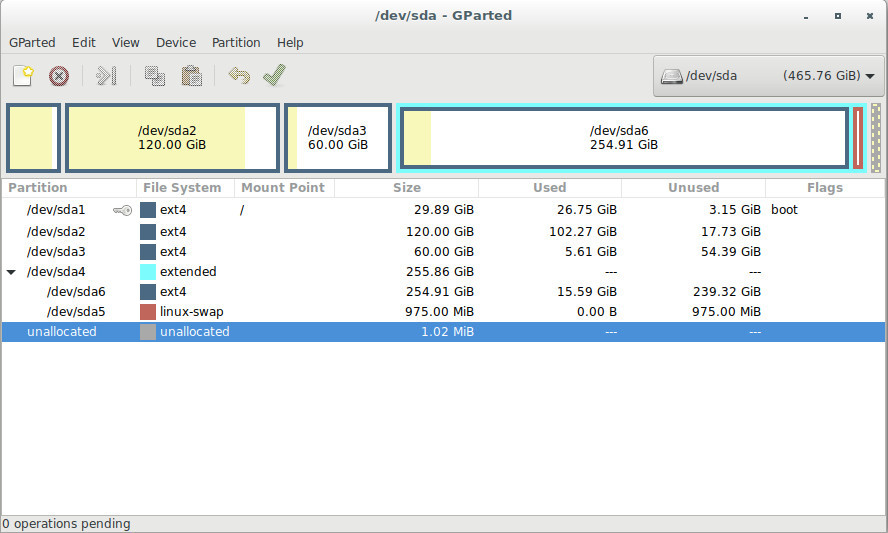
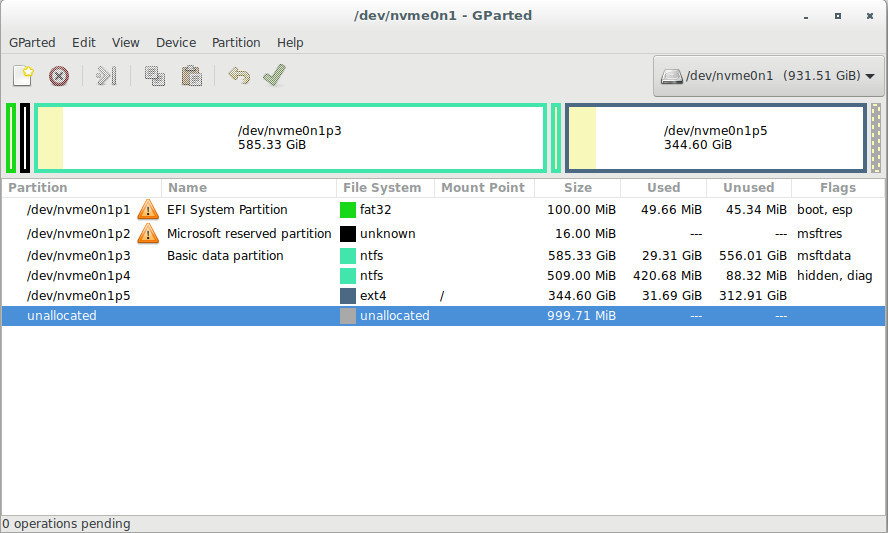
我有一个笔记本电脑应该运行两个Debian 9's,一个Debian 11和一个Windows10从两个磁盘,一个硬盘驱动器,/sda/,和一个新的固态驱动器,/nvme0n1/。
我用绞刀克隆/sda1/'s Debian 9并将其扩展到SDD的/nvme0n1p5/上。
当我使用识别所有四种操作系统的/nvme0n1p5/启动Debian 9( GRUB2 )时,它总是在Legacy boot模式上引导源分区/sda1/。Debian 11安装在/sda5/引导上,就像/nvme0n1p1/上的Windows一样。
更新的SSD /nvme0n1/使用GPT进行分区,而HDD仍然使用MBR。
在克隆了源分区之后,我不得不将grub2重新安装为grub as 64,卸载grub,以适应UEFI双启动/多引导正如这里所建议的。
我还没有尝试从机器上删除带有源分区的HDD,并查看GRUB的反应,但我不应该这样做。
EDIT 1
我尝试给/nvme0n1p5/一个新的UUID并更新GRUB,但这并没有解决问题。
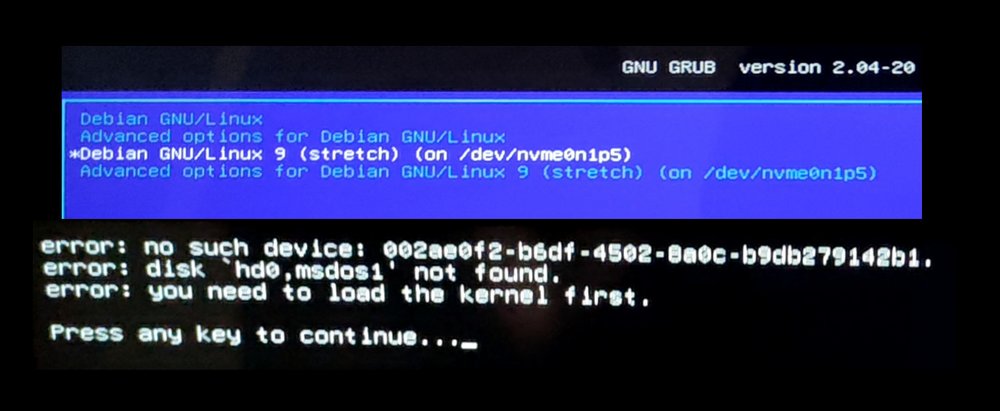
然后我试着移除硬盘看看会发生什么。结果在第四张图像中。/nvme0n1p1/上的窗口不再可见。我不能引导到/sda1/或/nvme0n1p5/。第一个是预期的。第二种不是。
回答 1
Unix & Linux用户
发布于 2022-08-14 11:51:03
最后,我发现问题是/etc/fstab上的UUID问题。在克隆分区/nvme0n1p5/上的Linux将加载针对/sda1/的UUID的文件系统。
我必须在我的/etc/fstab文件中用目标分区的新UUID替换原始分区的旧UUID。
# /etc/fstab: static file system information.
#
# Use 'blkid' to print the universally unique identifier for a
# device; this may be used with UUID= as a more robust way to name devices
# that works even if disks are added and removed. See fstab(5).
#
#
# / was on /dev/sda1 during installation
UUID=002ae0f2-b6df-4502-8a0c-b9db279142b1 /               ext4    errors=remount-ro 0       1
至
# /etc/fstab: static file system information.
#
# Use 'blkid' to print the universally unique identifier for a
# device; this may be used with UUID= as a more robust way to name devices
# that works even if disks are added and removed. See fstab(5).
#
#
# / was on /dev/sda1 during installation
UUID=248b6fec-3f9a-4e48-838f-cdea88cfe933 /               ext4    errors=remount-ro 0       1
在我的修补过程中,我对grub进行了多次更新,有很多种方法。我不相信这第二个问题是原始问题的一部分,而是修复了我可能创建的第二个问题。我包括这个以防万一。grub菜单项指向用于检索文件系统的错误分区,但指向检索Linux内核的正确条目。
submenu "Advanced options for Debian GNU/Linux 9 (stretch) (on /dev/nvme0n1p5)"{
menuentry "Debian GNU/Linux (on /dev/nvme0n1p5)" --class gnu-linux --class gnu --class os $menuentry_id_option 'osprober-gnulinux-/boot/vmlinuz-4.9.0-13-amd64--248b6fec-3f9a-4e48-838f-cdea88cfe933' {
        insmod part_gpt
        insmod ext2
        if [ x$feature_platform_search_hint = xy ]; then
          search --no-floppy --fs-uuid --set=root  002ae0f2-b6df-4502-8a0c-b9db279142b1
        else
          search --no-floppy --fs-uuid --set=root 002ae0f2-b6df-4502-8a0c-b9db279142b1
        fi
        linux /boot/vmlinuz-4.9.0-13-amd64 root=UUID=248b6fec-3f9a-4e48-838f-cdea88cfe933 ro efi=runtime quiet
        initrd /boot/initrd.img-4.9.0-13-amd64
}
至:
submenu "Advanced options for Debian GNU/Linux 9 (stretch) (on /dev/nvme0n1p5)"{
menuentry "Debian GNU/Linux (on /dev/nvme0n1p5)" --class gnu-linux --class gnu --class os $menuentry_id_option 'osprober-gnulinux-/boot/vmlinuz-4.9.0-13-amd64--248b6fec-3f9a-4e48-838f-cdea88cfe933' {
        insmod part_gpt
        insmod ext2
        if [ x$feature_platform_search_hint = xy ]; then
          search --no-floppy --fs-uuid --set=root  248b6fec-3f9a-4e48-838f-cdea88cfe933
        else
          search --no-floppy --fs-uuid --set=root 248b6fec-3f9a-4e48-838f-cdea88cfe933
        fi
        linux /boot/vmlinuz-4.9.0-13-amd64 root=UUID=248b6fec-3f9a-4e48-838f-cdea88cfe933 ro efi=runtime quiet
        initrd /boot/initrd.img-4.9.0-13-amd64
}
这可以通过使用Debian 10或更多版本的grub-customizer来实现。否则,只需挂载EFI系统分区并打开/grub/grub.cfg。您将不得不修改高级启动选项以及。记住复制原始/grub/grub.cfg的备份,以防出问题。
用sudo blkid找到自己正确的UUID。正确的UUID是要引导到的分区的UUID。
https://unix.stackexchange.com/questions/705067
复制相似问题
腾讯云开发者

Copyright © 2013 - 2026 Tencent Cloud. All Rights Reserved. 腾讯云 版权所有
深圳市腾讯计算机系统有限公司 ICP备案/许可证号:粤B2-20090059  粤公网安备44030502008569号
腾讯云计算(北京)有限责任公司 京ICP证150476号 | 京ICP备11018762号