
使用UIView向UIKitDynamics添加拖动功能
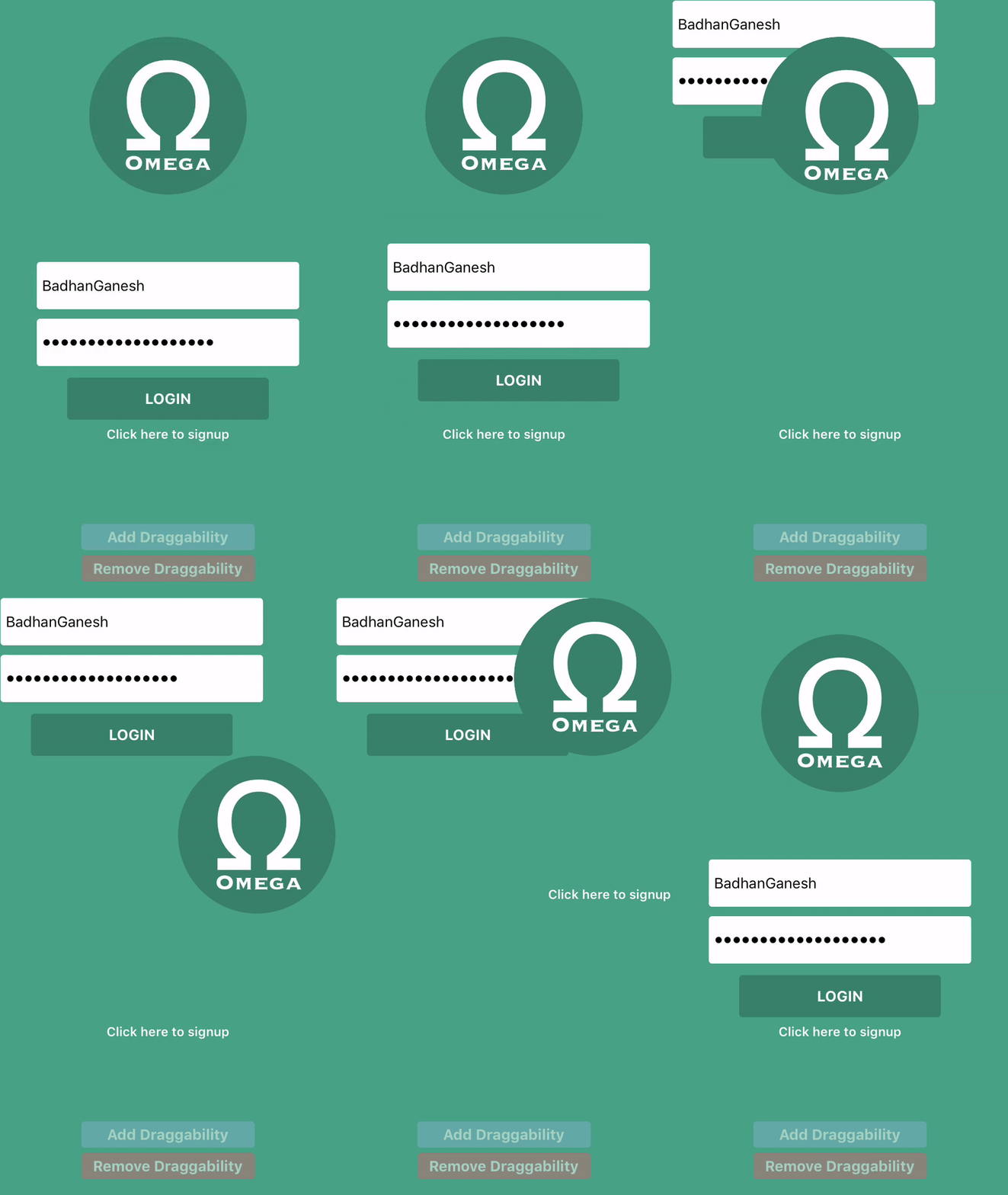
我最近发布了一个名为iOS控件/组件的BJDraggable,它基本上通过调用一个方法,使我们能够在其superview边界内拖动视图。整个设置使用UIKitDynamics API工作。(滚动到最后以查看已实现的输出。)
这些是我向消费者公开的方法。您可以在详细代码(BJDraggable.swift)中跟踪这些方法调用。
@objc protocol BJDraggable: class {

    @objc func addDraggability(withinView referenceView: UIView)
    @objc func addDraggability(withinView referenceView: UIView, withMargin insets:UIEdgeInsets)
    @objc func removeDraggability()

}这是我的完整密码。请容忍这段代码的长度,它很长。演示项目可在GitHub获得.提前感谢您的时间。
BJDraggable.swift
import UIKit

var kReferenceViewKey: String = "ReferenceViewKey"
var kDynamicAnimatorKey: String = "DynamicAnimatorKey"
var kAttachmentBehaviourKey: String = "AttachmentBehaviourKey"
var kPanGestureKey: String = "PanGestureKey"
var kResetPositionKey: String = "ResetPositionKey"

fileprivate enum BehaviourNames {
    case main
    case border
    case collision
    case attachment
}

/**A simple protocol *(No need to implement methods and properties yourself. Just drop-in the BJDraggable file to your project and all done)* utilizing the powerful `UIKitDynamics` API, which makes **ANY** `UIView` draggable within a boundary view that acts as collision body, with a single method call.
 */
@objc protocol BJDraggable: class {

    /**
     Gives you the power to drag your `UIView` anywhere within a specified view, and collide within its bounds.
     - parameter referenceView: The boundary view which acts as a wall, and your view will collide with it and would never fall out of bounds hopefully. **Note that the reference view should contain the view that you're trying to add draggability to in its view hierarchy. The app would crash otherwise.**
     */
    @objc func addDraggability(withinView referenceView: UIView)

    /**
     This single method call will give you the power to drag your `UIView` anywhere within a specified view, and collide within its bounds.
     - parameter referenceView: This is the boundary view which acts as a wall, and your view will collide with it and would never fall out of bounds hopefully. **Note that the reference view should contain the view that you're trying to add draggability to in its view hierarchy. The app would crash otherwise.**
     - parameter insets: If you want to make the boundary to be offset positively or negatively, you can specify that here. This is nothing but a margin for the boundary.
     */
    @objc func addDraggability(withinView referenceView: UIView, withMargin insets:UIEdgeInsets)

    /**
     Removes the power from you, to drag the view in question
     */
    @objc func removeDraggability()

}


///Implementation of `BJDraggable` protocol
extension UIView: BJDraggable {

    //
    //////////////////////////////////////////////////////////////////////////////////////////
    //MARK:-
    //MARK: Properties
    //MARK:-
    //////////////////////////////////////////////////////////////////////////////////////////
    //

    public var shouldResetViewPositionAfterRemovingDraggability: Bool {
        get {
            let getValue = (objc_getAssociatedObject(self, &kResetPositionKey) as? Bool)
            return getValue == nil ? false : getValue!
        }
        set {
            objc_setAssociatedObject(self, &kResetPositionKey, newValue, .OBJC_ASSOCIATION_RETAIN_NONATOMIC)
            self.translatesAutoresizingMaskIntoConstraints = !newValue
        }
    }

    fileprivate var referenceView: UIView? {
        get {
            return objc_getAssociatedObject(self, &kReferenceViewKey) as? UIView
        }
        set {
            objc_setAssociatedObject(self, &kReferenceViewKey, newValue, .OBJC_ASSOCIATION_RETAIN_NONATOMIC)
        }
    }

    fileprivate var animator: UIDynamicAnimator? {
        get {
            return objc_getAssociatedObject(self, &kDynamicAnimatorKey) as? UIDynamicAnimator
        }
        set {
            objc_setAssociatedObject(self, &kDynamicAnimatorKey, newValue, .OBJC_ASSOCIATION_RETAIN_NONATOMIC)
        }
    }

    fileprivate var attachmentBehaviour: UIAttachmentBehavior? {
        get {
            return objc_getAssociatedObject(self, &kAttachmentBehaviourKey) as? UIAttachmentBehavior
        }
        set {
            objc_setAssociatedObject(self, &kAttachmentBehaviourKey, newValue, .OBJC_ASSOCIATION_RETAIN_NONATOMIC)
        }
    }

    fileprivate var panGestureRecognizer: UIPanGestureRecognizer? {
        get {
            return objc_getAssociatedObject(self, &kPanGestureKey) as? UIPanGestureRecognizer
        }
        set {
            objc_setAssociatedObject(self, &kPanGestureKey, newValue, .OBJC_ASSOCIATION_RETAIN_NONATOMIC)
        }
    }

    //
    //////////////////////////////////////////////////////////////////////////////////////////
    //MARK:-
    //MARK: Method Implementations
    //MARK:-
    //////////////////////////////////////////////////////////////////////////////////////////
    //

    final func addDraggability(withinView referenceView: UIView) {
        self.addDraggability(withinView: referenceView, withMargin: UIEdgeInsets.init(top: 0, left: 0, bottom: 0, right: 0))
    }

    final func addDraggability(withinView referenceView: UIView, withMargin insets:UIEdgeInsets) {

        guard self.animator == nil else { return }

        ///////////////////////
        /////Configuration/////
        ///////////////////////

        performInitialConfiguration()
        addPanGestureRecognizer()

        ////////////////////////////////////////////////
        /////Getting Collision Items For Behaviours/////
        ////////////////////////////////////////////////

        let collisionItems = self.drawAndGetCollisionViewsAround(referenceView, withInsets: insets)

        ////////////////////
        /////Behaviours/////
        ////////////////////

        let mainItemBehaviour = get(behaviour: .main, for: referenceView, withInsets: insets, configuredWith: collisionItems)!
        let borderItemsBehaviour = get(behaviour: .border, for: referenceView, withInsets: insets, configuredWith: collisionItems)!
        let collisionBehaviour = get(behaviour: .collision, for: referenceView, withInsets: insets, configuredWith: collisionItems)!
        let attachmentBehaviour = get(behaviour: .attachment, for: referenceView, withInsets: insets, configuredWith: collisionItems)!

        //////////////////
        /////Animator/////
        //////////////////

        let animator = UIDynamicAnimator.init(referenceView: referenceView)
        animator.addBehavior(mainItemBehaviour)
        animator.addBehavior(borderItemsBehaviour)
        animator.addBehavior(collisionBehaviour)
        animator.addBehavior(attachmentBehaviour)

        /////////////////////
        /////Persistence/////
        /////////////////////

        self.animator = animator
        self.referenceView = referenceView
        self.attachmentBehaviour = attachmentBehaviour as? UIAttachmentBehavior

    }

    final func removeDraggability() {
        if let recognizer = self.panGestureRecognizer { self.removeGestureRecognizer(recognizer) }
        self.translatesAutoresizingMaskIntoConstraints = !self.shouldResetViewPositionAfterRemovingDraggability
        self.animator?.removeAllBehaviors()

        if let subviews = self.referenceView?.subviews {
            for view in subviews {
                if view.tag == 122 || view.tag == 222 || view.tag == 322 || view.tag == 422 {
                    view.removeFromSuperview()
                }
            }
        }

        self.referenceView = nil
        self.attachmentBehaviour = nil
        self.animator = nil
        self.panGestureRecognizer = nil
    }

    //
    //////////////////////////////////////////////////////////////////////////////////////////
    //MARK:-
    //MARK: Helpers 1
    //MARK:-
    //////////////////////////////////////////////////////////////////////////////////////////
    //

    fileprivate func performInitialConfiguration() {
        self.isUserInteractionEnabled = true
    }

    fileprivate func addPanGestureRecognizer() {
        let panGestureRecognizer = UIPanGestureRecognizer.init(target: self, action: #selector(self.panGestureHandler(_:)))
        self.addGestureRecognizer(panGestureRecognizer)
        self.panGestureRecognizer = panGestureRecognizer
    }

    @objc final func panGestureHandler(_ gesture: UIPanGestureRecognizer) {
        guard let referenceView = self.referenceView else { return }
        let touchPoint = gesture.location(in: referenceView)
        self.attachmentBehaviour?.anchorPoint = touchPoint
    }

    fileprivate func get(behaviour:BehaviourNames, for referenceView:UIView, withInsets:UIEdgeInsets, configuredWith boundaryCollisionItems:[UIDynamicItem]) -> UIDynamicBehavior? {

        let allItems = [self] + boundaryCollisionItems

        switch behaviour {
        case .border:
            let borderItemsBehaviour = UIDynamicItemBehavior.init(items: boundaryCollisionItems)
            borderItemsBehaviour.allowsRotation = false
            borderItemsBehaviour.isAnchored = true
            borderItemsBehaviour.friction = 2.0
            return borderItemsBehaviour
        case .main:
            let mainItemBehaviour = UIDynamicItemBehavior.init(items: [self])
            mainItemBehaviour.allowsRotation = false
            mainItemBehaviour.isAnchored = false
            mainItemBehaviour.friction = 2.0
            return mainItemBehaviour
        case .collision:
            let collisionBehaviour = UICollisionBehavior.init(items: allItems)
            collisionBehaviour.collisionMode = .items
            collisionBehaviour.addBoundary(withIdentifier: "Boundary" as NSCopying, for: self.boundaryPathFor(referenceView))
            return collisionBehaviour
        case .attachment:
            let attachmentBehaviour = UIAttachmentBehavior.init(item: self, attachedToAnchor: self.center)
            return attachmentBehaviour
        }
    }

    //
    //////////////////////////////////////////////////////////////////////////////////////////
    //MARK:-
    //MARK: Helpers 2
    //MARK:-
    //////////////////////////////////////////////////////////////////////////////////////////
    //

    func alteredFrameByPoints(_ point:CGFloat) -> CGRect {

        var newFrame = self.frame

        newFrame.origin.x -= point
        newFrame.origin.y -= point
        newFrame.size.width += point * 2
        newFrame.size.height += point * 2

        return newFrame
    }

    fileprivate func boundaryPathFor(_ view:UIView) -> UIBezierPath {
        let cgPath = CGPath.init(rect: view.alteredFrameByPoints(2.0), transform:nil)
        return UIBezierPath.init(cgPath: cgPath)
    }

    fileprivate func getNewRectFrom(rect:CGRect, byApplying insets:UIEdgeInsets) -> CGRect {

        var newRect:CGRect = .zero

        let x = rect.origin.x + insets.left
        let y = rect.origin.y + insets.top

        let width = rect.width - insets.right
        let height = rect.height - insets.bottom

        newRect.origin.x = x
        newRect.origin.y = y
        newRect.size.width = width
        newRect.size.height = height

        return newRect
    }

    @discardableResult
    fileprivate func drawAndGetCollisionViewsAround(_ referenceView:UIView, withInsets insets:UIEdgeInsets) -> ([UIView]) {

        let boundaryViewWidth = CGFloat(1)
        let boundaryViewHeight = CGFloat(1)

        ////////////////////
        ////Get New Rect////
        ////////////////////

        let newReferenceViewRect = self.getNewRectFrom(rect:referenceView.alteredFrameByPoints(1),
                                                       byApplying:insets)

        ////////////
        ////Left////
        ////////////

        let leftView = UIView(frame: CGRect.init(x: newReferenceViewRect.origin.x - (boundaryViewWidth - 1), y: newReferenceViewRect.origin.y, width: boundaryViewWidth, height: newReferenceViewRect.size.height - insets.bottom))
        leftView.isUserInteractionEnabled = false
        leftView.tag = 122

        /////////////
        ////Right////
        /////////////

        let rightView = UIView(frame: CGRect.init(x: newReferenceViewRect.size.width - 2.0, y: newReferenceViewRect.origin.y, width: boundaryViewWidth, height: newReferenceViewRect.size.height - insets.bottom))
        rightView.isUserInteractionEnabled = false
        rightView.tag = 222

        ///////////
        ////Top////
        ///////////

        let topView = UIView(frame: CGRect.init(x: newReferenceViewRect.origin.x, y: newReferenceViewRect.origin.y - (boundaryViewHeight - 1), width: newReferenceViewRect.size.width - insets.right, height: boundaryViewHeight))
        topView.isUserInteractionEnabled = false
        topView.tag = 322

        //////////////
        ////Bottom////
        //////////////

        let bottomView = UIView(frame: CGRect.init(x: newReferenceViewRect.origin.x, y: newReferenceViewRect.size.height - 2.0, width: newReferenceViewRect.size.width - insets.right, height: boundaryViewHeight))
        bottomView.isUserInteractionEnabled = false
        bottomView.tag = 422

        ///////////////////
        ////Add Subview////
        ///////////////////

        referenceView.addSubview(leftView)
        referenceView.addSubview(rightView)
        referenceView.addSubview(topView)
        referenceView.addSubview(bottomView)

        return [leftView, rightView, topView, bottomView]
    }

}
这就是它的工作方式:
回答 1
Code Review用户
发布于 2018-06-24 19:00:33
将可选值与nil进行比较,如
return getValue == nil ? false : getValue!最好使用零合并运算符??:
return getValue ?? false它更短,避免了强制展开,只访问变量一次,并清楚地表达了意图.(还请参见堆栈溢出的什么时候我应该将一个可选的值与零进行比较?。)
现在不再需要中间变量了:
return objc_getAssociatedObject(self, &kResetPositionKey) as? Bool ?? false关联对象的键。
var kReferenceViewKey: String = "ReferenceViewKey"
// ...
是全局变量。为了限制它们的可见性,可以将它们设置为“文件私有”。
fileprivate var kReferenceViewKey = "ReferenceViewKey"
// ...
或静态属性,私有于扩展:
extension UIView: BJDraggable {

    private static var kReferenceViewKey = "ReferenceViewKey"
    // ...

}
还请注意,没有必要使用显式类型注释。
只需要变量的地址作为相关值的键,类型和值并不重要。您甚至可以将其定义为单个字节。
private static var kReferenceViewKey: UInt8 = 0为了节省一些记忆。
这里
if view.tag == 122 || view.tag == 222 || view.tag == 322 || view.tag == 422 “魔术标签号”被用来标识前面添加的特殊视图。这很容易出错,因为原始的UIView可能偶然地使用相同的标记。
另一种方法是为这些特殊视图创建一个自定义的UIView子类,或者将对它们的引用保存在另一个(关联的)属性中。
这
func alteredFrameByPoints(_ point:CGFloat) -> CGRect {
    var newFrame = self.frame
    newFrame.origin.x -= point
    newFrame.origin.y -= point
    newFrame.size.width += point * 2
    newFrame.size.height += point * 2
    return newFrame
}
可以简化为
func alteredFrameByPoints(_ point:CGFloat) -> CGRect {
    return self.frame.insetBy(dx: -point, dy: -point)
}
而这个功能
fileprivate func getNewRectFrom(rect:CGRect, byApplying insets:UIEdgeInsets) -> CGRect {
    var newRect:CGRect = .zero
    let x = rect.origin.x + insets.left
    let y = rect.origin.y + insets.top
    let width = rect.width - insets.right
    let height = rect.height - insets.bottom
    newRect.origin.x = x
    newRect.origin.y = y
    newRect.size.width = width
    newRect.size.height = height
    return newRect
}
到底是什么
UIEdgeInsetsInsetRect(rect, insets) // Swift <= 4.1
rect.inset(by: insets)              // Swift >= 4.2
已经有了。
https://codereview.stackexchange.com/questions/197166
复制相似问题
腾讯云开发者

Copyright © 2013 - 2026 Tencent Cloud. All Rights Reserved. 腾讯云 版权所有
深圳市腾讯计算机系统有限公司 ICP备案/许可证号:粤B2-20090059  粤公网安备44030502008569号
腾讯云计算(北京)有限责任公司 京ICP证150476号 | 京ICP备11018762号