
在其他部件上移动阴影
我的基本部件是一个列。第一个元素是一个容器,它有一个BoxShadow。第二个元素是一个ListView,它根据上下文构建多个卡片。如果卷轴为0,则显示阴影。然而,当开始滚动,卡是“超过”阴影(较高的z-索引),并隐藏它。
展开
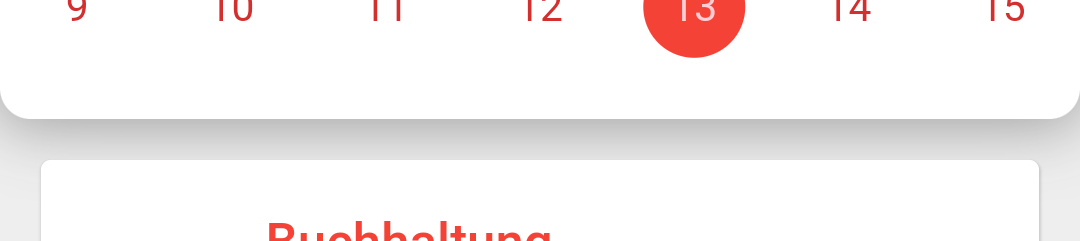
卷动

阴影应该永远在上面,在纸牌上。这是怎么做的?
回答 3
Stack Overflow用户
发布于 2021-08-01 06:46:15
根据你的问题,这是关于哪里出了问题的概念。
Column的第一个孩子是Container with shadow。Shadow呈现在定义大小之外。如果您在此Container之后不提供任何空格,我们将无法看到阴影。这个空间可以由Container margin、SizedBox或wrapping our list with填充. But now our main question is how we get shadow while index=0. I believe it is coming from ListChildren`‘来完成。它们包含上层空间,这就是为什么我们只能第一次看到。
Ui渲染优先级从下到上开始。
如何解决这个问题:我们可以在容器底部提供空间,或者分配margin(不是填充),或者在container之后使用SizedBox提供与shadow相同的高度。
- 在容器上提供底层
margin。 - 添加具有阴影高度的SizedBox。
- 用
Padding包装我们的列表并提供top:。
在这张图片中,我们的shadow: white,background:amber。
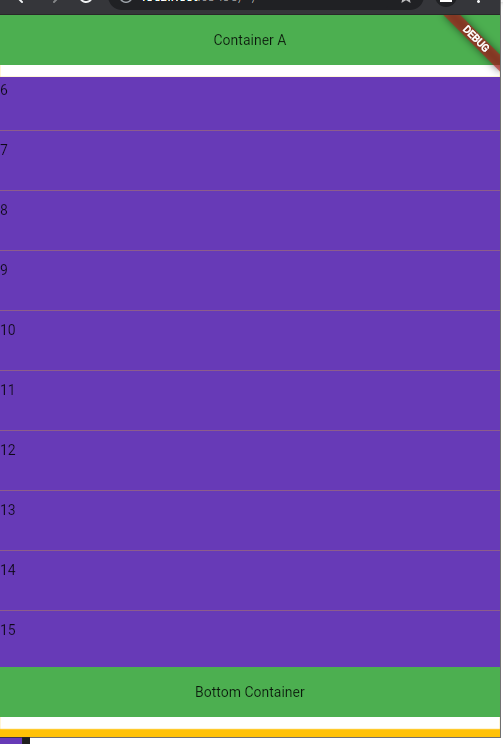
演示代码:
import 'package:flutter/material.dart';

class ColumnWithContainerShadow extends StatelessWidget {
  const ColumnWithContainerShadow({Key? key}) : super(key: key);

  @override
  Widget build(BuildContext context) {
    return Scaffold(
      backgroundColor: Colors.amber,
      body: Column(
        children: [
          Container(
            height: 50,
            width: double.infinity,
            ////* we dont need margin if we have padding on ListView
            // margin: EdgeInsets.only(bottom: 12),
            decoration: BoxDecoration(
              color: Colors.green,
              boxShadow: [
                BoxShadow(
                  offset: Offset(0, 12),
                  color: Colors.white,
                )
              ],
            ),
            child: Center(child: Text("Container A")),
          ),
          Expanded(
            child: Padding(
              padding: const EdgeInsets.only(top: 12),
              child: ListView(
                children: [
                  ...List.generate(
                    333,
                    (index) => Container(
                      /// enable this margine and remove other spaces to see 1st child shadow.(shadow depend on children position)
                      // margin: EdgeInsets.only(top: 12),
                      height: 60,
                      color: Colors.deepPurple,
                      child: Text("$index"),
                    ),
                  )
                ],
              ),
            ),
          ),
          Container(
            height: 50,
            width: double.infinity,
            alignment: Alignment.center,
            decoration: BoxDecoration(
              color: Colors.green,
              boxShadow: [
                BoxShadow(
                  offset: Offset(0, 12),
                  color: Colors.white,
                )
              ],
            ),
            child: Text("Bottom Container"),
          ),
          // Comment to close shadow
          SizedBox(
            height: 20,
          )
        ],
      ),
    );
  }
}Stack Overflow用户
发布于 2021-08-02 18:32:16
编辑
如果不希望容器阴影在滚动中消失,请删除ScrollNotification和NotificationListener
有一个小部件
您可以将ScrollNotification与NotificationListener结合使用。试试这;
编码愉快!
class TestPage extends StatefulWidget {
  const TestPage({Key key}) : super(key: key);

  @override
  _TestPageState createState() => _TestPageState();
}

class _TestPageState extends State<TestPage> {
  double blurRadius = 10.0;
  double spreadRadius = 1.0;

  @override
  void initState() {
    super.initState();
  }

  @override
  Widget build(BuildContext context) {
    return Scaffold(
      appBar: AppBar(
        backgroundColor: Colors.blueGrey,
        title: Text('Title'),
      ),
      body: Container(
        width: Get.width,
        height: Get.height,
        child: Stack(
          children: [
            Padding(
              padding: const EdgeInsets.symmetric(horizontal: 16.0).copyWith(
                top: 62.0,
              ),
              child: NotificationListener<ScrollNotification>(
                // ignore: missing_return
                onNotification: (scrollNotification) {
                  if (scrollNotification is ScrollStartNotification) {
                    setState(() {
                      blurRadius = 0.0;
                      spreadRadius = 0.0;
                    });
                  } else if (scrollNotification is ScrollEndNotification) {
                    setState(() {
                      blurRadius = 10.0;
                      spreadRadius = 1.0;
                    });
                  }
                },
                child: ListView.builder(
                  // controller: _controller,
                  itemCount: 10,
                  itemBuilder: (context, index) {
                    return Card(
                      child: Container(
                          width: Get.width * .8,
                          height: 100.0,
                          child: Center(
                            child: Text('child @ index : $index'),
                          )),
                    );
                  },
                ),
              ),
            ),
            Positioned(
              top: 0,
              left: 0,
              right: 0,
              child: Container(
                width: Get.width,
                height: 60.0,
                margin: EdgeInsets.only(),
                decoration: BoxDecoration(
                  color: Colors.white,
                  borderRadius: BorderRadius.only(
                    bottomLeft: Radius.circular(20.0),
                    bottomRight: Radius.circular(20.0),
                  ),
                  boxShadow: [
                    BoxShadow(
                      color: Colors.grey,
                      blurRadius: blurRadius,
                      spreadRadius: spreadRadius,
                    ),
                  ],
                ),
                child: Center(
                  child: Text('TOP CONTAINER'),
                ),
              ),
            ),
          ],
        ),
      ),
    );
  }
}Stack Overflow用户
发布于 2021-07-30 18:42:53
将此上部框包装在Material小部件中,并提供一个提升。
https://stackoverflow.com/questions/57931152
复制相似问题
腾讯云开发者

Copyright © 2013 - 2026 Tencent Cloud. All Rights Reserved. 腾讯云 版权所有
深圳市腾讯计算机系统有限公司 ICP备案/许可证号:粤B2-20090059  粤公网安备44030502008569号
腾讯云计算(北京)有限责任公司 京ICP证150476号 | 京ICP备11018762号