
使用按钮动态添加HTML Inputbox
使用按钮动态添加HTML Inputbox
提问于 2019-09-12 07:39:41
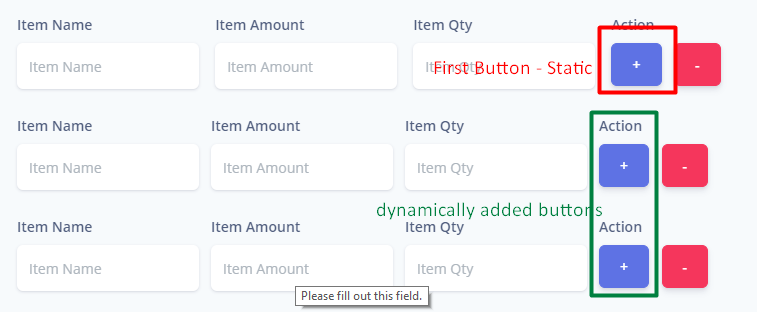
这是我的代码来生成输入框,它生成框,但是生成的“添加更多”按钮将无法工作。只能使用第一个静态按钮添加新文件。
                            <script type='text/javascript'>
                                $(document).ready(function() {
                                var max_fields = 10;
                                var wrapper = $(".container1");
                                var add_button = $(".add_form_field");

                                var x = 1;
                                $(add_button).click(function(e) {
                                    e.preventDefault();
                                    if (x < max_fields) {
                                        x++;
                                        $(wrapper).append('<div class="pl-lg-7" id="toremove"> <div class="form-check-inline"> <div class="form-group{{$errors->has('item_name') ? ' has-danger' : ''}}"> <label class="form-control-label" for="input-name">{{__('Item Name')}}</label> <input type="text" name="item_name[]" id="input-name" class="form-control form-control-alternative{{$errors->has('item_name') ? ' is-invalid' : ''}}" placeholder="{{__('Item Name')}}" value="{{old('item_name')}}" required autofocus> @if ($errors->has('item_name')) <span class="invalid-feedback" role="alert"> <strong>{{$errors->first('item_name')}}</strong> </span> @endif </div></div><div class="form-check-inline"> <div class="form-group{{$errors->has('item_amount') ? ' has-danger' : ''}}"> <label class="form-control-label" for="input-name">{{__('Item Amount')}}</label> <input type="text" name="item_amount[]" id="input-name" class="form-control form-control-alternative{{$errors->has('item_amount') ? ' is-invalid' : ''}}" placeholder="{{__('Item Amount')}}" value="{{old('item_amount')}}" required autofocus> @if ($errors->has('item_amount')) <span class="invalid-feedback" role="alert"> <strong>{{$errors->first('item_amount')}}</strong> </span> @endif </div></div><div class="form-check-inline"> <div class="form-group{{$errors->has('item_qty') ? ' has-danger' : ''}}"> <label class="form-control-label" for="input-name">{{__('Item Qty')}}</label> <input type="text" name="item_qty" id="input-name" class="form-control form-control-alternative{{$errors->has('item_qty') ? ' is-invalid' : ''}}" placeholder="{{__('Item Qty')}}" value="{{old('item_qty')}}" required autofocus> @if ($errors->has('item_qty')) <span class="invalid-feedback" role="alert"> <strong>{{$errors->first('item_qty')}}</strong> </span> @endif </div></div><div class="form-check-inline"> <div class="form-group{{$errors->has('item_name') ? ' has-danger' : ''}}"> <label class="form-control-label" for="input-name">{{__('Action')}}</label> <div class="text-center"> <a class="btn btn-primary text-white add_form_field">{{__('+')}}</a> <a class="btn btn-danger text-white delete">{{__('-')}}</a> </div></div></div></div>'); //add input box
                                    } else {
                                        alert('You Reached the limits')
                                    }
                                });

                                $(wrapper).on("click", ".delete", function(e) {
                                    e.preventDefault();
                                $(this).closest('#toremove').slideUp();
                                x--;
                                })
                            });
</script>回答 2
Stack Overflow用户
回答已采纳
发布于 2019-09-12 07:42:20
您需要使用.on绑定dynamiclaly生成元素上的单击事件。
$(document).on('click',".add_form_field",function(e) {
     e.preventDefault();
     if (x < max_fields) {
         x++;
        $(wrapper).append('<div class="pl-lg-7" id="toremove"> <div class="form-check-inline"> <div class="form-group{{$errors->has('item_name') ? ' has-danger' : ''}}"> <label class="form-control-label" for="input-name">{{__('Item Name')}}</label> <input type="text" name="item_name[]" id="input-name" class="form-control form-control-alternative{{$errors->has('item_name') ? ' is-invalid' : ''}}" placeholder="{{__('Item Name')}}" value="{{old('item_name')}}" required autofocus> @if ($errors->has('item_name')) <span class="invalid-feedback" role="alert"> <strong>{{$errors->first('item_name')}}</strong> </span> @endif </div></div><div class="form-check-inline"> <div class="form-group{{$errors->has('item_amount') ? ' has-danger' : ''}}"> <label class="form-control-label" for="input-name">{{__('Item Amount')}}</label> <input type="text" name="item_amount[]" id="input-name" class="form-control form-control-alternative{{$errors->has('item_amount') ? ' is-invalid' : ''}}" placeholder="{{__('Item Amount')}}" value="{{old('item_amount')}}" required autofocus> @if ($errors->has('item_amount')) <span class="invalid-feedback" role="alert"> <strong>{{$errors->first('item_amount')}}</strong> </span> @endif </div></div><div class="form-check-inline"> <div class="form-group{{$errors->has('item_qty') ? ' has-danger' : ''}}"> <label class="form-control-label" for="input-name">{{__('Item Qty')}}</label> <input type="text" name="item_qty" id="input-name" class="form-control form-control-alternative{{$errors->has('item_qty') ? ' is-invalid' : ''}}" placeholder="{{__('Item Qty')}}" value="{{old('item_qty')}}" required autofocus> @if ($errors->has('item_qty')) <span class="invalid-feedback" role="alert"> <strong>{{$errors->first('item_qty')}}</strong> </span> @endif </div></div><div class="form-check-inline"> <div class="form-group{{$errors->has('item_name') ? ' has-danger' : ''}}"> <label class="form-control-label" for="input-name">{{__('Action')}}</label> <div class="text-center"> <a class="btn btn-primary text-white add_form_field">{{__('+')}}</a> <a class="btn btn-danger text-white delete">{{__('-')}}</a> </div></div></div></div>'); //add input box
      } else {
         alert('You Reached the limits')
      }
});Stack Overflow用户
发布于 2019-09-12 07:44:44
之所以会出现这种情况,是因为您没有使用活动-委派动态添加/创建元素。您所需要做的就是按照与click单击处理程序相同的方法将您的.delete处理程序更改为on处理程序。
页面原文内容由Stack Overflow提供。腾讯云小微IT领域专用引擎提供翻译支持
原文链接:
https://stackoverflow.com/questions/57901912
复制相关文章
相似问题
腾讯云开发者

Copyright © 2013 - 2026 Tencent Cloud. All Rights Reserved. 腾讯云 版权所有
深圳市腾讯计算机系统有限公司 ICP备案/许可证号:粤B2-20090059  粤公网安备44030502008569号
腾讯云计算(北京)有限责任公司 京ICP证150476号 | 京ICP备11018762号