
生成:生成失败-执行taskAction
生成:生成失败-执行taskAction
提问于 2019-09-11 16:08:13
我已经安装了android 3.1.3版本,在编写了一些错误代码之后,为了解决这个错误,我将Gradle版本从4.4升级到4.6,将Android插件版本从3.1.3升级到3.2.0-alpha18 18。它解决了原来的错误,但收到了新的错误。我正在显示屏幕截图中的完全错误。
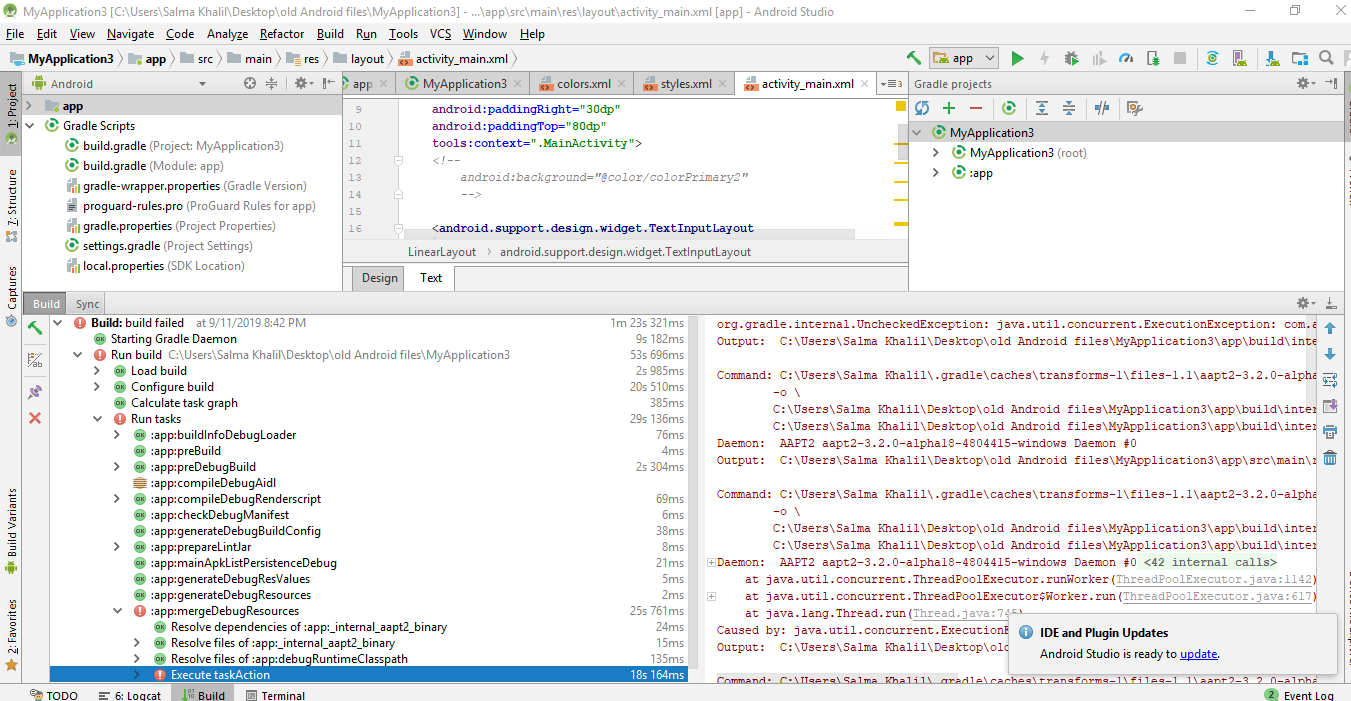
错误:
com.android.builder.internal.aapt.v2.Aapt2Exception: Android resource compilation failed请帮我解决这个问题。
style.xml
<resources>

    <!-- Base application theme. -->
    <style name="AppThemeLogin" parent="Theme.AppCompat.Light.DarkActionBar">
        <!-- Customize your theme here. -->
        <item name="colorPrimary">@color/colorPrimary</item>
        <item name="colorPrimaryDark">@color/colorPrimaryDark</item>
        <item name="colorAccent">@color/colorAccent</item>
        <item name="windowActionBar">false</item>
        <item name="windowNoTitle">true</item>
    </style>
    <!-- Base application theme. -->
    <style name="AppThemeLogin.AppBarOverlay" parent="ThemeOverlay.AppCompat.Dark.ActionBar"/>
    <style name="AppThemeLogin.PopupOverlay" parent="ThemeOverlay.AppCompat.Light"/>

    <style name="AppThemeRegist" parent="Theme.AppCompat.Light.DarkActionBar">
        <!-- Customize your theme here. -->
        <item name="colorPrimary">@color/colorPrimary2</item>
        <item name="colorPrimaryDark">@color/colorPrimaryDark2</item>
        <item name="colorAccent">@color/colorAccent</item>
    </style>
    <style name="AppThemeRegist.AppBarOverlay" parent="ThemeOverlay.AppCompat.Dark.ActionBar"/>
    <style name="AppThemeRegist.PopupOverlay" parent="ThemeOverlay.AppCompat.Light"/>

</resources>
color.xml
<?xml version="1.0" encoding="utf-8"?>
<resources>
    <color name="colorPrimary">#d60064</color>
    <color name="colorPrimaryDark">#b30d4d</color>
    <color name="colorAccent">#elelel</color>
    <color name="colorText">#ffffff</color>
    <color name="colorPrimaryDark2">#106991</color>
    <color name="colorPrimary2">#1984b4</color>
</resources>
LogCat错误
Android resource compilation failed
Output:  C:\Users\Salma Khalil\Desktop\old Android files\App\app\build\intermediates\incremental\mergeDebugResources\merged.dir\values\values.xml:193: error: invalid color.

Command: C:\Users\Salma Khalil\.gradle\caches\transforms-1\files-1.1\aapt2-3.2.0-alpha18-4804415-windows.jar\189ba8b8e7730e6f63f4e978782e0299\aapt2-3.2.0-alpha18-4804415-windows\aapt2.exe compile --legacy \
        -o \
        C:\Users\Salma Khalil\Desktop\old Android files\App\app\build\intermediates\res\merged\debug \
        C:\Users\Salma Khalil\Desktop\old Android files\App\app\build\intermediates\incremental\mergeDebugResources\merged.dir\values\values.xml
Daemon: AAPT2 aapt2-3.2.0-alpha18-4804415-windows Daemon #0回答 1
Stack Overflow用户
回答已采纳
发布于 2019-09-12 09:34:51
您的颜色代码无效"#elelel“不是颜色代码。更改此行颜色代码值
<color name="colorAccentdd">#elelel</color>或选择您的颜色代码
<color name="colorAccentdd">#EE0909</color>页面原文内容由Stack Overflow提供。腾讯云小微IT领域专用引擎提供翻译支持
原文链接:
https://stackoverflow.com/questions/57893051
复制相关文章
相似问题
腾讯云开发者

Copyright © 2013 - 2026 Tencent Cloud. All Rights Reserved. 腾讯云 版权所有
深圳市腾讯计算机系统有限公司 ICP备案/许可证号:粤B2-20090059  粤公网安备44030502008569号
腾讯云计算(北京)有限责任公司 京ICP证150476号 | 京ICP备11018762号