
wordpress主题的中心页脚
wordpress主题的中心页脚
提问于 2019-09-08 17:03:06
我目前正在创建一个网站并使用非常好的Reykjavik主题。首先,我创造了一个儿童主题。现在,我想对儿童主题做一些修改。在此模板中,可以个性化页脚,但不能更改其位置。我提供给页面检查员检查它的位置,但什么也找不到.
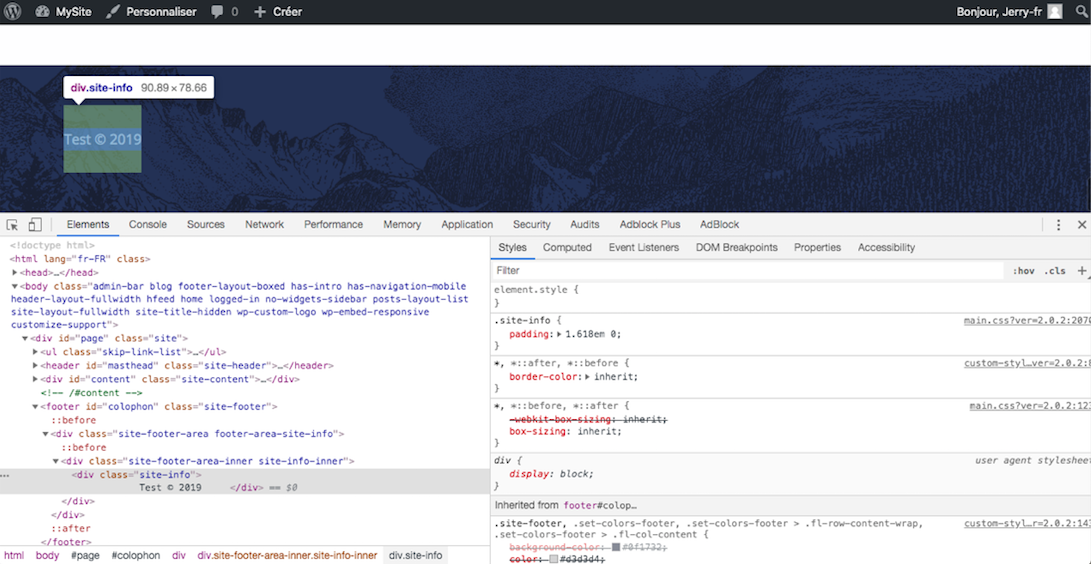
我提供修改我的style.css子主题,将相对位置添加到页脚,但是它不会改变任何东西。

你知道如何对页脚的文字进行居中吗?
(非常感谢:)
曾傑瑞
回答 2
Stack Overflow用户
回答已采纳
发布于 2019-09-09 07:39:34
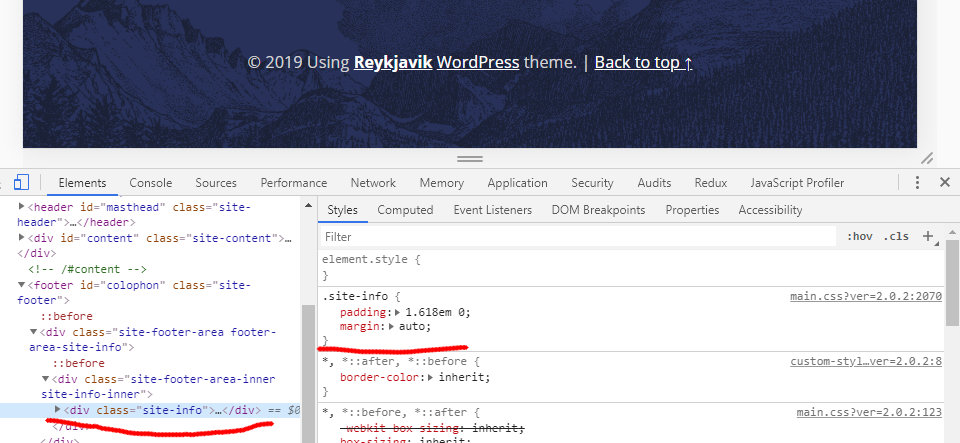
我们为网站信息类添加页边距: auto,然后文本居中。
.site-info { margin: auto }
Stack Overflow用户
发布于 2019-09-08 17:41:53
如果以块元素为中心,则为
这是如果你试图集中一个<div>,<img>等。
您可能想考虑使用margin: 0 auto;
.centered {
  margin: 0 auto;
  /*margin:0 auto: this gives the element a 0 top and bottom margin, and automatically sets the left and right to the maximum it can be*/
  width:100px;
  /*You need to specify a width for this to work*/
}<div>
<p class="centered">
Hello World
</p>
</div>
如果您正在对内联元素进行居中
对于内联元素,如<span>、<img>或text元素
为此,您只需使用text-align:center;
.centered {
  text-align: center;
  /*Just tell the text to center itself in the element*/
}<p class="centered">
Hello World!
</p>
资料来源
页面原文内容由Stack Overflow提供。腾讯云小微IT领域专用引擎提供翻译支持
原文链接:
https://stackoverflow.com/questions/57844003
复制相关文章
相似问题
腾讯云开发者

Copyright © 2013 - 2026 Tencent Cloud. All Rights Reserved. 腾讯云 版权所有
深圳市腾讯计算机系统有限公司 ICP备案/许可证号:粤B2-20090059  粤公网安备44030502008569号
腾讯云计算(北京)有限责任公司 京ICP证150476号 | 京ICP备11018762号