
Qt QDateEdit自定义样式表
我希望将自定义样式表应用于激活了QDateEdit小部件的QCalendarPopup小部件。
我现在的CSS:
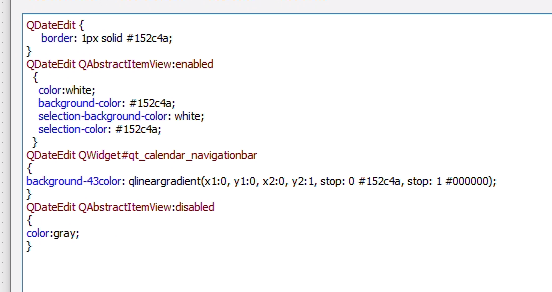
它看起来是什么样子:

我需要解决三件事:
- 日期名称(即mon )的背景色和字体颜色。托伊。.太阳)
- 改变周末的颜色
- 更改左右箭头的背景色
谢谢!
-我修改后的.ui代码
<?xml version="1.0" encoding="UTF-8"?>
<ui version="4.0">
<class>MainWindow</class>
<widget class="QMainWindow" name="MainWindow">
<property name="geometry">
<rect>
<x>0</x>
<y>0</y>
<width>450</width>
<height>230</height>
</rect>
</property>
<property name="windowTitle">
<string>Swap Fly Analyzer</string>
</property>
<property name="windowIcon">
<iconset>
<normaloff>../icons/iapp.svg</normaloff>../icons/iapp.svg</iconset>
</property>
<property name="unifiedTitleAndToolBarOnMac">
<bool>false</bool>
</property>
<widget class="QWidget" name="centralwidget">
<widget class="QTabWidget" name="tabWidget">
<property name="geometry">
<rect>
<x>0</x>
<y>0</y>
<width>450</width>
<height>250</height>
</rect>
</property>
<property name="styleSheet">
<string notr="true"> QTabWidget::pane { /* The tab widget frame */
border-top: 2px solid #C2C7CB;
position: absolute;
top: -0.5em;
}
QTabWidget::tab-bar {
alignment: center;
}
/* Style the tab using the tab sub-control. Note that
it reads QTabBar _not_ QTabWidget */
QTabBar::tab {
background-color: qlineargradient(x1: 0, y1: 0, x2: 0, y2: 1,
stop: 0 #ffffff, stop: 1 #454545);
border: 2px solid #C4C4C3;
border-bottom-color: #C2C7CB; /* same as the pane color */
border-top-left-radius: 4px;
border-top-right-radius: 4px;
min-width: 8ex;
padding: 2px;
}
QTabBar::tab:selected, QTabBar::tab:hover {
background-color: qlineargradient(x1: 0, y1: 0, x2: 0, y2: 1,
stop: 0 #152c4a, stop: 1 #000000);
color:white;
}
QTabBar::tab:selected {
border-color: #9B9B9B;
border-bottom-color: #C2C7CB; /* same as pane color */
}
</string>
</property>
<property name="currentIndex">
<number>0</number>
</property>
<widget class="QWidget" name="analysis">
<attribute name="title">
<string>Analysis</string>
</attribute>
<widget class="QPushButton" name="PushButton_Analysis_Go">
<property name="geometry">
<rect>
<x>170</x>
<y>190</y>
<width>82</width>
<height>15</height>
</rect>
</property>
<property name="styleSheet">
<string notr="true"> QPushButton {
border: 1px solid #152c4a;
background-color: qlineargradient(x1: 0, y1: 0, x2: 0, y2: 1,
stop: 0 #152c4a, stop: 1 #000000);
min-width: 80px;
color: white;
}
QPushButton:pressed {
background-color: qlineargradient(x1: 0, y1: 0, x2: 0, y2: 1,
stop: 0 #000000, stop: 1 #152c4a);
}
QPushButton:flat {
border: none; /* no border for a flat push button */
}
QPushButton:default {
border-color: navy; /* make the default button prominent */
}</string>
</property>
<property name="text">
<string>< GO ></string>
</property>
</widget>
<widget class="QWidget" name="layoutWidget">
<property name="geometry">
<rect>
<x>20</x>
<y>21</y>
<width>411</width>
<height>52</height>
</rect>
</property>
<layout class="QGridLayout" name="gridLayout_3">
<item row="0" column="0">
<widget class="QLabel" name="Label_Analysis_Currency">
<property name="text">
<string>Currency</string>
</property>
</widget>
</item>
<item row="0" column="1" rowspan="2">
<spacer name="HorizontalSpacer_Analysis_Currency">
<property name="orientation">
<enum>Qt::Horizontal</enum>
</property>
<property name="sizeHint" stdset="0">
<size>
<width>40</width>
<height>20</height>
</size>
</property>
</spacer>
</item>
<item row="0" column="2">
<widget class="QComboBox" name="ComboBox_Analysis_Currency">
<property name="styleSheet">
<string notr="true"> QComboBox {
border: 1px solid #152c4a;
}
</string>
</property>
<property name="editable">
<bool>false</bool>
</property>
</widget>
</item>
<item row="1" column="5" rowspan="2">
<spacer name="HorizontalSpacer_Analysis_EndDate">
<property name="orientation">
<enum>Qt::Horizontal</enum>
</property>
<property name="sizeHint" stdset="0">
<size>
<width>40</width>
<height>20</height>
</size>
</property>
</spacer>
</item>
<item row="1" column="6" rowspan="2">
<widget class="QDateEdit" name="DateEdit_Analysis_EndDate">
<property name="styleSheet">
<string notr="true"> QDateEdit {
border: 1px solid #152c4a;
}
QDateEdit QAbstractItemView:hover
{
color:black;
background-color: white;
}
/* normal days */
QDateEdit QAbstractItemView:enabled
{
color:white;
background-color: #152c4a;
selection-background-color: white;
selection-color: #152c4a;
}
/* days in other months */
/* navigation bar */
QDateEdit QWidget#qt_calendar_navigationbar
{
background-color: qlineargradient(x1:0, y1:0, x2:0, y2:1, stop: 0 #152c4a, stop: 1 #000000);
}
QDateEdit QAbstractItemView:disabled
{
color:gray;
}
QCalendarWidget QTableView
{
alternate-background-color: black;
}
QCalendarWidget QTableView QLabel
{
color: "white";
}
QCalendarWidget QToolButton#qt_calendar_prevmonth
{
qproperty-icon: url("icons/calendar_caretToLeft.png");
}
QCalendarWidget QToolButton#qt_calendar_nextmonth
{
qproperty-icon: url("icons/calendar_caretToRight.png");
}
</string>
</property>
<property name="calendarPopup">
<bool>true</bool>
</property>
</widget>
</item>
<item row="2" column="0">
<widget class="QLabel" name="Label_Analysis_StartDate">
<property name="text">
<string>Start Date</string>
</property>
</widget>
</item>
<item row="2" column="1">
<spacer name="HorizontalSpacer_Analysis_StartDate">
<property name="orientation">
<enum>Qt::Horizontal</enum>
</property>
<property name="sizeHint" stdset="0">
<size>
<width>40</width>
<height>20</height>
</size>
</property>
</spacer>
</item>
<item row="2" column="2">
<widget class="QDateEdit" name="DateEdit_Analysis_StartDate">
<property name="styleSheet">
<string notr="true"> QDateEdit {
border: 1px solid #152c4a;
}
QDateEdit QAbstractItemView:hover
{
color:black;
background-color: white;
}
/* normal days */
QDateEdit QAbstractItemView:enabled
{
color:white;
background-color: #152c4a;
selection-background-color: white;
selection-color: #152c4a;
}
/* days in other months */
/* navigation bar */
QDateEdit QWidget#qt_calendar_navigationbar
{
background-color: qlineargradient(x1:0, y1:0, x2:0, y2:1, stop: 0 #152c4a, stop: 1 #000000);
}
QDateEdit QAbstractItemView:disabled
{
color:gray;
}
QCalendarWidget QTableView
{
alternate-background-color: black;
}
QCalendarWidget QTableView QLabel
{
color: "white";
}
QCalendarWidget QToolButton#qt_calendar_prevmonth
{
qproperty-icon: url("icons/calendar_caretToLeft.png");
}
QCalendarWidget QToolButton#qt_calendar_nextmonth
{
qproperty-icon: url("icons/calendar_caretToRight.png");
}
</string>
</property>
<property name="calendarPopup">
<bool>true</bool>
</property>
</widget>
</item>
<item row="2" column="3">
<spacer name="HorizontalSpacer_Analysis_DateMiddle">
<property name="orientation">
<enum>Qt::Horizontal</enum>
</property>
<property name="sizeHint" stdset="0">
<size>
<width>40</width>
<height>20</height>
</size>
</property>
</spacer>
</item>
<item row="2" column="4">
<widget class="QLabel" name="Label_Analysis_EndDate">
<property name="text">
<string>End Date</string>
</property>
</widget>
</item>
</layout>
</widget>
<widget class="QWidget" name="layoutWidget">
<property name="geometry">
<rect>
<x>20</x>
<y>100</y>
<width>411</width>
<height>74</height>
</rect>
</property>
<layout class="QGridLayout" name="gridLayout_4">
<item row="0" column="0">
<spacer name="horizontalSpacer_11">
<property name="orientation">
<enum>Qt::Horizontal</enum>
</property>
<property name="sizeHint" stdset="0">
<size>
<width>40</width>
<height>20</height>
</size>
</property>
</spacer>
</item>
<item row="0" column="1">
<spacer name="horizontalSpacer_10">
<property name="orientation">
<enum>Qt::Horizontal</enum>
</property>
<property name="sizeHint" stdset="0">
<size>
<width>40</width>
<height>20</height>
</size>
</property>
</spacer>
</item>
<item row="0" column="2">
<widget class="QLabel" name="Label_Analysis_Left">
<property name="text">
<string>Left</string>
</property>
</widget>
</item>
<item row="0" column="3">
<spacer name="horizontalSpacer_9">
<property name="orientation">
<enum>Qt::Horizontal</enum>
</property>
<property name="sizeHint" stdset="0">
<size>
<width>40</width>
<height>20</height>
</size>
</property>
</spacer>
</item>
<item row="0" column="4">
<widget class="QLabel" name="Label_Analysis_Center">
<property name="text">
<string>Center</string>
</property>
</widget>
</item>
<item row="0" column="5">
<spacer name="horizontalSpacer_8">
<property name="orientation">
<enum>Qt::Horizontal</enum>
</property>
<property name="sizeHint" stdset="0">
<size>
<width>40</width>
<height>20</height>
</size>
</property>
</spacer>
</item>
<item row="0" column="6">
<widget class="QLabel" name="Label_Analysis_Right">
<property name="text">
<string>Right</string>
</property>
</widget>
</item>
<item row="1" column="0">
<widget class="QLabel" name="Label_Analysis_Rate">
<property name="text">
<string>Rate</string>
</property>
</widget>
</item>
<item row="1" column="1">
<spacer name="horizontalSpacer_2">
<property name="orientation">
<enum>Qt::Horizontal</enum>
</property>
<property name="sizeHint" stdset="0">
<size>
<width>40</width>
<height>20</height>
</size>
</property>
</spacer>
</item>
<item row="1" column="2">
<widget class="QComboBox" name="ComboBox_Analysis_LeftRate">
<property name="styleSheet">
<string notr="true"> QComboBox {
border: 1px solid #152c4a;
}
</string>
</property>
<property name="editable">
<bool>false</bool>
</property>
</widget>
</item>
<item row="1" column="3">
<spacer name="horizontalSpacer_3">
<property name="orientation">
<enum>Qt::Horizontal</enum>
</property>
<property name="sizeHint" stdset="0">
<size>
<width>40</width>
<height>20</height>
</size>
</property>
</spacer>
</item>
<item row="1" column="4">
<widget class="QComboBox" name="ComboBox_Analysis_CenterRate">
<property name="styleSheet">
<string notr="true"> QComboBox {
border: 1px solid #152c4a;
}
</string>
</property>
<property name="editable">
<bool>false</bool>
</property>
</widget>
</item>
<item row="1" column="5">
<spacer name="horizontalSpacer_4">
<property name="orientation">
<enum>Qt::Horizontal</enum>
</property>
<property name="sizeHint" stdset="0">
<size>
<width>40</width>
<height>20</height>
</size>
</property>
</spacer>
</item>
<item row="1" column="6">
<widget class="QComboBox" name="ComboBox_Analysis_RightRate">
<property name="styleSheet">
<string notr="true"> QComboBox {
border: 1px solid #152c4a;
}
</string>
</property>
<property name="editable">
<bool>false</bool>
</property>
</widget>
</item>
<item row="2" column="0">
<widget class="QLabel" name="Label_Analysis_Coefficient">
<property name="text">
<string>Coefficient</string>
</property>
</widget>
</item>
<item row="2" column="1">
<spacer name="horizontalSpacer_5">
<property name="orientation">
<enum>Qt::Horizontal</enum>
</property>
<property name="sizeHint" stdset="0">
<size>
<width>40</width>
<height>20</height>
</size>
</property>
</spacer>
</item>
<item row="2" column="3">
<spacer name="horizontalSpacer_6">
<property name="orientation">
<enum>Qt::Horizontal</enum>
</property>
<property name="sizeHint" stdset="0">
<size>
<width>40</width>
<height>20</height>
</size>
</property>
</spacer>
</item>
<item row="2" column="5">
<spacer name="horizontalSpacer_7">
<property name="orientation">
<enum>Qt::Horizontal</enum>
</property>
<property name="sizeHint" stdset="0">
<size>
<width>40</width>
<height>20</height>
</size>
</property>
</spacer>
</item>
<item row="2" column="2">
<widget class="QLineEdit" name="LineEdit_Analysis_LeftCoefficient">
<property name="styleSheet">
<string notr="true">QLineEdit {
border: 1px solid #152c4a;
}</string>
</property>
</widget>
</item>
<item row="2" column="4">
<widget class="QLineEdit" name="LineEdit_Analysis_CenterCoefficient">
<property name="styleSheet">
<string notr="true">QLineEdit {
border: 1px solid #152c4a;
}</string>
</property>
</widget>
</item>
<item row="2" column="6">
<widget class="QLineEdit" name="LineEdit_Analysis_RightCoefficient">
<property name="styleSheet">
<string notr="true">QLineEdit {
border: 1px solid #152c4a;
}</string>
</property>
</widget>
</item>
</layout>
</widget>
<widget class="QProgressBar" name="ProgressBar_Analysis_Status">
<property name="geometry">
<rect>
<x>310</x>
<y>190</y>
<width>118</width>
<height>20</height>
</rect>
</property>
<property name="styleSheet">
<string notr="true"> QProgressBar {
border: 1px solid #454545;
text-align: center;
}
QProgressBar::chunk {
background-color: #152c4a;
}
</string>
</property>
<property name="value">
<number>1</number>
</property>
</widget>
</widget>
<widget class="QWidget" name="settings">
<attribute name="title">
<string>Settings</string>
</attribute>
<widget class="QWidget" name="layoutWidget">
<property name="geometry">
<rect>
<x>20</x>
<y>30</y>
<width>320</width>
<height>100</height>
</rect>
</property>
<layout class="QGridLayout" name="gridLayout">
<item row="0" column="0">
<widget class="QLabel" name="Label_Settings_InputFile">
<property name="text">
<string>Input File</string>
</property>
</widget>
</item>
<item row="0" column="2">
<widget class="QLineEdit" name="LineEdit_Settings_InputFile">
<property name="styleSheet">
<string notr="true">QLineEdit {
border: 1px solid #152c4a;
}</string>
</property>
</widget>
</item>
<item row="2" column="0">
<widget class="QLabel" name="Label_Settings_BenchmarkSheetName">
<property name="text">
<string>Benchmark Sheet Name</string>
</property>
</widget>
</item>
<item row="3" column="2">
<widget class="QLineEdit" name="LineEdit_Settings_RegressionListSheetName">
<property name="styleSheet">
<string notr="true">QLineEdit {
border: 1px solid #152c4a;
}</string>
</property>
</widget>
</item>
<item row="3" column="0">
<widget class="QLabel" name="Label_Settings_RegressionListSheetName">
<property name="text">
<string>Regression List Sheet Name</string>
</property>
</widget>
</item>
<item row="1" column="0">
<widget class="QLabel" name="Label_Settings_FSIRSListSheetName">
<property name="text">
<string>FS IRS List Sheet Name</string>
</property>
</widget>
</item>
<item row="2" column="2">
<widget class="QLineEdit" name="LineEdit_Settings_BenchmarkSheetName">
<property name="styleSheet">
<string notr="true">QLineEdit {
border: 1px solid #152c4a;
}</string>
</property>
</widget>
</item>
<item row="1" column="2">
<widget class="QLineEdit" name="LineEdit_Settings_FSIRSListSheetName">
<property name="styleSheet">
<string notr="true">QLineEdit {
border: 1px solid #152c4a;
}</string>
</property>
</widget>
</item>
<item row="1" column="1">
<spacer name="HorizontalSpacer_Settings_FSIRSListSheetName">
<property name="orientation">
<enum>Qt::Horizontal</enum>
</property>
<property name="sizeHint" stdset="0">
<size>
<width>40</width>
<height>20</height>
</size>
</property>
</spacer>
</item>
<item row="3" column="1">
<spacer name="HorizontalSpacer_Settings_RegressionListSheetName">
<property name="orientation">
<enum>Qt::Horizontal</enum>
</property>
<property name="sizeHint" stdset="0">
<size>
<width>40</width>
<height>20</height>
</size>
</property>
</spacer>
</item>
<item row="0" column="1">
<spacer name="HorizontalSpacer_Settings_InputFile">
<property name="orientation">
<enum>Qt::Horizontal</enum>
</property>
<property name="sizeHint" stdset="0">
<size>
<width>40</width>
<height>20</height>
</size>
</property>
</spacer>
</item>
<item row="2" column="1">
<spacer name="HorizontalSpacer_Settings_BenchmarkSheetName">
<property name="orientation">
<enum>Qt::Horizontal</enum>
</property>
<property name="sizeHint" stdset="0">
<size>
<width>40</width>
<height>20</height>
</size>
</property>
</spacer>
</item>
</layout>
</widget>
<widget class="QWidget" name="layoutWidget">
<property name="geometry">
<rect>
<x>20</x>
<y>130</y>
<width>321</width>
<height>41</height>
</rect>
</property>
<layout class="QGridLayout" name="gridLayout_2">
<item row="0" column="1">
<spacer name="verticalSpacer">
<property name="orientation">
<enum>Qt::Vertical</enum>
</property>
<property name="sizeHint" stdset="0">
<size>
<width>20</width>
<height>40</height>
</size>
</property>
</spacer>
</item>
<item row="1" column="0">
<widget class="QPushButton" name="PushButton_Settings_Cancel">
<property name="styleSheet">
<string notr="true"> QPushButton {
border: 1px solid #152c4a;
background-color: qlineargradient(x1: 0, y1: 0, x2: 0, y2: 1,
stop: 0 #ffffff, stop: 1 #454545);
min-width: 80px;
color: #152c4a;
}
QPushButton:pressed {
background-color: qlineargradient(x1: 0, y1: 0, x2: 0, y2: 1,
stop: 0 #454545, stop: 1 #ffffff);
}
QPushButton:flat {
border: none; /* no border for a flat push button */
}
QPushButton:default {
border-color: navy; /* make the default button prominent */
}</string>
</property>
<property name="text">
<string>Cancel</string>
</property>
</widget>
</item>
<item row="1" column="1">
<spacer name="horizontalSpacer">
<property name="orientation">
<enum>Qt::Horizontal</enum>
</property>
<property name="sizeHint" stdset="0">
<size>
<width>40</width>
<height>20</height>
</size>
</property>
</spacer>
</item>
<item row="1" column="2">
<widget class="QPushButton" name="PushButton_Settings_Save">
<property name="styleSheet">
<string notr="true"> QPushButton {
border: 1px solid #152c4a;
background-color: qlineargradient(x1: 0, y1: 0, x2: 0, y2: 1,
stop: 0 #152c4a, stop: 1 #000000);
min-width: 80px;
color: white;
}
QPushButton:pressed {
background-color: qlineargradient(x1: 0, y1: 0, x2: 0, y2: 1,
stop: 0 #000000, stop: 1 #152c4a);
}
QPushButton:flat {
border: none; /* no border for a flat push button */
}
QPushButton:default {
border-color: navy; /* make the default button prominent */
}</string>
</property>
<property name="text">
<string>Save</string>
</property>
</widget>
</item>
</layout>
</widget>
</widget>
</widget>
</widget>
</widget>
<resources/>
<connections/>
</ui>
enter code here回答 1
Stack Overflow用户
发布于 2019-09-08 21:31:12
具有日期名称的标题的背景色可以用
QCalendarWidget QTableView
{
    alternate-background-color: #6D6D6D;  /* day name/week number background */
}
非周末日名称是默认的QLabel颜色,因此这是可行的:
QCalendarWidget QTableView QLabel
{
    color: "white";
}
周末名称的颜色(在标题和日历中)可以从C++中设置,我看不到从CSS中更改它的方法。(当然,其他工作日的颜色也可以用这种方式设置,而不是CSS。)
QTextCharFormat fmt;
fmt.setForeground(QBrush(Qt::blue));
dateEdit->calendarWidget()->setWeekdayTextFormat(Qt::Saturday, fmt);
dateEdit->calendarWidget()->setWeekdayTextFormat(Qt::Sunday, fmt);
前进/后退按钮实际上是图标(假设你指的是箭头的实际绿色部分)。这在Qt 5.12中适用于我(我读过一些报告说这个曾经是错误的,但它肯定是在一段时间前修复的)。
QCalendarWidget QToolButton#qt_calendar_prevmonth
{
    qproperty-icon: url(back.png);
}
QCalendarWidget QToolButton#qt_calendar_nextmonth
{
    qproperty-icon: url(forward.png);
}注意,我在这里对QCalendarWidget进行样式化,这是实际的显示类(我认为它与QDateEdit一起工作,因为日历小部件成为它的一个子部件,但是我会对实际的日历小部件进行样式设置)。
同样在#qt_calendar_navigationbar中,您可能有一个用于月份列表的QMenu和用于编辑该年的QSpinBox。您可能也希望/需要对其进行样式化。例如。
QCalendarWidget QWidget#qt_calendar_navigationbar QMenu,
QCalendarWidget QWidget#qt_calendar_navigationbar QSpinBox
{
    background-color: #152C4A;
    color: white;
}
HTH。
虽然本例不使用CSS,但它演示了如何从C++:https://doc.qt.io/qt-5/qtwidgets-widgets-calendarwidget-example.html自定义日历视图的某些部分。
https://stackoverflow.com/questions/57842708
复制相似问题
腾讯云开发者

Copyright © 2013 - 2026 Tencent Cloud. All Rights Reserved. 腾讯云 版权所有
深圳市腾讯计算机系统有限公司 ICP备案/许可证号:粤B2-20090059  粤公网安备44030502008569号
腾讯云计算(北京)有限责任公司 京ICP证150476号 | 京ICP备11018762号