
TextInputLayout造型
TextInputLayout造型
提问于 2019-09-05 08:34:17
我对我的定制TextInputLayout有问题。这是我的密码
<com.google.android.material.textfield.TextInputLayout
    android:id="@+id/phone"
    android:layout_width="0dp"
    android:layout_height="wrap_content"
    android:theme="@style/CustomTextInputLayout"
    android:hint="@string/phone_number"
    android:layout_marginTop="8dp"
    android:layout_marginStart="16dp"
    android:layout_marginEnd="16dp"
    app:startIconDrawable="@drawable/account"
    android:background="@color/bg_light_gray"
    app:layout_constraintLeft_toLeftOf="parent"
    app:layout_constraintRight_toRightOf="parent"
    app:layout_constraintTop_toBottomOf="@+id/page_description">

    <com.google.android.material.textfield.TextInputEditText
        android:layout_width="match_parent"
        android:layout_height="?attr/listPreferredItemHeight"
        android:background="@color/bg_light_gray"
        android:inputType="phone"
        android:singleLine="true" />
</com.google.android.material.textfield.TextInputLayout>这是我来自style.xml文件的代码
<style name="CustomTextInputLayout" parent="Widget.Design.TextInputLayout">
    <item name="errorTextAppearance">@style/ErrorText</item>
    <item name="colorControlNormal">@color/green_txt</item>
    <item name="colorControlActivated">@color/orange</item>
    <item name="colorControlHighlight">@color/orange</item>
</style>我想使TextInputLayout的基线颜色变成橙色,但现在它是灰色的。此外,我放置了一个图标,它有它原来的颜色橙色,但放置后,它变成了深灰色。现在我不明白为什么会发生这种情况,也不明白如何解决这个问题。有人能帮我吗?
回答 1
Stack Overflow用户
回答已采纳
发布于 2019-09-05 08:54:29
我想把TextInputLayout的基线颜色变成橙色
只需使用物质主题 (例如,Widget.MaterialComponents.TextInputLayout.FilledBox) app:boxStrokeColor属性来更改颜色。
<com.google.android.material.textfield.TextInputLayout
    android:id="@+id/custom_end_icon"
    style="@style/Widget.MaterialComponents.TextInputLayout.FilledBox"
    app:boxStrokeColor="@color/text_input_selector
其中选择器类似于:
<?xml version="1.0" encoding="utf-8"?>
<selector xmlns:android="http://schemas.android.com/apk/res/android">
  <item android:color="?attr/colorPrimary" android:state_focused="true"/>
  <item android:alpha="0.87" android:color="?attr/colorOnSurface" android:state_hovered="true"/>
  <item android:alpha="0.12" android:color="?attr/colorOnSurface" android:state_enabled="false"/>
  <item android:alpha="0.38" android:color="?attr/colorAccent"/>
</selector>
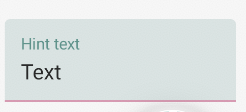
我也放置了一个图标,它有它原来的颜色橙色,但放置后,它变成了深灰色。
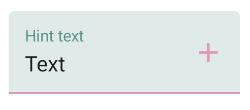
使用app:endIconTint属性将颜色或颜色选择器应用于您的结束图标。
<com.google.android.material.textfield.TextInputLayout
    android:id="@+id/custom_end_icon"
    android:hint="Hint text"
    style="@style/Widget.MaterialComponents.TextInputLayout.FilledBox"
    app:boxStrokeColor="@color/text_input_selector"
    app:endIconMode="custom"
    app:endIconDrawable="@drawable/ic_add_24px"
    app:endIconTint="@color/text_input_selector"
页面原文内容由Stack Overflow提供。腾讯云小微IT领域专用引擎提供翻译支持
原文链接:
https://stackoverflow.com/questions/57801486
复制相关文章
相似问题
腾讯云开发者

Copyright © 2013 - 2026 Tencent Cloud. All Rights Reserved. 腾讯云 版权所有
深圳市腾讯计算机系统有限公司 ICP备案/许可证号:粤B2-20090059  粤公网安备44030502008569号
腾讯云计算(北京)有限责任公司 京ICP证150476号 | 京ICP备11018762号