
如何安排扣子来填补利润?
如何安排扣子来填补利润?
提问于 2019-09-04 13:20:21
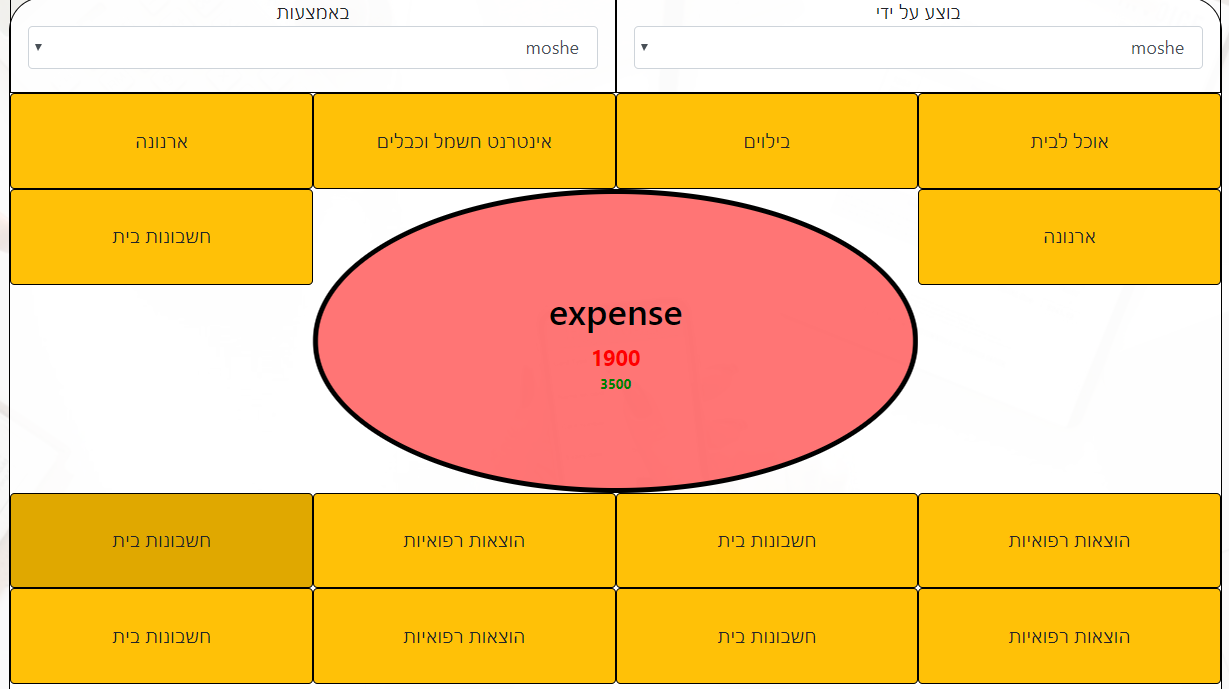
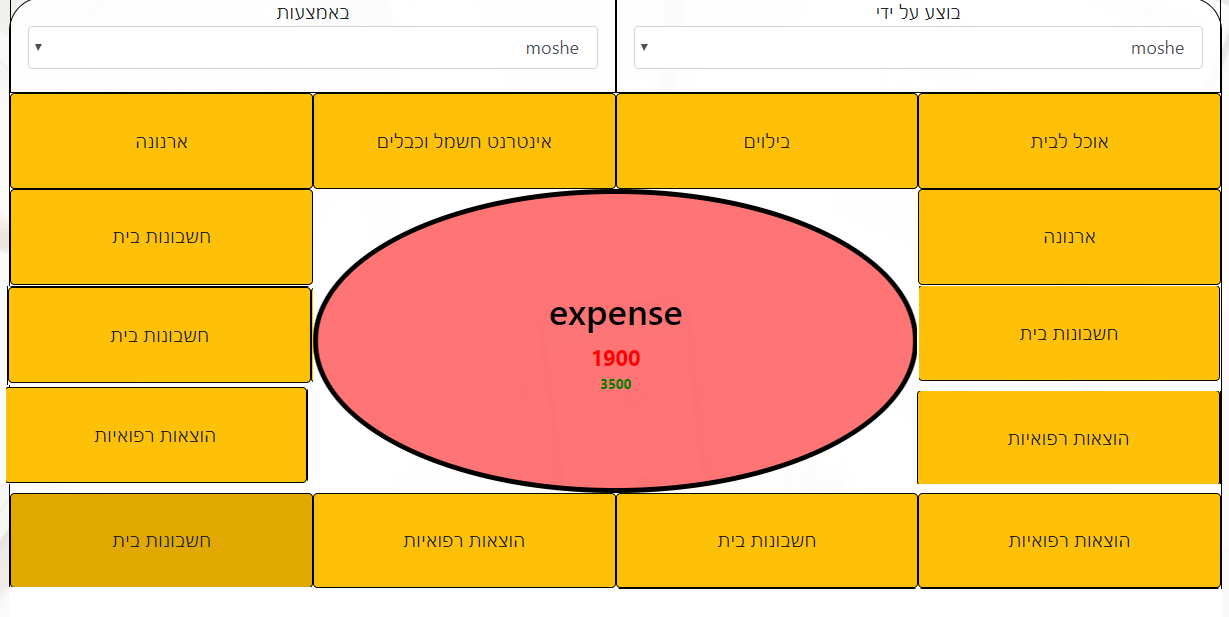
我正在尝试创建一个带有Bootstra4的支出板。现在我就是这样做的,我希望按钮显示在下面的图片中。我不知道该怎么做。
我现在得到的是:
我最后想得到的是:
.btn-warning {
  border: 1px solid black;
  height: 85px;
}

.middel {
  background-color: #ff00008a;
  border: 4px solid black;
  height: 270px;
  border-radius: 50%;
}<link href="https://stackpath.bootstrapcdn.com/bootstrap/4.3.1/css/bootstrap.min.css" rel="stylesheet" integrity="sha384-ggOyR0iXCbMQv3Xipma34MD+dH/1fQ784/j6cY/iJTQUOhcWr7x9JvoRxT2MZw1T" crossorigin="anonymous">
<div class="container" style="border: 1px solid black">
<div class="row">
<div class="col-6" style="border: 1px solid black;height: 85px;"> בוצע על ידי
<select class="form-control">
<option> moshe </option>
<option> haim </option>
<option> kobi </option>
</select>
</div>
<div class="col-6" style="border: 1px solid black; height: 85px;"> באמצעות
<select class="form-control">
<option> moshe </option>
<option> haim </option>
<option> kobi </option>
</select>
</div>
</div>
<div class="row">
<button class="col-3 btn btn-warning"> אוכל לבית </button>
<button class="col-3 btn btn-warning"> בילוים </button>
<button class="col-3 btn btn-warning"> אינטרנט חשמל וכבלים </button>
<button class="col-3 btn btn-warning"> ארנונה </button>
<button class="col-3 btn btn-warning"> ארנונה </button>
<button class="col-6 middel">
<h2>expense</h2>
<div style="font-size: 120%; color: red"> <b>1900</b></div>
<div style="font-size: 75%; color: green"><b> 3500</b></div>
</button>
<button class="col-3 btn btn-warning"> חשבונות בית </button>
<button class="col-3 btn btn-warning"> הוצאות רפואיות </button><button class="col-3 btn btn-warning">
חשבונות בית </button>
<button class="col-3 btn btn-warning"> הוצאות רפואיות </button>
<button class="col-3 btn btn-warning"> חשבונות בית </button>
<button class="col-3 btn btn-warning"> הוצאות רפואיות </button>
<button class="col-3 btn btn-warning"> חשבונות בית </button>
<button class="col-3 btn btn-warning"> הוצאות רפואיות </button>
<button class="col-3 btn btn-warning"> חשבונות בית </button>
</div>
<div class="row" style="margin: 5px;height: 75px;border: 1px solid black">
<div class="col-4">
בחר את תאריך ביצוע הפעולה :
</div>
<div class="col-8">
<input class="form-control" type="date">
</div>
</div>
<div class="row" style="margin: 5px;height: 75px; border: 1px solid black">
<input class="col-12" type="text" placeholder="תאר את ההוצאה (לא חובה)">
</div>
<div class="row" style="margin: 5px;height: 75px; border: 1px solid black">
<button class="btn btn-dark col-12"> הוסף </button>
</div>
</div>
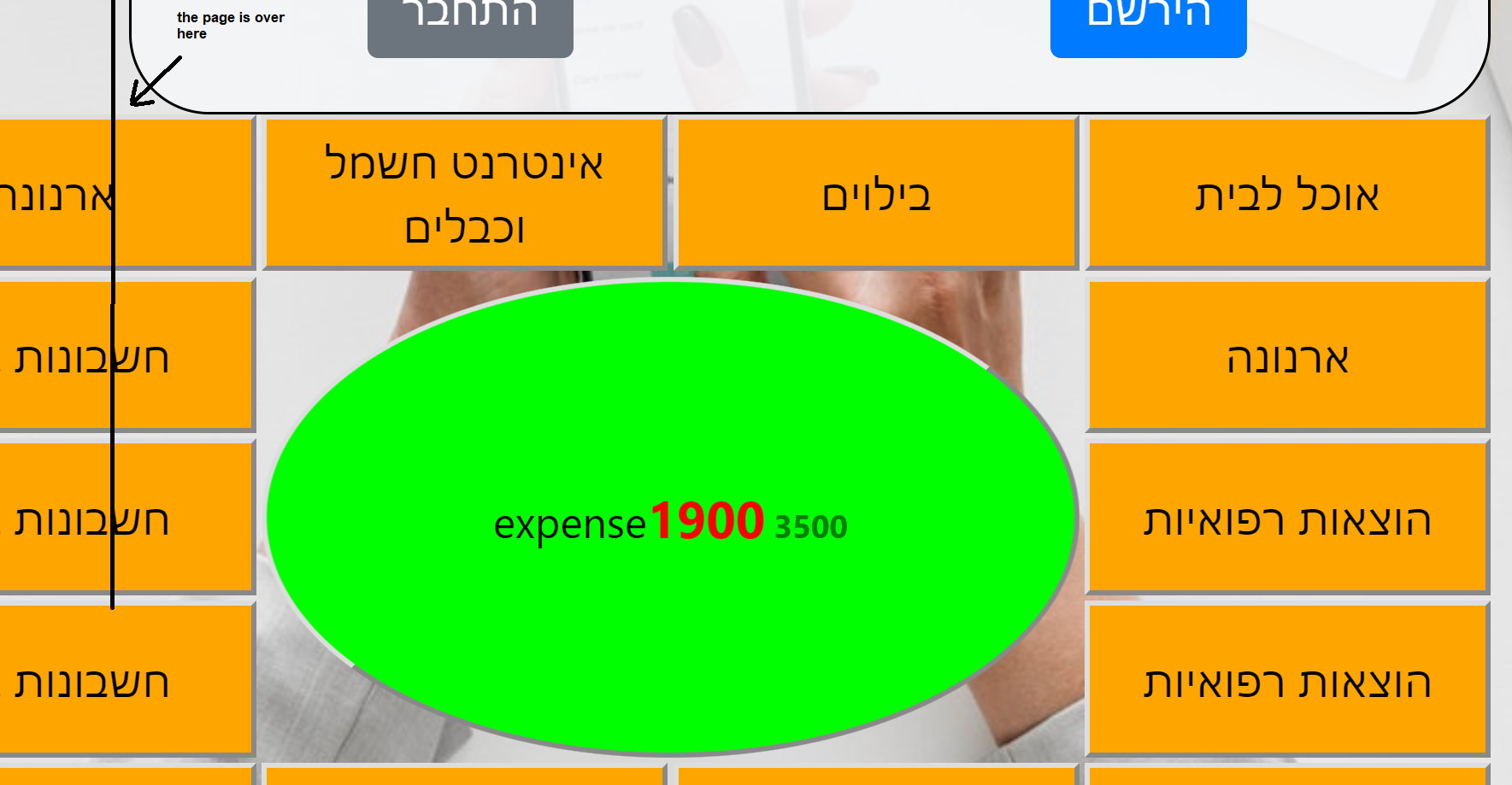
在@connexo后附上照片答案:
回答 2
Stack Overflow用户
回答已采纳
发布于 2019-09-04 13:29:35
考虑使用CSS网格。请注意您的HTML实际上是无效的。button不能包含h2和div之一,只能包含非交互式短语内容.
body {
  margin: 0;
}

.grid {
  width: 100vw;
  height: 100vh;
  display: grid;
  grid-template-rows: repeat(5, minmax(0, 1fr));
  grid-template-columns: repeat(4, minmax(0, 1fr));
  grid-gap: 2px;
}

.grid button {
  background-color: orange;
}

.grid .centercell {
  background-color: lime;
  grid-row: 2/5;
  grid-column: 2/4;
  border-radius: 50%;
}<div class="grid">
<button> אוכל לבית </button>
<button> בילוים </button>
<button> אינטרנט חשמל וכבלים </button>
<button> ארנונה </button>
<button> ארנונה </button>
<button class="centercell">
<span>expense</span>
<span style="font-size: 120%; color: red"> <b>1900</b></span>
<span style="font-size: 75%; color: green"><b> 3500</b></span>
</button>
<button> חשבונות בית </button>
<button> הוצאות רפואיות </button><button>
חשבונות בית </button>
<button> הוצאות רפואיות </button>
<button> חשבונות בית </button>
<button> הוצאות רפואיות </button>
<button> חשבונות בית </button>
<button> הוצאות רפואיות </button>
<button> חשבונות בית </button>
</div>
Stack Overflow用户
发布于 2019-09-04 13:37:29
我认为您需要像这样更改html结构:
.btn-warning {
  border: 1px solid black;
  height: 85px;
}

.middel {
  background-color: #ff00008a;
  border: 4px solid black;
  height: 270px;
  border-radius: 50%;
}<link href="https://stackpath.bootstrapcdn.com/bootstrap/4.3.1/css/bootstrap.min.css" rel="stylesheet" integrity="sha384-ggOyR0iXCbMQv3Xipma34MD+dH/1fQ784/j6cY/iJTQUOhcWr7x9JvoRxT2MZw1T" crossorigin="anonymous">
<div class="container" style="border: 1px solid black">
<div class="row">
<div class="col-6" style="border: 1px solid black;height: 85px;"> בוצע על ידי
<select class="form-control">
<option> moshe </option>
<option> haim </option>
<option> kobi </option>
</select>
</div>
<div class="col-6" style="border: 1px solid black; height: 85px;"> באמצעות
<select class="form-control">
<option> moshe </option>
<option> haim </option>
<option> kobi </option>
</select>
</div>
</div>
<div class="row">
<button class="col-3 btn btn-warning"> אוכל לבית </button>
<button class="col-3 btn btn-warning"> בילוים </button>
<button class="col-3 btn btn-warning"> אינטרנט חשמל וכבלים </button>
<button class="col-3 btn btn-warning"> ארנונה </button>
</div>
<div class="row">
<div class="col-3">
<button class="col-12 btn btn-warning"> ארנונה </button>
<button class="col-12 btn btn-warning"> הוצאות רפואיות </button>
<button class="col-12 btn btn-warning">
חשבונות בית </button>
</div>
<div class="col-6">
<button class="col-12 middel">
<h2>expense</h2>
<div style="font-size: 120%; color: red"> <b>1900</b></div>
<div style="font-size: 75%; color: green"><b> 3500</b></div>
</button>
</div>
<div class="col-3">
<button class="col-12 btn btn-warning"> חשבונות בית </button>
<button class="col-12 btn btn-warning"> חשבונות בית </button>
<button class="col-12 btn btn-warning"> הוצאות רפואיות </button>
</div>
</div>
<div class="row">
<button class="col-3 btn btn-warning"> הוצאות רפואיות </button>
<button class="col-3 btn btn-warning"> חשבונות בית </button>
<button class="col-3 btn btn-warning"> הוצאות רפואיות </button>
<button class="col-3 btn btn-warning"> חשבונות בית </button>
</div>
<div class="row" style="margin: 5px;height: 75px;border: 1px solid black">
<div class="col-4">
בחר את תאריך ביצוע הפעולה :
</div>
<div class="col-8">
<input class="form-control" type="date">
</div>
</div>
<div class="row" style="margin: 5px;height: 75px; border: 1px solid black">
<input class="col-12" type="text" placeholder="תאר את ההוצאה (לא חובה)">
</div>
<div class="row" style="margin: 5px;height: 75px; border: 1px solid black">
<button class="btn btn-dark col-12"> הוסף </button>
</div>
</div>
页面原文内容由Stack Overflow提供。腾讯云小微IT领域专用引擎提供翻译支持
原文链接:
https://stackoverflow.com/questions/57789314
复制相关文章
相似问题
腾讯云开发者

Copyright © 2013 - 2026 Tencent Cloud. All Rights Reserved. 腾讯云 版权所有
深圳市腾讯计算机系统有限公司 ICP备案/许可证号:粤B2-20090059  粤公网安备44030502008569号
腾讯云计算(北京)有限责任公司 京ICP证150476号 | 京ICP备11018762号