
ngx-引导:如何更改分页按钮的外观
ngx-引导:如何更改分页按钮的外观
提问于 2019-09-03 09:20:15
我在我的项目中使用ngx引导程序中的分页组件,并尝试更改按钮以及它的外观和失败情况。有办法改变吗?
我的组件:
<div class="table-container">
  <table class="table">
    <thead>
      <tr class="table-nav">
        <th scope="col">שנה</th>
        <th scope="col">סוג הדוח</th>
        <th scope="col">ח.פ</th>
        <th scope="col">שם החברה</th>
      </tr>
    </thead>
    <tbody>
      <ng-container *ngFor="let tax of currentPage">
        <tr>
          <td>{{tax.year}}</td>
          <td>{{tax.type}}</td>
          <td>{{tax.cid}}</td>
          <td>{{tax.company}}</td>
        </tr>
      </ng-container>
    </tbody>
  </table>
  <div class="table-footer">
  <pagination class="pagination" nextText=">" previousText="<" [align]="true"
    [totalItems]="totalItems" (pageChanged)="pageChanged($event)">
  </pagination>
</div>
</div>
这是默认样式:
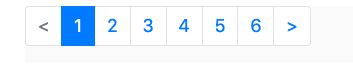
我得让它看起来像这样:

回答 1
Stack Overflow用户
回答已采纳
发布于 2019-11-01 16:48:58
首先,我在分页元素中添加了一个类,如下所示
<pagination
                                    [maxSize]="maxSizeBtn"
                                    [firstText]="firstText"
                                    [lastText]="lastText"
                                    [previousText]="prevText"
                                    [nextText]="nextText"
                                    [itemsPerPage]="perPage"
                                    [boundaryLinks]="showBoundaryLinks"
                                    [totalItems]="totalItems"
                                    [(ngModel)]="currentPage"
                                    (pageChanged)="pageChanged($event)"
                                    (numPages)="smallnumPages = $event"
                                    id="comp-pagination"
                                    class="my-pagination"
                                    ></pagination>
在此之后,我强制选择的页面项目必须有一个红色的背景颜色像这样。将CSS指令放入.css组件文件中。
//更改分页背景选定的按钮颜色
.my-pagination::ng-deep .page-item.active .page-link {
    z-index: 1;
    color: #FFFFFF;
    background-color:red !important;
    border-color: #009DA0;
}
不要忘记所选页项的默认背景色被覆盖的!重要指令。
谢谢
页面原文内容由Stack Overflow提供。腾讯云小微IT领域专用引擎提供翻译支持
原文链接:
https://stackoverflow.com/questions/57768655
复制相关文章
相似问题
腾讯云开发者

Copyright © 2013 - 2026 Tencent Cloud. All Rights Reserved. 腾讯云 版权所有
深圳市腾讯计算机系统有限公司 ICP备案/许可证号:粤B2-20090059  粤公网安备44030502008569号
腾讯云计算(北京)有限责任公司 京ICP证150476号 | 京ICP备11018762号