
为什么ctx.strokeRect()的行为与顺序ctx.rect() ctx.stroke()调用不同
为什么ctx.strokeRect()的行为与顺序ctx.rect() ctx.stroke()调用不同
提问于 2019-08-30 17:37:33
我用创建-反应-应用程序创建了一个app应用程序。在这个应用程序中,用户上传一张画在画布上的图片。这个应用程序允许用户裁剪图像,当用户鼠标拖动图像时,我试图绘制裁剪区域的矩形预览。
下面是绘制动态作物区域预览的函数。这个功能很好,因为它使用的是ctx.strokeRect()。每次用户移动鼠标时,rectXY都会被更新,并调用drawCropRect来清除前一个矩形并创建一个新的矩形。
    // draw rectangle preview of cropped area
  const drawCropRect = (
    canvasRef,
    rectXY,
    croppedCanvasData
  ) => {
    const canvas = canvasRef.current;
    const ctx = canvas.getContext("2d");
    ctx.clearRect(0, 0, canvas.width, canvas.height);
    ctx.putImageData(croppedCanvasData,0,0, 0,0,canvas.width,canvas.height);
    ctx.strokeStyle = "#f6dd43";
    // calling strokeRect() - this works
    ctx.strokeRect(
      rectXY.xStart,
      rectXY.yStart,
      rectXY.xCurrent - rectXY.xStart,
      rectXY.yCurrent - rectXY.yStart
    );
  };

  // calls drawCropRect when the user is dragging the mouse to crop image

  useEffect(() => {
    if (props.step === "crop") {
      drawCropRect(canvasRef, cropRect, croppedCanvasData[0]);
    }
  }, [cropRect]);
  // cropRect is a state hook containing starting and current mouse positions
// drawCropRect will get called every time cropRect updates.. so whenever the user moves the mouse during a crop event. 但是,如果没有调用ctx.strokeRect(),而是调用了ctx.rect(),然后调用了ctx.stroke(),则没有清除矩形,并且看到图像上生成的所有矩形。
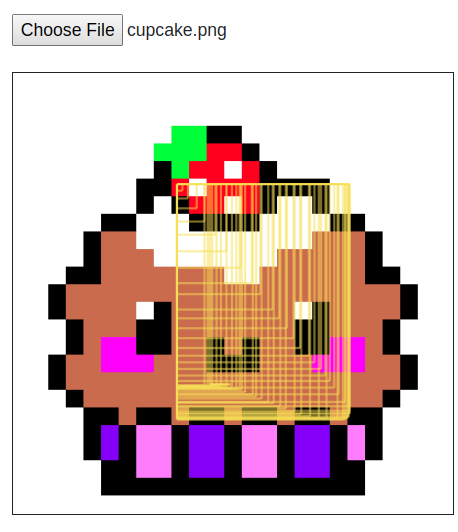
这里有相同的函数,但是调用单独的ctx.rect()和ctx.stroke()。
  // draw rectangle preview of cropped area
  const drawCropRect = (canvasRef, rectXY, croppedCanvasData) => {
    const canvas = canvasRef.current;
    const ctx = canvas.getContext("2d");
    ctx.clearRect(0, 0, canvas.width, canvas.height);
    ctx.putImageData(
      croppedCanvasData,
      0,
      0,
      0,
      0,
      canvas.width,
      canvas.height
    );
    ctx.strokeStyle = "#f6dd43";
    // calling rect() and then stroke()- this does not work
    ctx.rect(
      rectXY.xStart,
      rectXY.yStart,
      rectXY.xCurrent - rectXY.xStart,
      rectXY.yCurrent - rectXY.yStart
    );
    ctx.stroke();
};为什么会发生这种情况?当用户移动鼠标时,调用单独的ctx.rect()和ctx.stroke()如何防止它们被清除?
回答 1
Stack Overflow用户
回答已采纳
发布于 2019-08-30 18:49:16
在ctx.beginPath()的rect()部分开始时尝试使用drawCropRect()。
如果不使用ctx.beginPath(),它就会抛出画布。
希望这能有所帮助!
页面原文内容由Stack Overflow提供。腾讯云小微IT领域专用引擎提供翻译支持
原文链接:
https://stackoverflow.com/questions/57731070
复制相关文章
相似问题
腾讯云开发者

Copyright © 2013 - 2026 Tencent Cloud. All Rights Reserved. 腾讯云 版权所有
深圳市腾讯计算机系统有限公司 ICP备案/许可证号:粤B2-20090059  粤公网安备44030502008569号
腾讯云计算(北京)有限责任公司 京ICP证150476号 | 京ICP备11018762号