
iOS 13.0 -支持黑暗模式的最佳方法,同时也支持iOS 11和12
所以我已经在苹果开发者论坛上发了帖子,但还没有得到回复。
背景:
iOS 13引入了暗模式和一些预定义的光和暗变体的系统颜色:(https://developer.apple.com/videos/play/wwdc2019/214/)
这些颜色可以直接作为命名颜色在故事情节提要中使用。它们还作为静态颜色添加到UIColor类中:(colors)
但是,添加到UIColor中的静态颜色在iOS 11和12的代码中是不可用的。这使得使用它们非常困难,因为所有对新系统颜色的引用都必须包装在可用性检查中:

它还提出了一个问题:在iOS 11和12上,当系统颜色直接在童话板中使用时,系统颜色将解析到什么?在我们的测试中,他们似乎解决了光变体,尽管我们还没有测试所有这些。
当前方法:
这就是我们所倾向的做法。为了更早的Colors.xcassets版本支持,我们将向iOS文件中添加所有颜色,并通过CustomColors Enum执行一个版本检查和映射,以便根据iOS版本返回正确的UIColor系统颜色。一旦我们放弃对iOS 11和12的支持,我们将从Colors.xcassets中删除各自的颜色,因为我们将只使用系统颜色。我们还将重构所有的故事板,以使用新的系统颜色。
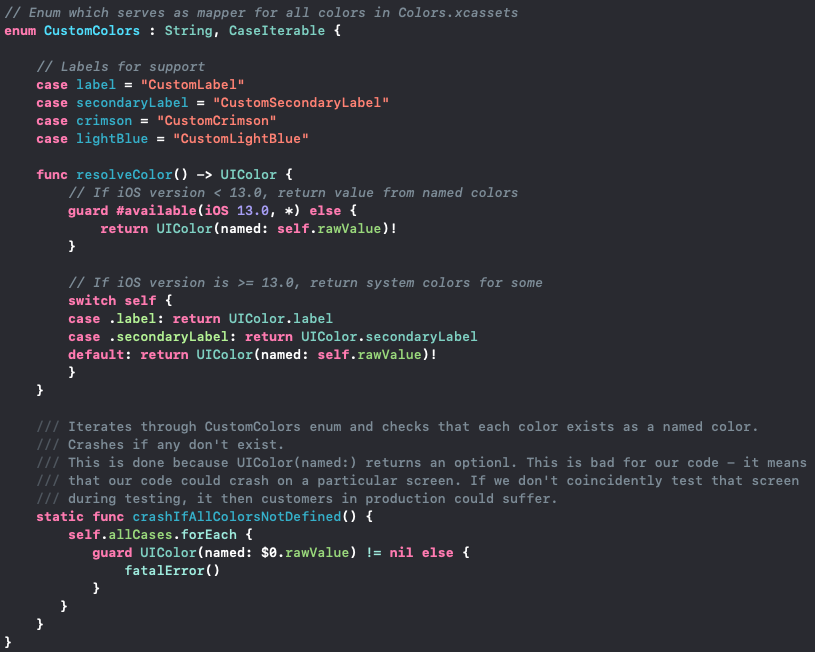
这种方法的缺点是:
- 如果我们想在删除对iOS 11和12 (UIColor.label、UIColor.systemBackground等)的支持后在代码中直接使用系统颜色,那么消除所有枚举引用可能是一个相当大的重构。
- 因为我们将在故事情节提要中使用系统颜色,所以我们必须确保我们的Colors.xcassets等效物使用相同的颜色代码。
- 这个bug:(UIColor(named:) always returns nil on iOS 11.0-11.2) -如果它没有被修复,那么这种方法是不可用的(编辑:这个bug在XCode 11 GM seed 2 11A420a中修复)
- 与所有资产目录一样,使用神奇字符串访问目录中的项使开发人员很容易犯错误,获得零而不是资产(本例中的颜色)。如果我们不测试每一个屏幕,这可能会导致很难收集bug,迫使我们编写crashIfAllColorsNotDefined()方法。使用枚举确实降低了这种风险,因为神奇的字符串只在一个地方存储/使用。
其他方法:(How do I easily support light and dark mode with a custom color used in my app?)
问题:
您还可以使用新的系统颜色来支持iOS 13的黑暗模式,同时仍然支持iOS 11和12吗?在较早的iOS版本上,在故事板中使用新的系统颜色安全吗?
回答 1
Stack Overflow用户
发布于 2020-02-20 02:10:24
Enum和UIColor扩展的结合是最终的方向。定制颜色有两个“部分”--你的应用程序的特殊颜色和复制的苹果颜色。
苹果发布的一些新颜色只能在iOS13或更高版本(systemBackground、opaqueSeparator、secondaryLabel等)中使用。如果您想立即使用这些,那么您将不得不创建它们作为自定义的颜色。这是一个值得关注的问题,因为它增加了未来的技术负担,因为一旦iOS13成为您支持的最低版本,就必须重构这些颜色。这在故事板中尤其难以重构。
按照此解决方案的设置方式,UIColors扩展可以很容易地修改,以便在稍后阶段返回正式的苹果颜色。你应该只以编程的方式设置重复的苹果颜色--不要直接在故事板上使用它们。
代码中的:
self.backgroundColor = .red1
self.layer.borderColor = UIColor.successGreen1.cgColor
颜色Enum:
// Enum for all custom colors
private enum CustomColors : String, CaseIterable {
    case red1 = "red1"
    case red2 = "red2"
    case blue1 = "blue1"
    case blue2 = "blue2"
    case successGreen1 = "successGreen1"
    case warningOrange1 = "warningOrange1"

    //----------------------------------------------------------------------
    // MARK: - Apple colors
    //----------------------------------------------------------------------

    // Duplicates for new apple colors only available in iOS 13
    case opaqueSeparator = "customOpaqueSeparator"
    case systemBackground = "customSystemBackground"
    case systemGroupedBackground = "customSystemGroupedBackground"
    case secondarySystemGroupedBackground = "customSecondarySystemGroupedBackground"
    case secondaryLabel = "customSecondaryLabel"
    case systemGray2 = "customSystemGray2"
}
UIColor扩展:
// Extension on UIColor for all custom (and unsupported) colors available
extension UIColor {

    //----------------------------------------------------------------------
    // MARK: - Apple colors with #available(iOS 13.0, *) check
    //----------------------------------------------------------------------

    // These can all be removed when iOS13 becomes your minimum supported platform.
    // Or just return the correct apple-defined color instead.

    /// Opaque Seperator color
    static var customOpaqueSeparator: UIColor {
        if #available(iOS 13.0, *) {
            return UIColor.opaqueSeparator
        } else {
            return UIColor(named: CustomColors.opaqueSeparator.rawValue)!
        }
    }

    /// System Background color
    static var customSystemBackground: UIColor {
        if #available(iOS 13.0, *) {
            return UIColor.systemBackground
        } else {
            return UIColor(named: CustomColors.systemBackground.rawValue)!
        }
    }

    /// System Grouped Background color
    static var customSystemGroupedBackground: UIColor {
        if #available(iOS 13.0, *) {
            return UIColor.systemGroupedBackground
        } else {
            return UIColor(named: CustomColors.systemGroupedBackground.rawValue)!
        }
    }

    // more

    //----------------------------------------------------------------------
    // MARK: - My App Custom Colors
    //----------------------------------------------------------------------

    /// Red 1 color
    static var red1: UIColor {
        return UIColor(named: CustomColors.red1.rawValue)!
    }

    /// Red 2 color
    static var red2: UIColor {
        return UIColor(named: CustomColors.red2.rawValue)!
    }

    /// Success Green 1 color
    static var successGreen1: UIColor {
        return UIColor(named: CustomColors.successGreen1.rawValue)!
    }

    // more

    //----------------------------------------------------------------------
    // MARK: - Crash If Not Defined check
    //----------------------------------------------------------------------

    // Call UIColor.crashIfCustomColorsNotDefined() in AppDelegate.didFinishLaunchingWithOptions. If your application
    // has unit tests, perhaps ensure that all colors exist via unit tests instead.

    /// Iterates through CustomColors enum and check that each color exists as a named color.
    /// Crashes if any don't exist.
    /// This is done because UIColor(named:) returns an optionl. This is bad -
    /// it means that our code could crash on a particular screen, but only at runtime. If we don't coincidently test that screen
    /// during testing phase, then customers could suffer unexpected behavior.
    static func crashIfCustomColorsNotDefined() {
        CustomColors.allCases.forEach {
           guard UIColor(named: $0.rawValue) != nil else {
            Logger.log("Custom Colors - Color not defined: " + $0.rawValue)
            fatalError()
           }
       }
    }
}故事板中的:
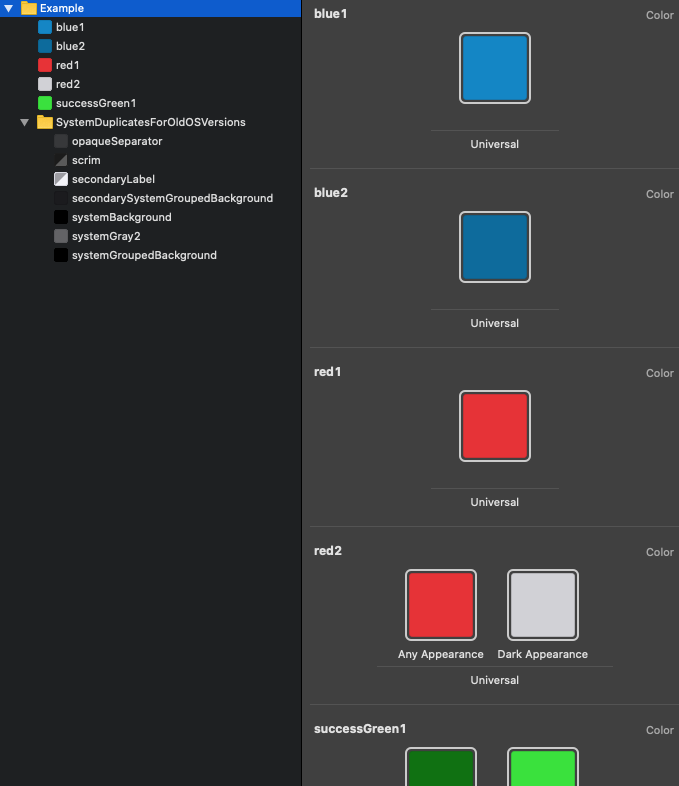
直接选择自定义颜色,除了重复的苹果颜色。
Colors.xcassets:
https://stackoverflow.com/questions/57719197
复制相似问题
腾讯云开发者

Copyright © 2013 - 2026 Tencent Cloud. All Rights Reserved. 腾讯云 版权所有
深圳市腾讯计算机系统有限公司 ICP备案/许可证号:粤B2-20090059  粤公网安备44030502008569号
腾讯云计算(北京)有限责任公司 京ICP证150476号 | 京ICP备11018762号