
如何限制TextSpan小部件的文本长度
如何限制TextSpan小部件的文本长度
提问于 2019-08-28 05:53:58
我是新来的。如何在使用TextSpan小部件时限制文本?
我的代码
Widget build(BuildContext context) {
    return Padding(
      padding: const EdgeInsets.symmetric(vertical: 8.0),
      child: Row(
        children: <Widget>[
          Expanded(
            flex: 2,
            child: Row(
              children: <Widget>[
                Stack(
                  children: <Widget>[
                    ClipRRect(
                      borderRadius: BorderRadius.all(Radius.circular(8)),
                      child: Image.asset(
                        lastPlayedGame.imagePath,
                        height: 60,
                        width: 45,
                        fit: BoxFit.cover,
                      ),
                    ),
                    Positioned(
                      left: 8,
                      right: 8,
                      top: 0,
                      bottom: 0,
                      child: Container(
                        decoration: BoxDecoration(
                          shape: BoxShape.circle,
                          color: Colors.white,
                        ),
                        child: Icon(
                          Icons.play_arrow,
                          color: Colors.red,
                        ),
                      ),
                    ),
                  ],
                ),
                Padding(
                  padding: const EdgeInsets.symmetric(horizontal: 12),
                  child: RichText(
                    text: TextSpan(children: [
                      TextSpan(text: lastPlayedGame.name, style: headingTwoTextStyle,),
                      TextSpan(text: '\n'),
                      TextSpan(text: "${lastPlayedGame.hoursPlayed} hours played", style: bodyTextStyle),
                    ]),
                  ),
                )
              ],
            ),
          ),
          Expanded(
            child: GameProgressWidget(screenWidth: screenWidth, gameProgress: gameProgress),
          ),
        ],
      ),
    );
  }
}
在我的Android设备上运行时,我会得到一个错误:
RenderFlex在右边溢出15个像素。
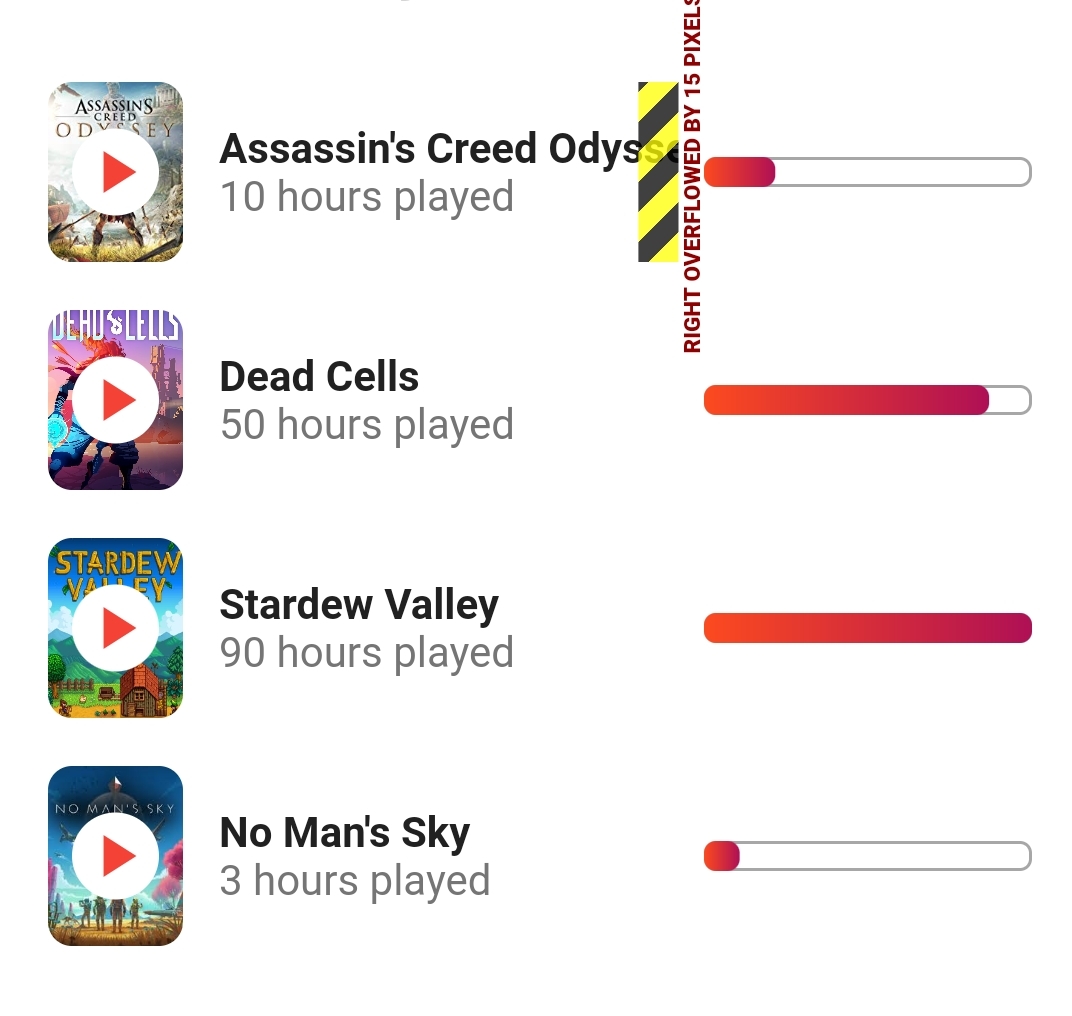
如何限制文本长度?也许检查文本是否是屏幕的最大值,是否会显示Assasin's Creed... (可能用圆点?)
回答 6
Stack Overflow用户
回答已采纳
发布于 2019-08-28 06:13:36
如果要在RichText中使用划中的Widget并使用省略号防止溢出,则首先必须将其包装在灵活中。Flexible向Row显示RichText可以缩小。
在将RichText包装到Flexible中之后,只需将overflow: TextOverflow.ellipsis添加到RichText中即可。这里是一个最小的例子,其中有一个RichText在Flexible中,一个在Row中。
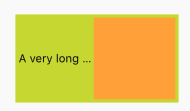
import 'package:flutter/material.dart';

void main() => runApp(MyApp());

class MyApp extends StatelessWidget {
  @override
  Widget build(BuildContext context) {
    return MaterialApp(
      home: Scaffold(
        body: Center(
            child: Container(
              padding: EdgeInsets.all(4.0),
          color: Colors.lime,
          width: 200.0,
          child: Row(
            children: <Widget>[
              Flexible(
                child: RichText(
                  overflow: TextOverflow.ellipsis,
                  strutStyle: StrutStyle(fontSize: 12.0),
                  text: TextSpan(
                      style: TextStyle(color: Colors.black),
                      text: 'A very long text :)'),
                ),
              ),
              Container(
                width: 100.0,
                height: 100.0,
                color: Colors.orangeAccent,
              )
            ],
          ),
        )),
      ),
    );
  }
}Stack Overflow用户
发布于 2020-02-10 12:22:44
不需要使用RichText。只需添加文本( overflow: TextOverflow.ellipsis的一个参数),然后用Flexible包装文本小部件
示例
 Row(
            children: <Widget>[
              Icon(Icons.location_on, color: Colors.grey),
              Flexible(
                  child: Text(propertyModel.propertyAddress, style: AppTextStyle.headerSmall2(context),
                 overflow: TextOverflow.ellipsis),
              )
            ],
),Stack Overflow用户
发布于 2021-06-21 05:05:02
如果您想要自定义它,也可以尝试这样做:
Text(
  _name.length > 10 ? _name.substring(0, 10)+'...' : _name,
   style: TextStyle(
     color: Colors.white,
     fontSize: 22,
     fontWeight: FontWeight.w500,
   ),
),如果文本的ellipsis长度超过10,则显示。
页面原文内容由Stack Overflow提供。腾讯云小微IT领域专用引擎提供翻译支持
原文链接:
https://stackoverflow.com/questions/57685855
复制相关文章
相似问题
腾讯云开发者

Copyright © 2013 - 2026 Tencent Cloud. All Rights Reserved. 腾讯云 版权所有
深圳市腾讯计算机系统有限公司 ICP备案/许可证号:粤B2-20090059  粤公网安备44030502008569号
腾讯云计算(北京)有限责任公司 京ICP证150476号 | 京ICP备11018762号