
PDFlib -控制背景和不透明度的文本颜色,文本背景和文字笔画
PDFlib -控制背景和不透明度的文本颜色,文本背景和文字笔画
提问于 2019-08-27 20:04:28
我试图设置单独的值背景和不透明度的文本颜色,文本背景和文字笔画(大纲)。
代码如下
$p->save();
$p->setfont($font, 240);
$p->set_gstate($p->create_gstate('opacityfill=1 opacitystroke=1')); // Both fill and stroke are opaque
$p->set_graphics_option('fillcolor={rgb 0.075 0.973 0.024} strokecolor={rgb 0 0 1}');
$p->fit_textline('QfjIL', 30, 30, 'matchbox={boxheight={88% 24.5%} borderwidth=0 round=0 fillcolor={rgb 1 1 0}} charspacing=0 textrendering=2 strokewidth=10 position={left top}');
$p->restore();
在以下方面的成果:
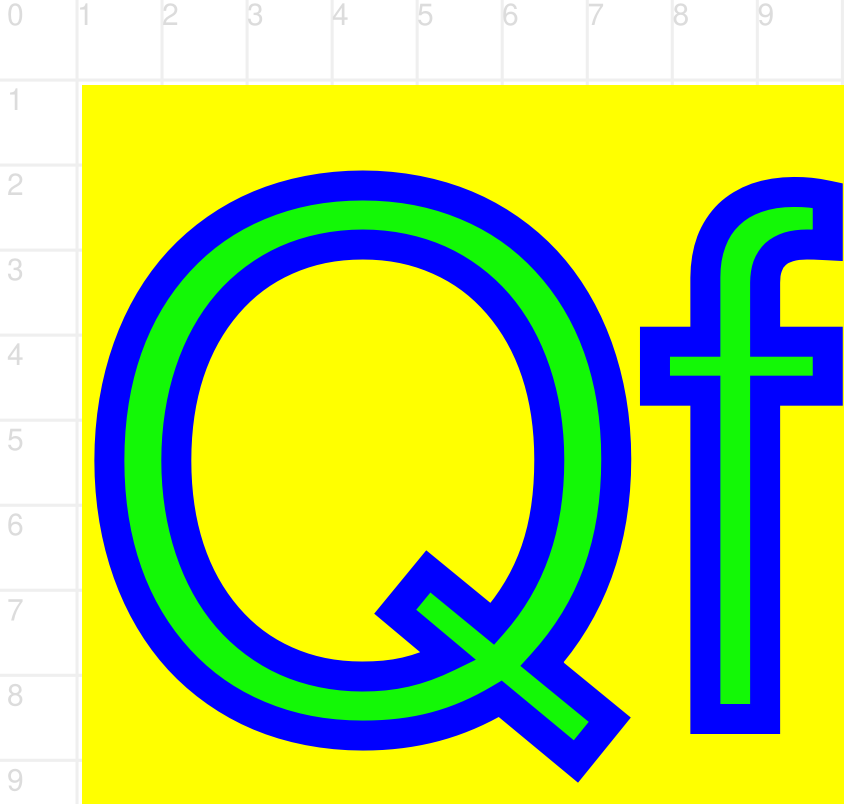
黄色背景,蓝色字母笔画和绿色字母填充是不透明的-如预期。
在gstate中添加填充和笔画的不透明度如下:
$p->save();
$p->setfont($font, 240);
$p->set_gstate($p->create_gstate('opacityfill=0.3 opacitystroke=0.3'));
$p->set_graphics_option('fillcolor={rgb 0.075 0.973 0.024} strokecolor={rgb 0 0 1}');
$p->fit_textline('QfjIL', 30, 30, 'matchbox={boxheight={88% 24.5%} borderwidth=0 round=0 fillcolor={rgb 1 1 0}} charspacing=0 textrendering=2 strokewidth=10 position={left top}');
$p->restore();
结果在所有背景中,填充和笔画使用相同的不透明度:

问题
如何分别控制文字背景不透明(黄色)、字母笔画不透明度(蓝色)和字母填充不透明度(绿色)?
回答 1
Stack Overflow用户
回答已采纳
发布于 2019-08-28 10:20:06
这是预期的结果,因为您为所有填充和笔画内容指定了图形状态。
您应该只为文本设置不透明状态,为火柴盒设置一个实心状态。
$p->save();
$gstate_solid = $p->create_gstate('opacityfill=1 opacitystroke=1');
$gstate = $p->create_gstate('opacityfill=0.3 opacitystroke=0.3');
$p->fit_textline('QfjIL', 30, 30,
   'fontname=NotoSerif-Regular encoding=unicode fontsize=240 ' .
   'matchbox={boxheight={88% 24.5%} borderwidth=0 round=0 fillcolor={rgb 1 1 0} gstate=' . $gstate_solid . '} '
   'charspacing=0 textrendering=2 strokewidth=10 position={left top} gstate=' . $gstate . 'fillcolor={rgb 0.075 0.973 0.024} strokecolor={rgb 0 0 1}');
$p->restore();
这给出了下面的结果,我想这是预期的结果。

您可以在PDFlib 9.2API引用中找到有关火柴盒选项的所有细节,第6.2章“火柴盒”。
页面原文内容由Stack Overflow提供。腾讯云小微IT领域专用引擎提供翻译支持
原文链接:
https://stackoverflow.com/questions/57681545
复制相关文章
相似问题
腾讯云开发者

Copyright © 2013 - 2026 Tencent Cloud. All Rights Reserved. 腾讯云 版权所有
深圳市腾讯计算机系统有限公司 ICP备案/许可证号:粤B2-20090059  粤公网安备44030502008569号
腾讯云计算(北京)有限责任公司 京ICP证150476号 | 京ICP备11018762号