
如何使recyclerView占用安卓约束布局中最多一半的屏幕(最大)?
如何使recyclerView占用安卓约束布局中最多一半的屏幕(最大)?
提问于 2019-08-27 09:28:41
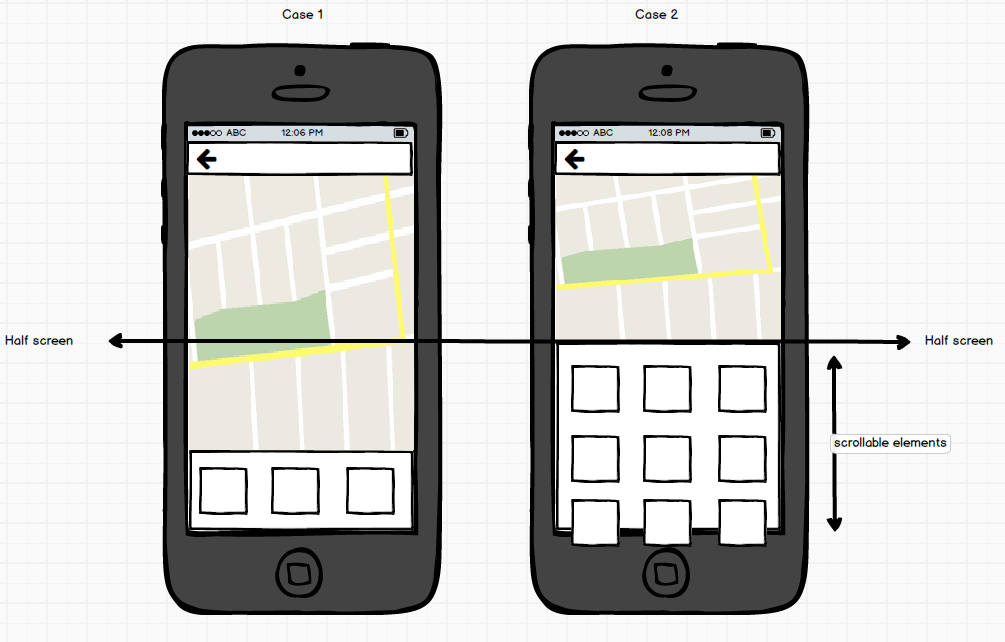
我有一个屏幕,包含两个视图,一个地图(顶部)和一个回收(底部)规则很简单。
回收商的视图可以延伸到屏幕的中央,如果需要更多的空间,它应该滚动,地图将占据其余的空间,当然,如果回收商的元素较少,它应该缩小,为地图留下更多的空间。
我试图使用约束布局来实现这一点,同时我也试图避免涉及计算的解决方案。
请查看下面的图片,以获得更多关于我正在努力实现的目标的信息:
这是我的密码
<?xml version="1.0" encoding="utf-8"?>
<androidx.constraintlayout.widget.ConstraintLayout xmlns:android="http://schemas.android.com/apk/res/android"
    xmlns:app="http://schemas.android.com/apk/res-auto"
    xmlns:tools="http://schemas.android.com/tools"
    android:layout_width="match_parent"
    android:layout_height="match_parent"
    android:background="@color/white"
    tools:context="com.qmic.itraffic.ui.activities.crowdsourcing.CrowdSourceReportingDetailsActivity">

    <androidx.constraintlayout.widget.Guideline
        android:id="@+id/halfScreenGuideline"
        android:layout_width="wrap_content"
        android:layout_height="wrap_content"
        android:orientation="horizontal"
        app:layout_constraintGuide_percent="0.5" />

    <FrameLayout
        android:id="@+id/content_frame"
        android:layout_width="0dp"
        android:layout_height="0dp"
        app:layout_constraintBottom_toTopOf="@+id/categories"
        app:layout_constraintEnd_toEndOf="parent"
        app:layout_constraintStart_toStartOf="parent"
        android:background="@color/manatee"
        />

    <androidx.recyclerview.widget.RecyclerView
        android:id="@+id/categories"
        android:layout_width="match_parent"
        android:layout_height="0dp"
        android:layout_marginTop="8dp"
        android:layout_marginBottom="8dp"
        android:clipToPadding="false"
        app:layout_constraintBottom_toBottomOf="parent"
        app:layout_constraintEnd_toEndOf="parent"
        app:layout_constraintStart_toStartOf="parent"
        app:layout_constraintTop_toTopOf="@+id/halfScreenGuideline" />


</androidx.constraintlayout.widget.ConstraintLayout>
我的问题是,我能否仅使用xml (约束布局)来实现这种行为?或者我需要进行计算?。
回答 2
Stack Overflow用户
回答已采纳
发布于 2019-08-27 09:40:55
请您在回收视图xml中使用以下代码。
android:layout_height="wrap_content"
app:layout_constrainedHeight="true"
更改高度以包装内容,并添加第二行。这样,回收视图的高度应该与其内容相同,但绝不能超过指南/违禁品。
Stack Overflow用户
发布于 2019-08-29 06:34:22
Akhil Soman的答案是正确的,但遗漏了一件事。
app:layout_constraintVertical_bias="1.0"没有它,RecyclerView就会浮在屏幕底部,留下一个空空间。
以下是完整的答案,供参考
<androidx.recyclerview.widget.RecyclerView
        android:id="@+id/categories"
        android:layout_width="match_parent"
        android:layout_height="wrap_content"
        android:layout_marginTop="0dp"
        android:layout_marginBottom="0dp"
        android:clipToPadding="false"
        app:layout_constrainedHeight="true"
        app:layout_constraintBottom_toBottomOf="parent"
        app:layout_constraintEnd_toEndOf="parent"
        app:layout_constraintStart_toStartOf="parent"
        app:layout_constraintTop_toTopOf="@+id/halfScreenGuideline"
app:layout_constraintVertical_bias="1.0" />另外,Jaymin的建议似乎很有趣,可以解决这个问题,但是我还没有应用它,因为我已经使用了Akil解决方案。
页面原文内容由Stack Overflow提供。腾讯云小微IT领域专用引擎提供翻译支持
原文链接:
https://stackoverflow.com/questions/57671615
复制相关文章
相似问题
腾讯云开发者

Copyright © 2013 - 2026 Tencent Cloud. All Rights Reserved. 腾讯云 版权所有
深圳市腾讯计算机系统有限公司 ICP备案/许可证号:粤B2-20090059  粤公网安备44030502008569号
腾讯云计算(北京)有限责任公司 京ICP证150476号 | 京ICP备11018762号