
如何提高表格识别器的精度?
如何提高表格识别器的精度?
提问于 2019-08-26 17:17:54
我在5张图片上训练了我的模型,但是精度并不特别高。
表单链接:https://imgur.com/a/BOHVG7G
JSON产出:
{
  "status": "success",
  "pages": [
    {
      "number": 1,
      "height": 1055,
      "width": 1225,
      "clusterId": 0,
      "keyValuePairs": [
        {
          "key": [
            {
              "text": "Name:",
              "boundingBox": [
                163.7,
                987.1,
                242.2,
                987.1,
                242.2,
                963.4,
                163.7,
                963.4
              ]
            }
          ],
          "value": [
            {
              "text": "Luca Bassi",
              "boundingBox": [
                365.3,
                982.1,
                458.8,
                982.1,
                458.8,
                963.4,
                365.3,
                963.4
              ],
              "confidence": 1
            },
            {
              "text": "Brassi",
              "boundingBox": [
                365.3,
                938.7,
                417.1,
                938.7,
                417.1,
                919,
                365.3,
                919
              ],
              "confidence": 1
            }
          ]
        },
        {
          "key": [
            {
              "text": "Surname:",
              "boundingBox": [
                166.9,
                937.8,
                282.8,
                937.8,
                282.8,
                913.1,
                166.9,
                913.1
              ]
            }
          ],
          "value": [
            {
              "text": "19 Cider Lane",
              "boundingBox": [
                367.3,
                719.1,
                490.4,
                719.1,
                490.4,
                698.4,
                367.3,
                698.4
              ],
              "confidence": 0.8
            }
          ]
        },
        {
          "key": [
            {
              "text": "e-Mail Address:",
              "boundingBox": [
                164.7,
                893.4,
                358.1,
                893.4,
                358.1,
                867.8,
                164.7,
                867.8
              ]
            }
          ],
          "value": [
            {
              "text": "brassi@brassi.com",
              "boundingBox": [
                364.3,
                893.4,
                528,
                893.4,
                528,
                867.8,
                364.3,
                867.8
              ],
              "confidence": 0.6
            }
          ]
        },
        {
          "key": [
            {
              "text": "Phone Number:",
              "boundingBox": [
                163.7,
                849.1,
                361.1,
                849.1,
                361.1,
                822.6,
                163.7,
                822.6
              ]
            }
          ],
          "value": [
            {
              "text": "456-3456",
              "boundingBox": [
                367.3,
                849.1,
                451.8,
                849.1,
                451.8,
                822.6,
                367.3,
                822.6
              ],
              "confidence": 1
            }
          ]
        },
        {
          "key": [
            {
              "text": "Mobile Number:",
              "boundingBox": [
                164.7,
                803.8,
                361.1,
                803.8,
                361.1,
                777.3,
                164.7,
                777.3
              ]
            }
          ],
          "value": [
            {
              "text": "456-2135",
              "boundingBox": [
                366.3,
                803.8,
                450.8,
                803.8,
                450.8,
                777.3,
                366.3,
                777.3
              ],
              "confidence": 1
            }
          ]
        },
        {
          "key": [
            {
              "text": "Street:",
              "boundingBox": [
                166.9,
                714.1,
                246.2,
                714.1,
                246.2,
                690.5,
                166.9,
                690.5
              ]
            }
          ],
          "value": []
        },
        {
          "key": [
            {
              "text": "House:",
              "boundingBox": [
                163.7,
                668.8,
                250.2,
                668.8,
                250.2,
                645.3,
                163.7,
                645.3
              ]
            }
          ],
          "value": [
            {
              "text": "Detroit",
              "boundingBox": [
                364.3,
                628.5,
                427.3,
                628.5,
                427.3,
                609.7,
                364.3,
                609.7
              ],
              "confidence": 0.6
            }
          ]
        },
        {
          "key": [
            {
              "text": "Town:",
              "boundingBox": [
                166.9,
                623.5,
                241.2,
                623.5,
                241.2,
                598.9,
                166.9,
                598.9
              ]
            }
          ],
          "value": [
            {
              "text": "80012",
              "boundingBox": [
                365.3,
                585.2,
                418.1,
                585.2,
                418.1,
                565.5,
                365.3,
                565.5
              ],
              "confidence": 1
            }
          ]
        },
        {
          "key": [
            {
              "text": "Postcode:",
              "boundingBox": [
                164.7,
                580.2,
                286.8,
                580.2,
                286.8,
                554.5,
                164.7,
                554.5
              ]
            }
          ],
          "value": [
            {
              "text": "Russia",
              "boundingBox": [
                365.3,
                534.8,
                417.1,
                534.8,
                417.1,
                516.2,
                365.3,
                516.2
              ],
              "confidence": 0.6
            }
          ]
        },
        {
          "key": [
            {
              "text": "Comments:",
              "boundingBox": [
                166.9,
                487.7,
                305.2,
                487.7,
                305.2,
                464,
                166.9,
                464
              ]
            }
          ],
          "value": [
            {
              "text": "The quick brown fox",
              "boundingBox": [
                366.3,
                485.7,
                549.4,
                485.7,
                549.4,
                464,
                366.3,
                464
              ],
              "confidence": 0.6
            }
          ]
        }
      ],
      "tables": []
    }
  ],
  "errors": []
}
正如你所看到的,姓氏和地址并不是很好。是否有一种更有效的训练方法,还是我只需要使用更大的数据集?
我在蔚蓝的传送门里翻来覆去,但我不太确定我是否找到了一个更好地训练它的选择。
回答 1
Stack Overflow用户
回答已采纳
发布于 2019-08-27 08:45:07
我用opencv和matplotlib用Python创建了一个程序来检查您的结果,然后我发现Surname和e-Mail Address都出来了,但是House和Country没有,如下图所示。
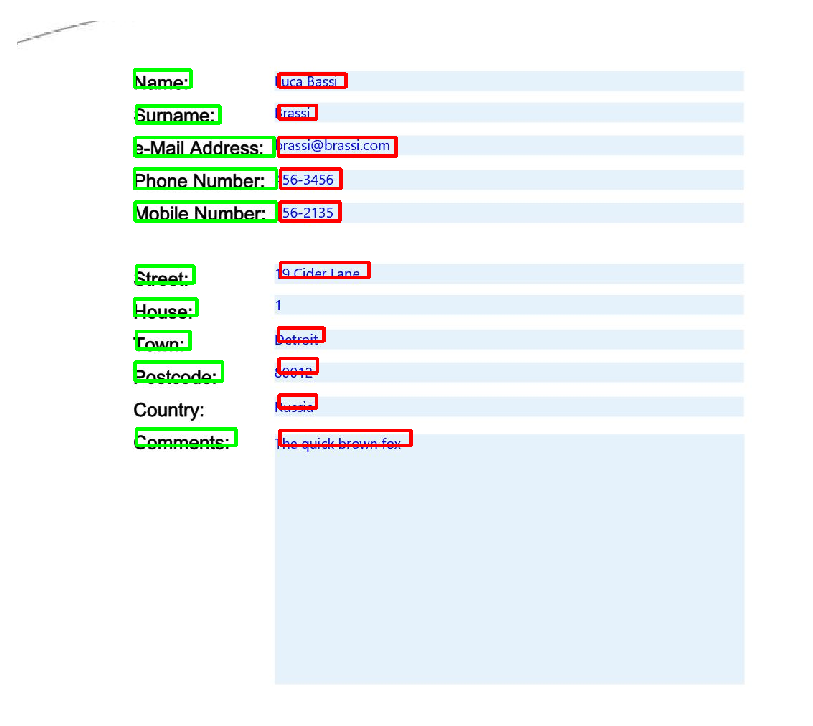
这是我画的代码。
import cv2
import matplotlib.pyplot as plt
import json
import numpy as np

json_file = open('sample.json')
json_dict = json.load(json_file)
page = json_dict['pages'][0]
height = page['height']
keyValuePairs = page['keyValuePairs']

key_boundingBoxes = [np.int64(key['boundingBox']) for keyValuePair in keyValuePairs for key in keyValuePair['key']]
key_texts = [key['text'] for keyValuePair in keyValuePairs for key in keyValuePair['key']]
value_texts = [value['text'] for keyValuePair in keyValuePairs for value in keyValuePair['value']]
print(key_texts)
value_boundingBoxes = [np.int64(value['boundingBox']) for keyValuePair in keyValuePairs for value in keyValuePair['value']]

img = cv2.imread("sample.jpg")
img = cv2.cvtColor(img, cv2.COLOR_BGR2RGB)
[cv2.rectangle(img, (boundingBox[0], height - boundingBox[1]),(boundingBox[4], height - boundingBox[5]) ,(0,255,0), 3) for boundingBox in key_boundingBoxes]
[cv2.rectangle(img, (boundingBox[0], height - boundingBox[1]),(boundingBox[4], height - boundingBox[5]) ,(255,0,0), 3) for boundingBox in value_boundingBoxes]
plt.figure()
plt.imshow(img)
plt.axis('off')
plt.show()
当然,这与提高准确度无关。
根据我的经验,很容易提高训练模型的准确性,就是要给训练模型提供更多的图像,因为你使用的是Azure认知服务中你不能改变的算法。
页面原文内容由Stack Overflow提供。腾讯云小微IT领域专用引擎提供翻译支持
原文链接:
https://stackoverflow.com/questions/57662250
复制相关文章
相似问题
腾讯云开发者

Copyright © 2013 - 2026 Tencent Cloud. All Rights Reserved. 腾讯云 版权所有
深圳市腾讯计算机系统有限公司 ICP备案/许可证号:粤B2-20090059  粤公网安备44030502008569号
腾讯云计算(北京)有限责任公司 京ICP证150476号 | 京ICP备11018762号