
诊断div失调
服务器端开发,涉足html/css设计。
我有三个单选按钮,我把它设计成“可点击”的盒子。我的意思是:
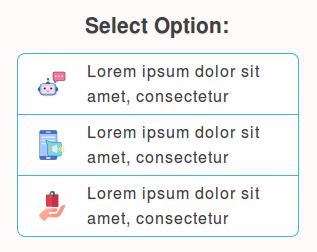
以上是我笔记本电脑的Firefox (Ubuntu )上的选项。
问题是,当在移动chrome/safari/opera等上查看时,同样的结果看起来明显不对齐。请自己看看:
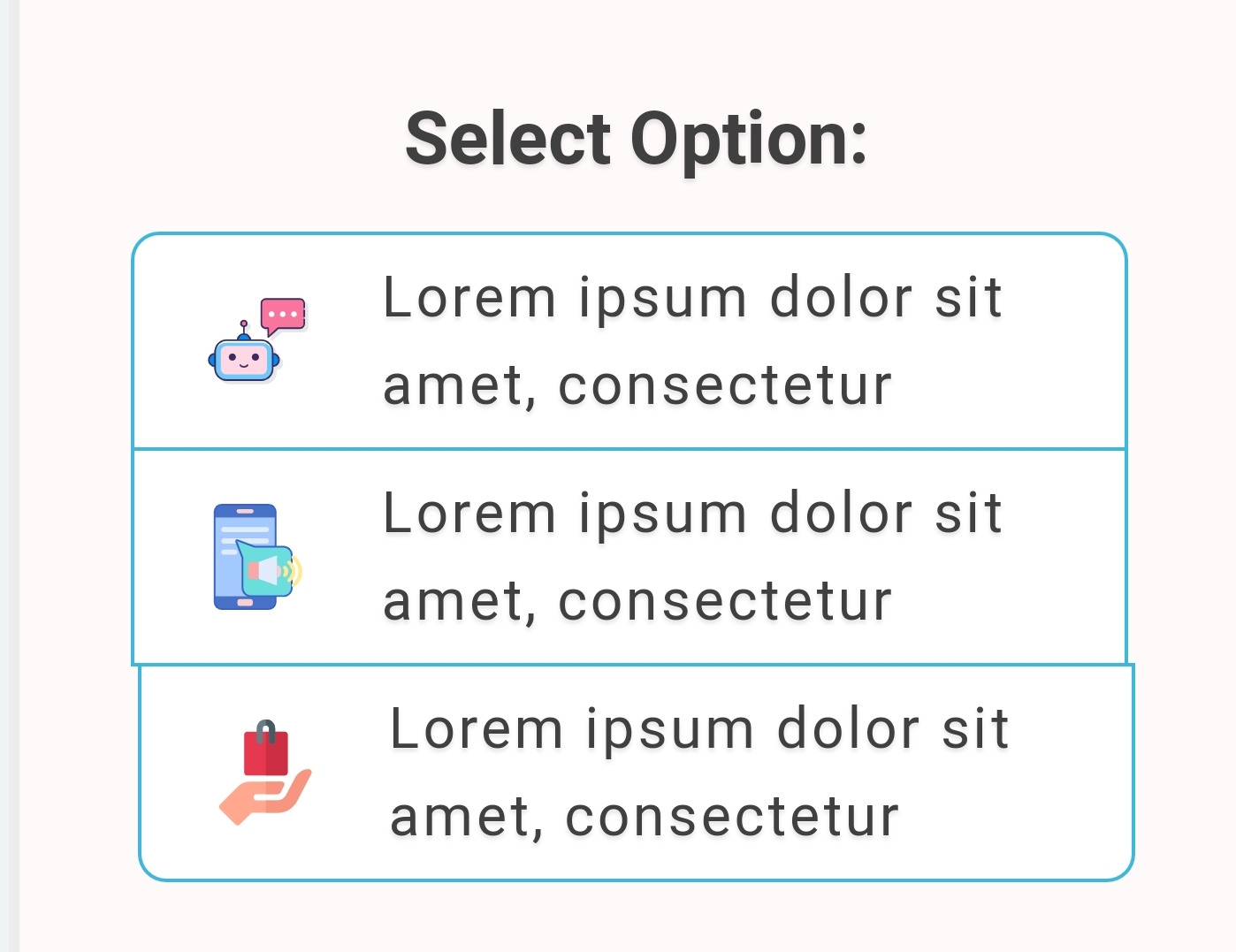
我已经盯着代码看了很长时间了,没能找到bug。专家能帮我解决这个问题吗?
这是我的密码:
/* Hide the browser's default checkbox */

.checkbox {
  position: absolute;
  opacity: 0;
  cursor: pointer;
  height: 0;
  width: 0;
}

.label {
  background: white;
  padding: 7px 10px;
  height: 46px;
  width: 260px;
  border: 1px solid #3cb7dd;
  margin-bottom: -1px;
  cursor: pointer;
  -webkit-user-select: none;
  -moz-user-select: none;
  -ms-user-select: none;
  user-select: none;
}

.fx {
  display: -webkit-box;
  display: -ms-flexbox;
  display: flex;
}

.fxjscn {
  -webkit-box-pack: center;
  -ms-flex-pack: center;
  justify-content: center;
}

.fxaicn {
  -webkit-box-align: center;
  -ms-flex-align: center;
  align-items: center;
}

.mbl {
  margin-bottom: 1em;
}

.mts {
  margin-top: 0.5em;
}

.lsp {
  line-height: 1.55;
}

.clb {
  color: #404040;
  text-shadow: 0 1px 1px rgba(0, 0, 0, 0.1);
}<div class="clb mbl mts" style="border:3px solid #ececec;border-radius:12px;overflow:hidden;background:snow;max-width:500px;margin-left:auto;margin-right:auto;width:97%">
<div style="margin: 0 auto;text-align: center;">
<input type="radio" name="aud" class="checkbox" id="aud-first" value="1">
<label class="label" for="aud-first" style="border-top-left-radius:8px;border-top-right-radius:8px;display: inline-flex;align-items: center;">
<div class="fx fxjscn fxaicn">
<img src="https://encrypted-tbn0.gstatic.com/images?q=tbn:ANd9GcRlkqOVnCqMpCCYnJf2TB-cm7mfmZGC914FbZZxetEZDJCJqdqqfQ" width="30" height="30" style="padding:0 10px">
<div class="sp lsp" style="padding:0 10px;text-align:left">Lorem ipsum dolor sit amet, consectetur</div>
</div>
</label>
<input type="radio" name="aud" class="checkbox" id="aud-second" value="2">
<label class="label" for="aud-second" style="display: inline-flex;align-items: center;">
<div class="fx fxjscn fxaicn">
<img src="https://encrypted-tbn0.gstatic.com/images?q=tbn:ANd9GcRlkqOVnCqMpCCYnJf2TB-cm7mfmZGC914FbZZxetEZDJCJqdqqfQ" width="30" height="30" style="padding:0 10px">
<div class="sp lsp" style="padding:0 10px;text-align:left">Lorem ipsum dolor sit amet, consectetur</div>
</div>
</label>
<input type="radio" name="aud" class="checkbox" id="aud-third" value="3">
<label class="label" for="aud-third" style="border-bottom-left-radius:8px;border-bottom-right-radius:8px;display: inline-flex;align-items: center">
<div class="fx fxjscn fxaicn">
<img src="https://encrypted-tbn0.gstatic.com/images?q=tbn:ANd9GcRlkqOVnCqMpCCYnJf2TB-cm7mfmZGC914FbZZxetEZDJCJqdqqfQ" width="30" height="30" style="padding:0 10px">
<div class="sp lsp" style="padding:0 10px;text-align:left">Lorem ipsum dolor sit amet, consectetur</div>
</div>
</label>
</div>
</div>
请原谅我加了一些额外的装饰代码。如果它们是造成上述错误的罪魁祸首(它们是原始代码的一部分),它们就会被包括在内。
注意:通过以下链接直接检查移动浏览器中的不对齐:https://codepen.io/mhb11/pen/BaBpxrr --这与我在问题中包含的代码完全相同。
回答 2
Stack Overflow用户
发布于 2019-08-23 12:52:26
不太清楚原因,但它与inline-flex和与内联元素相关的空白有关(或者可能是一个简单的bug)。改用flex,您就不会有这个问题了。您将具有相同的输出,因为您正在修复元素的宽度:
/* Hide the browser's default checkbox */

.checkbox {
  position: absolute;
  opacity: 0;
  cursor: pointer;
  height: 0;
  width: 0;
}

.label {
  background: white;
  padding: 7px 10px;
  height: 46px;
  width: 260px;
  border: 1px solid #3cb7dd;
  margin:0 auto -1px;
  cursor: pointer;
  -webkit-user-select: none;
  -moz-user-select: none;
  -ms-user-select: none;
  user-select: none;
}

.fx {
  display: -webkit-box;
  display: -ms-flexbox;
  display: flex;
}

.fxjscn {
  -webkit-box-pack: center;
  -ms-flex-pack: center;
  justify-content: center;
}

.fxaicn {
  -webkit-box-align: center;
  -ms-flex-align: center;
  align-items: center;
}

.mbl {
  margin-bottom: 1em;
}

.mts {
  margin-top: 0.5em;
}

.lsp {
  line-height: 1.55;
}

.clb {
  color: #404040;
  text-shadow: 0 1px 1px rgba(0, 0, 0, 0.1);
}<div class="clb mbl mts" style="border:3px solid #ececec;border-radius:12px;overflow:hidden;background:snow;max-width:500px;margin-left:auto;margin-right:auto;width:97%">
<div style="margin: 0 auto;">
<input type="radio" name="aud" class="checkbox" id="aud-first" value="1">
<label class="label" for="aud-first" style="border-top-left-radius:8px;border-top-right-radius:8px;display: flex;align-items: center;">
<div class="fx fxjscn fxaicn">
<img src="https://encrypted-tbn0.gstatic.com/images?q=tbn:ANd9GcRlkqOVnCqMpCCYnJf2TB-cm7mfmZGC914FbZZxetEZDJCJqdqqfQ" width="30" height="30" style="padding:0 10px">
<div class="sp lsp" style="padding:0 10px;text-align:left">Lorem ipsum dolor sit amet, consectetur</div>
</div>
</label>
<input type="radio" name="aud" class="checkbox" id="aud-second" value="2">
<label class="label" for="aud-second" style="display: flex;align-items: center;">
<div class="fx fxjscn fxaicn">
<img src="https://encrypted-tbn0.gstatic.com/images?q=tbn:ANd9GcRlkqOVnCqMpCCYnJf2TB-cm7mfmZGC914FbZZxetEZDJCJqdqqfQ" width="30" height="30" style="padding:0 10px">
<div class="sp lsp" style="padding:0 10px;text-align:left">Lorem ipsum dolor sit amet, consectetur</div>
</div>
</label>
<input type="radio" name="aud" class="checkbox" id="aud-third" value="3">
<label class="label" for="aud-third" style="border-bottom-left-radius:8px;border-bottom-right-radius:8px;display: flex;align-items: center">
<div class="fx fxjscn fxaicn">
<img src="https://encrypted-tbn0.gstatic.com/images?q=tbn:ANd9GcRlkqOVnCqMpCCYnJf2TB-cm7mfmZGC914FbZZxetEZDJCJqdqqfQ" width="30" height="30" style="padding:0 10px">
<div class="sp lsp" style="padding:0 10px;text-align:left">Lorem ipsum dolor sit amet, consectetur</div>
</div>
</label>
</div>
</div>
Stack Overflow用户
发布于 2019-08-23 12:26:28
现在,单选按钮仍然存在于输出中。它会影响到对准。不要将高度和宽度设置为0,而是使用所有这些额外属性,只需将“输入”单选按钮的“显示”属性设置为“无”。这是删除元素的最佳方法。
.checkbox {
  display:none;
}https://stackoverflow.com/questions/57625859
复制相似问题
腾讯云开发者

Copyright © 2013 - 2026 Tencent Cloud. All Rights Reserved. 腾讯云 版权所有
深圳市腾讯计算机系统有限公司 ICP备案/许可证号:粤B2-20090059  粤公网安备44030502008569号
腾讯云计算(北京)有限责任公司 京ICP证150476号 | 京ICP备11018762号