
当浏览表单选项菜单项时,如何回到用户被导航到嵌套图形时停止的位置?
我有一个应用程序,需要多个配对设备。从应用程序的流,有多个地方,你可以初始化配对流。
因此,我将配对流作为嵌套图,而在根图中,我有一个全局动作pairing_action。在嵌套图中,我有另一个全局操作finish_pairing。
问题是,当我从配对片段调用finish_pairing操作时,无论是在哪里启动配对流,我总是在主屏幕上结束。
但这不是我想要的,--我想回到我从启动配对流的屏幕上(在那里,当我进入配对流时停止了)。
代码给出如下。
navigation.xml
<navigation xmlns:android="http://schemas.android.com/apk/res/android"
    xmlns:app="http://schemas.android.com/apk/res-auto"
    xmlns:tools="http://schemas.android.com/tools"
    android:id="@+id/navigation"
    app:startDestination="@id/start_fragment">

    <!-- Global action to start pairing -->
    <action android:id="@+id/pairing_action"
        app:destination="@id/pairing"/>

    <fragment ... />
    <fragment ... />
    <fragment ... />

    <!-- Nested pairing flow -->
    <navigation android:id="@+id/pairing"
        android:label="Pairing"
        app:startDestination="@id/pairing_fragment">

        <!-- Nested global action to finish pairing -->
        <!-- Should get to the fragment which initiated pairing! -->
        <action android:id="@+id/finish_pairing"
            app:popUpTo="@id/pairing"
            app:popUpToInclusive="true" />

        <fragment ... />
        <fragment ... />
        <fragment ... />
    </navigation>
</navigation>
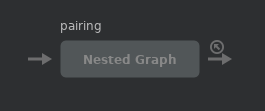
嵌套对导航图
编辑1:
我回到主屏幕,即使我按回按钮从配对流。
示例:我到了像这样的配对屏幕:
main -> devices -> pairing -> enter code现在,当我从finish_pairing屏幕调用enter code全局操作(或按回2次)时,我想返回到devices屏幕。但我最后却上了main。
编辑2:
这是从devices屏幕转到pairing graph的逻辑猫
V/FragmentManager: Commit: BackStackEntry...
D/FragmentManager: mName=2-2131231057 mIndex=-1 mCommitted=false
...
D/FragmentManager: Operations:
D/FragmentManager: Op #0: REPLACE PairingFragment...
...
D/FragmentManager: Op #1: SET_PRIMARY_NAV PairingFragment...
...
V/FragmentManager: Run: BackStackEntry...
V/FragmentManager: Bump nesting in BackStackEntry... by -1
V/FragmentManager: Bump nesting of StartFragment... to 1
V/FragmentManager: Bump nesting of StartFragment... to 0
V/FragmentManager: Bump nesting of DevicesFragment... to 1
V/FragmentManager: Bump nesting of DevicesFragment... to 0
V/FragmentManager: remove: DevicesFragment... nesting=0

V/FragmentManager: add: StartFragment...
V/FragmentManager: Bump nesting in BackStackEntry... by 1
V/FragmentManager: Bump nesting of StartFragment... to 1
V/FragmentManager: Bump nesting of StartFragment... to 2
V/FragmentManager: Bump nesting of PairingFragment... to 1
V/FragmentManager: Bump nesting of PairingFragment... to 2
V/FragmentManager: remove: StartFragment... nesting=2

V/FragmentManager: add: PairingFragment...
V/FragmentManager: Added fragment to active set PairingFragment...
V/FragmentManager: moveto CREATED: PairingFragment...
V/FragmentManager: moveto ACTIVITY_CREATED: PairingFragment...
V/FragmentManager: moveto STARTED: PairingFragment...
V/FragmentManager: moveto RESUMED: PairingFragment...

V/FragmentManager: movefrom RESUMED: DevicesFragment...
V/FragmentManager: movefrom STARTED: DevicesFragment...
V/FragmentManager: movefrom ACTIVITY_CREATED: DevicesFragment...
W/FragmentManager: moveToState: Fragment state for DevicesFragment... not updated inline; expected state 1 found 2
V/FragmentManager: movefrom CREATED: DevicesFragment...
D/FragmentManager: Clearing non-config state for DevicesFragment...
D/FragmentManager: onCleared called for FragmentManagerViewModel{a60610c} Fragments () Child Non Config () ViewModelStores ()
V/FragmentManager: Removed fragment from active set DevicesFragment...在导航到pairing graph时,似乎会弹出背靠背(首先是devices屏幕,然后是start屏幕),然后是pairing屏幕。
这不是个虫子吗?为什么全球行动要突然爆发?!
我使用选项菜单项进入配对流。
回答 2
Stack Overflow用户
发布于 2019-08-26 08:43:24
我在我的应用程序中大量使用菜单导航。NavigationUI支持它。 --但如果你仔细阅读文献资料,就会发现以下几点:
默认情况下,back堆栈将弹出回导航图的起始目标。具有
android:menuCategory="secondary"的菜单项不会弹出后台堆栈。
这也是为什么从设备屏幕进入配对屏幕的原因。
因此,解决方案是将android:menuCategory="secondary"添加到设备屏幕上的菜单中,并开始按预期工作。
Stack Overflow用户
发布于 2019-08-22 13:59:31
只需从嵌套图本身创建一个常规的动作,并设置popUpTo嵌套图本身。
<action
    android:id="@+id/action_pairing_nav_graph_self"
    app:popUpTo="@+id/pairing_nav_graph" />
设计
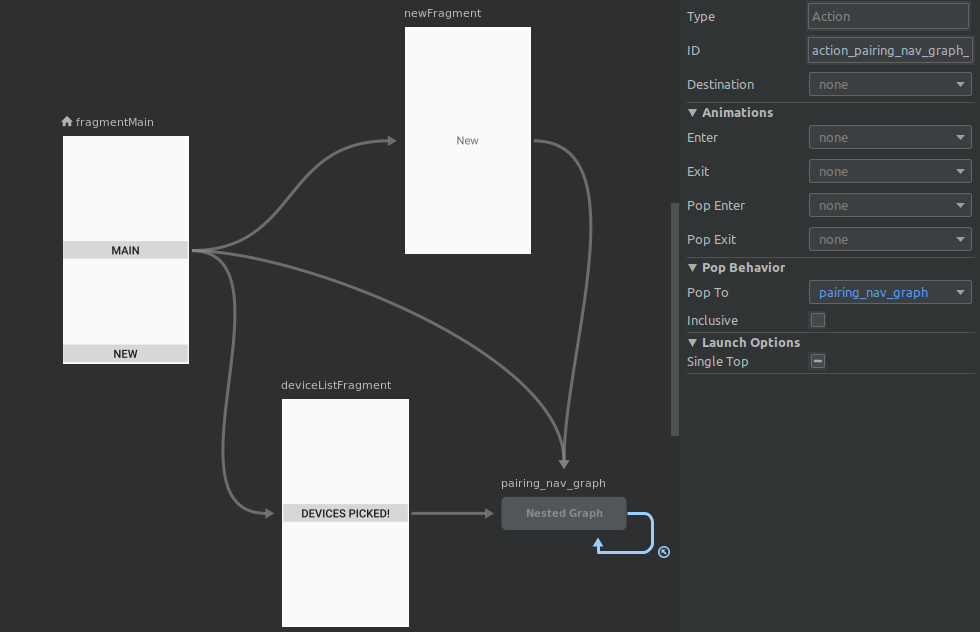
XML
<navigation...
    android:id="@+id/nav_graph.xml"
    app:startDestination="@id/fragmentMain">

    <fragment...>
        <action.../>
        <action.../>
        <action.../>
    </fragment>
    <fragment...>
        <action.../>
    </fragment>
    <fragment...>
        <action.../>
    </fragment>

    <!-- nested graph -->
    <navigation
        android:id="@+id/pairing_nav_graph"
        ...>
        <fragment ...>
        <fragment...>
            <action.../>
        </fragment>

        <!-- action to the graph itself -->
        <action
            android:id="@+id/action_pairing_nav_graph_self"
            app:popUpTo="@+id/pairing_nav_graph"
         />
    </navigation>
</navigation>结帐:回购中的设备配对分支作为一个工作示例。
https://stackoverflow.com/questions/57608745
复制相似问题
腾讯云开发者

Copyright © 2013 - 2026 Tencent Cloud. All Rights Reserved. 腾讯云 版权所有
深圳市腾讯计算机系统有限公司 ICP备案/许可证号:粤B2-20090059  粤公网安备44030502008569号
腾讯云计算(北京)有限责任公司 京ICP证150476号 | 京ICP备11018762号