
如何检查VS代码中的Debug.Writeline()输出?
我想知道使用Debug.Writeline扩展在VS代码中检查C# ()输出的确切方法。
我使用.net核心2.2作为一个框架,在这个网站HelloWorld.cs上运行一个示例测试。
测试通过了,但我在终端中看不到来自Debug.Writeline()的任何输出。因此,我搜索并发现,常见的解决方案是在我的.cs文件中包含以下代码:
/* Create a listener that outputs to the console screen, and
   add it to the debug listeners. */
   TextWriterTraceListener myWriter = new TextWriterTraceListener(System.Console.Out);
   Debug.Listeners.Add(myWriter);
但是,在我将代码放入文件后,它无法找到类“Debug”下的属性“listeners”。因此,我再次搜索,并意识到这是因为这个属性只包含在.Net框架4.8中。因此,我下载了.Net FrameworkV4.8并将“TargetFramework”更改如下:
<TargetFramework>net48</TargetFramework>修改后,我再次运行测试:
dotnet test 但结果仍然是这样:
Microsoft (R) Test Execution Command Line Tool Version 16.2.0-preview-20190606-02
Copyright (c) Microsoft Corporation.  All rights reserved.

Starting test execution, please wait...


Test Run Successful.
Total tests: 1
     Passed: 1
这是我的.csproj文件:
<Project Sdk="Microsoft.NET.Sdk">
  <PropertyGroup>
    <OutputType>Exe</OutputType>
    <TargetFramework>net48</TargetFramework>
  </PropertyGroup>
  <ItemGroup>
    <PackageReference Include="Azure.Identity" Version="1.0.0-preview.3"/>
    <PackageReference Include="Azure.Security.KeyVault.Keys" Version="4.0.0-preview.2"/>
    <PackageReference Include="NUnit" Version="3.12.0"/>
    <PackageReference Include="NUnit3TestAdapter" Version="3.14.0"/>
    <PackageReference Include="Microsoft.NET.Test.Sdk" Version="16.3.0-preview-20190808-03"/>
  </ItemGroup>
</Project>
这是我不加修改地运行的示例测试:
// Copyright (c) Microsoft Corporation. All rights reserved.
// Licensed under the MIT License. See License.txt in the project root for
// license information.

using Azure.Identity;
using NUnit.Framework;
using System;
using System.Diagnostics;
using System.Security.Cryptography;
using System.Threading;

namespace Azure.Security.KeyVault.Keys.Samples
{
    /// <summary>
    /// Sample demonstrates how to set, get, update and delete a key using the synchronous methods of the KeyClient.
    /// </summary>
    [Category("Live")]
    public partial class HelloWorld
    {
        [Test]
        public void HelloWorldSync()
        {
            // Environment variable with the Key Vault endpoint.
            string keyVaultUrl = Environment.GetEnvironmentVariable("AZURE_KEYVAULT_URL");

            // Instantiate a key client that will be used to call the service. Notice that the client is using default Azure
            // credentials. To make default credentials work, ensure that environment variables 'AZURE_CLIENT_ID',
            // 'AZURE_CLIENT_KEY' and 'AZURE_TENANT_ID' are set with the service principal credentials.
            var client = new KeyClient(new Uri(keyVaultUrl), new DefaultAzureCredential());

            // Let's create a RSA key valid for 1 year. If the key
            // already exists in the Key Vault, then a new version of the key is created.
            string rsaKeyName = $"CloudRsaKey-{Guid.NewGuid()}";
            var rsaKey = new RsaKeyCreateOptions(rsaKeyName, hsm: false, keySize: 2048)
            {
                Expires = DateTimeOffset.Now.AddYears(1)
            };

            client.CreateRsaKey(rsaKey);

            // Let's Get the Cloud RSA Key from the Key Vault.
            Key cloudRsaKey = client.GetKey(rsaKeyName);
            Debug.WriteLine($"Key is returned with name {cloudRsaKey.Name} and type {cloudRsaKey.KeyMaterial.KeyType}");

            // After one year, the Cloud RSA Key is still required, we need to update the expiry time of the key.
            // The update method can be used to update the expiry attribute of the key.
            cloudRsaKey.Expires.Value.AddYears(1);
            KeyBase updatedKey = client.UpdateKey(cloudRsaKey, cloudRsaKey.KeyMaterial.KeyOps);
            Debug.WriteLine($"Key's updated expiry time is {updatedKey.Expires}");

            // We need the Cloud RSA key with bigger key size, so you want to update the key in Key Vault to ensure
            // it has the required size.
            // Calling CreateRsaKey on an existing key creates a new version of the key in the Key Vault
            // with the new specified size.
            var newRsaKey = new RsaKeyCreateOptions(rsaKeyName, hsm: false, keySize: 4096)
            {
                Expires = DateTimeOffset.Now.AddYears(1)
            };

            client.CreateRsaKey(newRsaKey);

            // The Cloud RSA Key is no longer needed, need to delete it from the Key Vault.
            client.DeleteKey(rsaKeyName);

            // To ensure key is deleted on server side.
            Assert.IsTrue(WaitForDeletedKey(client, rsaKeyName));

            // If the keyvault is soft-delete enabled, then for permanent deletion, deleted key needs to be purged.
            client.PurgeDeletedKey(rsaKeyName);

        }

        private bool WaitForDeletedKey(KeyClient client, string keyName)
        {
            int maxIterations = 20;
            for (int i = 0; i < maxIterations; i++)
            {
                try
                {
                    client.GetDeletedKey(keyName);
                    return true;
                }
                catch
                {
                    Thread.Sleep(5000);
                }
            }
            return false;
        }
    }
}
这是修改后的测试:
// Copyright (c) Microsoft Corporation. All rights reserved.
// Licensed under the MIT License. See License.txt in the project root for
// license information.

using Azure.Identity;
using NUnit.Framework;
using System;
using System.Diagnostics;
using System.Security.Cryptography;
using System.Threading;

namespace Azure.Security.KeyVault.Keys.Samples
{
    /// <summary>
    /// Sample demonstrates how to set, get, update and delete a key using the synchronous methods of the KeyClient.
    /// </summary>
    [Category("Live")]
    public partial class HelloWorld
    {
        [Test]
        public static void Main()
        {
            /* Create a listener that outputs to the console screen, and
             add it to the debug listeners. */
           TextWriterTraceListener myWriter = new TextWriterTraceListener(System.Console.Out);
           Debug.Listeners.Add(myWriter);

            // Environment variable with the Key Vault endpoint.
            string keyVaultUrl = Environment.GetEnvironmentVariable("AZURE_KEYVAULT_URL");

            // Instantiate a key client that will be used to call the service. Notice that the client is using default Azure
            // credentials. To make default credentials work, ensure that environment variables 'AZURE_CLIENT_ID',
            // 'AZURE_CLIENT_KEY' and 'AZURE_TENANT_ID' are set with the service principal credentials.
            var client = new KeyClient(new Uri(keyVaultUrl), new DefaultAzureCredential());

            // Let's create a RSA key valid for 1 year. If the key
            // already exists in the Key Vault, then a new version of the key is created.
            string rsaKeyName = $"CloudRsaKey-{Guid.NewGuid()}";
            var rsaKey = new RsaKeyCreateOptions(rsaKeyName, hsm: false, keySize: 2048)
            {
                Expires = DateTimeOffset.Now.AddYears(1)
            };

            client.CreateRsaKey(rsaKey);
            // Let's Get the Cloud RSA Key from the Key Vault.
            Key cloudRsaKey = client.GetKey(rsaKeyName);
            Debug.WriteLine($"Key is returned with name {cloudRsaKey.Name} and type {cloudRsaKey.KeyMaterial.KeyType}");

            // After one year, the Cloud RSA Key is still required, we need to update the expiry time of the key.
            // The update method can be used to update the expiry attribute of the key.
            cloudRsaKey.Expires.Value.AddYears(1);
            KeyBase updatedKey = client.UpdateKey(cloudRsaKey, cloudRsaKey.KeyMaterial.KeyOps);
            Debug.WriteLine($"Key's updated expiry time is {updatedKey.Expires}");

            // We need the Cloud RSA key with bigger key size, so you want to update the key in Key Vault to ensure
            // it has the required size.
            // Calling CreateRsaKey on an existing key creates a new version of the key in the Key Vault
            // with the new specified size.
            var newRsaKey = new RsaKeyCreateOptions(rsaKeyName, hsm: false, keySize: 4096)
            {
                Expires = DateTimeOffset.Now.AddYears(1)
            };

            client.CreateRsaKey(newRsaKey);

            // The Cloud RSA Key is no longer needed, need to delete it from the Key Vault.
            client.DeleteKey(rsaKeyName);

            // To ensure key is deleted on server side.
            // Assert.IsTrue(WaitForDeletedKey(client, rsaKeyName));

            // If the keyvault is soft-delete enabled, then for permanent deletion, deleted key needs to be purged.
            // client.PurgeDeletedKey(rsaKeyName);

        }

        private bool WaitForDeletedKey(KeyClient client, string keyName)
        {
            int maxIterations = 20;
            for (int i = 0; i < maxIterations; i++)
            {
                try
                {
                    client.GetDeletedKey(keyName);
                    return true;
                }
                catch
                {
                    Thread.Sleep(5000);
                }
            }
            return false;
        }
    }
}
最后,我尝试在终端中键入以下内容:
dotnet run我终于以这样的格式从终端上得到了我期望的结果:
Key is returned with name CloudRsaKey-xxxxxxxx-xxxx-xxxx-xxxx-xxxxxxxxxxxx and type xxx
Key's updated expiry time is x/xx/20xx x:xx:xx AM +00:00但是我想知道这是否是查看Debug.Witeline()输出的唯一方法。因为我没有在终端中键入dotnet test命令,所以我不认为我实际上是在运行测试。我很困惑。
回答 1
Stack Overflow用户
发布于 2019-08-28 04:54:01
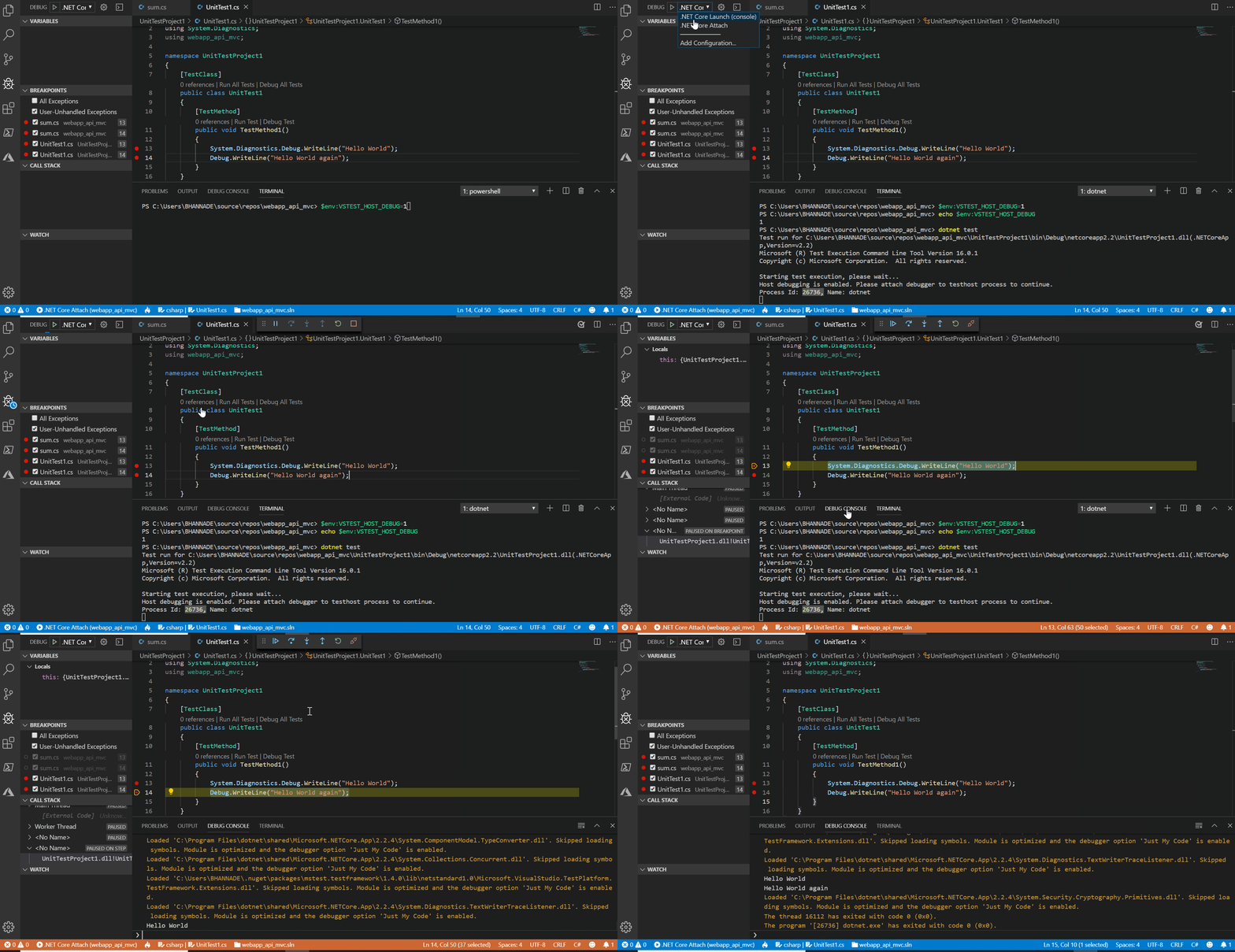
首先,您必须设置一个环境变量,该变量将启用托管在dotnet测试进程上的调试测试,以使用配置在VS代码中附加调试器。在使用Powershell的Windows上,这样做的方式是:$env:VSTEST_HOST_DEBUG=1
在没有此设置的情况下运行dotnet test只需通过。如果没有在调试模式下执行,甚至断点也会被忽略。
一旦将调试器附加到测试进程,您的断点就会被捕获,您将能够像往常一样逐步完成代码,现在可以在VS代码的调试控制台中看到所有Debug.WriteLine()语句的输出。
请查看这文章,以便快速浏览。
下面是一个简短的演示:
希望这能有所帮助!
https://stackoverflow.com/questions/57519610
复制相似问题
腾讯云开发者

Copyright © 2013 - 2026 Tencent Cloud. All Rights Reserved. 腾讯云 版权所有
深圳市腾讯计算机系统有限公司 ICP备案/许可证号:粤B2-20090059  粤公网安备44030502008569号
腾讯云计算(北京)有限责任公司 京ICP证150476号 | 京ICP备11018762号