
Swift: OSLog/os_log没有出现在控制台应用程序中
我正在用XCode 10.3构建一个Swift 5应用程序。为此,我有一个框架,其中包含一个日志系统的实现(用于调试)。此日志系统的默认实现基于OSLog/os_log。在消费应用程序中使用系统时,控制台应用程序中不会出现任何日志。但是,在放置断点时,我可以看到到达了os_log语句(参见下面的代码示例),并将正确的参数传递给os_log函数。但是,当我在主机应用程序中使用os_log或NSLog时,它们确实会出现。
我已经证实,LogSystem / DefaultLogImplementation类型没有问题,因为需要命中的所有断点都被击中了,所有单元测试都是绿色的。此外,到达并执行os_log语句,但不显示日志。我已经验证了所有消息都显示在控制台应用程序中,我已经验证了我选择了正确的设备,我尝试过多个过滤器(甚至在没有启用过滤器的情况下挖掘所有日志).
有人能帮助/指指点点这个问题可能是什么吗?我目前怀疑OSLog/os_log的实现中存在一个bug。
码样例
应用程序端代码,它使用与下面提供的示例类似的代码。
class SomeClass {
    private let logSystem = LogSystem()

    func doSomethingImportant() {
        // Do important stuff and log the result
        logSystem.debug("Finished process with result \(result)")
    }

}
框架端代码,由应用程序使用。
public class LogSystem {

    private let logImplementation: LogImplementation

    init(_ logImplementation: LogImplementation = DefaultLogImplementation()) {
        self.logImplementation = logImplementation
    }

    public func debug(_ message: String) {
        logImplementation.log(message, type: .debug) // And some other parameters...
    }

    public func error(_ message: String) {
        // Similar to debug(:)...
    }

}

public protocol LogImplementation {
    func log(_ message: String, type: LogType, ...other parameters...)
}

public class DefaultLogImplementation: LogImplementation {
    func log(_ message: String, type: LogType, ...other parameters...) {
        let parsedType = parseLogType(type) // Function that parses LogType to OSLogType
        let log = OSLog(subsystem: "my.subsystem.domain", category: "myCategory")
        os_log("%{private}@", log: log, type: parsedType, message) // Breakpoint here is reached, but log does not appear in console app (even with debugger attached, which should remove the effect of "%{private}%". Either way, at the very least censored logs should still appear in console app.
    }
}
附加信息
迅捷版: 5.0
XCode版本: 10.3
目标设备: iOS 12.2 iPhone X模拟器
NSLog出现在控制台应用程序中:是的
在控制台应用程序中选择正确的设备:是
正确的过滤器:是的
更新2019-08-16 13:00 (阿姆斯特丹时间)
似乎只有.debug级别的消息没有出现在控制台应用程序中。当将任何模拟器设备与OSLog结合使用时,都会发生此错误。我尝试了几个命令来修复这个问题:
sudo log config --mode level:debug,persist:debug
sudo log config --subsystem my.reverse.domain.name --mode level:debug,persist:debug
他们两人都没有解决这个问题。事实上,模拟器的调试级消息并没有显示在控制台应用程序中(甚至没有来自iOS本身)。是的,启用了显示.info和.debug级别消息的选项。
我尝试为模拟器设置日志级别,特别是通过以下命令:
xcrun simctl spawn booted log config --mode level:debug
但这会导致一个错误:
log: Simulator unable to set system mode
回答 2
Stack Overflow用户
发布于 2021-04-05 05:53:34
在控制台应用程序中,有两个选项可以包含/隐藏调试和信息消息:
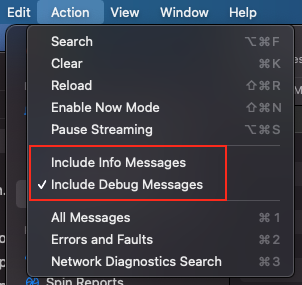
Stack Overflow用户
发布于 2019-11-12 08:14:52
我已经与Apple工程师谈过了,这是一个已知的问题,无法使用模拟器(在Xcode 11中)看到调试消息:打开反馈
https://stackoverflow.com/questions/57509909
复制相似问题
腾讯云开发者

Copyright © 2013 - 2026 Tencent Cloud. All Rights Reserved. 腾讯云 版权所有
深圳市腾讯计算机系统有限公司 ICP备案/许可证号:粤B2-20090059  粤公网安备44030502008569号
腾讯云计算(北京)有限责任公司 京ICP证150476号 | 京ICP备11018762号