
vue项目的小型化
- 我用的是vue: 2.6.10
- 使用vue cli 3 https://cli.vuejs.org/guide/生成项目。
- 这瓶酒含有一些怎样的webpack 4
我想归档缩小(删除所有空白空间、换行符等)我的项目的来源。所以我想要20毫巴,我想要~4mb
我的消息来源:
//file name package.json
{
  "name": "abc",
  "version": "1.0.0",
  "scripts": {
    "serve": "vue-cli-service serve",
    "build": "vue-cli-service build"
  },
...
}
我的项目包括:
- 包含我已经构建的组件的许多*.vue文件。
- 一些*.js文件
当我在控制台上打字时:
npm run build它从-> " build“:"vue-cli-service build”运行脚本。
一切都在运行,我最终得到的结果是:

我得到的是:
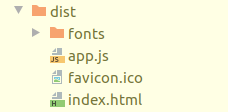
而app.js文件很重~20‘t,我不知道3.5mb build.min.js文件在哪里,如何通过这个vue cli强制npm归档?
也许你知道如何将vue应用程序从~20 to减少到~3.5mb?
回答 1
Stack Overflow用户
发布于 2019-08-11 11:10:01
我意识到我做错了什么:
- 值得一看的是webpack -版本(我有老版本的sudo应该安装webpack,在Ubuntu 19.04上安装了3.6.4版本)
- 我试着用vue.config.js包装webpack,这不是个好主意,有些东西对我不管用
- 最后,我为vue + vuetify配置了webpack.config.js,如下所示:
const路径=需要量(‘path’) const VueLoaderPlugin =需要量(‘vue- VuetifyLoaderPlugin /lib/plugin’) const VuetifyLoaderPlugin=需要量(‘vue TerserPlugin /lib/plugin’);module.exports ={module.exports={ entry:'./src/main.js',输出:{ path: path.resolve(__dirname,__dirname publicPath:'/dist/',文件名:'app.js‘},plugins:新VueLoaderPlugin(),新VuetifyLoaderPlugin(),新TerserPlugin(),新JavaScriptObfuscator({ identifierNamesGenerator:'mangled‘}),模块:{ rules:[{ test: /.vue$/,加载程序:’vue-加载程序‘,选项:{ loaders:{} //其他vue-加载器选项到这里} },{ test: /..css$/,使用:‘风格-加载程序’,‘css-加载程序’},{ test: /.js$/,加载程序:‘babel-加载程序’,排除: /node_modules/ },{ test: /。选项:{ name:'name.exthash‘},{ test: /.s(c\a)ss$/,使用:’vue样式-加载程序‘,’css-加载程序‘,{加载程序:’sass-加载程序‘,选项:{实现:要求(‘sass’),纤维:要求(‘纤维’),indentedSyntax: true //可选},优化:{ minimizer:新TerserPlugin({ terserOptions:{terserOptions:未定义,警告: false,解析:{},压缩:{},mangle: true,// Note
mangle.properties在默认情况下是false。模块: false,output: null,toplevel: false,nameCache: null,ie8: false,keep_classnames: undefined,keep_fnames: false,safari10: false,} },
因此,在一天结束时,我将结束app.js 3.82 MiB的缩小和混淆。我希望这篇文章能帮助那些寻找这样的答案的人。
https://stackoverflow.com/questions/57443710
复制相似问题
腾讯云开发者

Copyright © 2013 - 2026 Tencent Cloud. All Rights Reserved. 腾讯云 版权所有
深圳市腾讯计算机系统有限公司 ICP备案/许可证号:粤B2-20090059  粤公网安备44030502008569号
腾讯云计算(北京)有限责任公司 京ICP证150476号 | 京ICP备11018762号