
如何解决对XMLHttpRequest的访问被CORS策略所阻碍?
这个问题是西班牙文原著。,我用谷歌翻译在这里发布同样的问题,如果语法不是最好的话,我真的很抱歉,我做了更好的工作来翻译完整的问题在这里。,谢谢!
大家早上好
我在C #中有一个Rest,在这个API中我有几个GET和POST方法,我尝试了所有使用Postman的方法,它们都很好地工作,它们都给出了我期望的答案,当我试图从我的前端使用它们时,我尝试使用Axios和Ajax,每个人都抛出了以下例外:
·Axios

·jQuery Ajax:

我设法让这个错误更准确,哈哈:

我认为这可能是第一个原因,因为API位于https中,而我的前端位于http中,所以我将API放在https和http中,但这并没有解决这一问题。
我的消费方式如下:
·Axios:
let url = this.apiSeguridad + "usuario/";
let data = {
            Nit_ID: this.userInfo.nit_ID.ID,
            UserName: this.userInfo.userName.ID,
            Password: btoa(this.password),
            Public_IP: this.publicIP,
            Private_IP: this.localIP
           };
console.log(url, data);
let resultApi = await axios.post(url, data);
我还尝试使用以下代码:
let url = this.apiSeguridad + "usuario/";
let config = {
            headers: {
                 "Content-Type": "application/json",
                 "cache-control": "no-cache"
                 }
             };
let data = JSON.stringify({
           Nit_ID: this.userInfo.nit_ID.ID,
           UserName: this.userInfo.userName.ID,
           Password: btoa(this.password),
           Public_IP: this.publicIP,
           Private_IP: this.localIP
           });
console.log(url, data);
let resultApi = await axios.post(url, data,config);
结果没能成功。
在Ajax中,我尝试了类似的方法,但更多的是验证请求是否有效,但抛出相同的错误,我感兴趣的是让它在axios中工作。
GET请求工作正常,我只得到POST请求中的错误。
我对web.config上API的配置如下:

我想使用的POST方法是这样的:
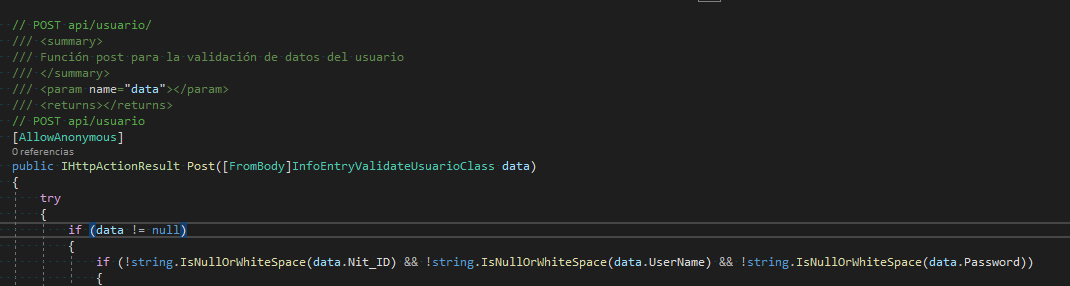
现在,我认为问题可能在于我在API中使用了JWT,并在WebApiConfig.cs中添加了这一行代码:
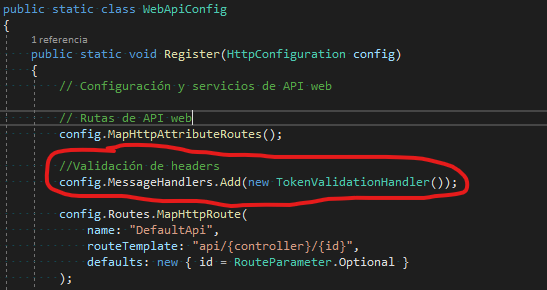
应该验证所有对具有属性[Authorize]的方法的请求的头。
为了实现JWT,我使用了本网站,这就是我使用并添加了这一行代码的地方。
我希望您的帮助能够解决这个问题,我不知道它是否是API配置,也不知道我是如何从axios中使用API的。
邮递员的应用程序工作正常,并按我的意愿回答我,下面是一个例子:
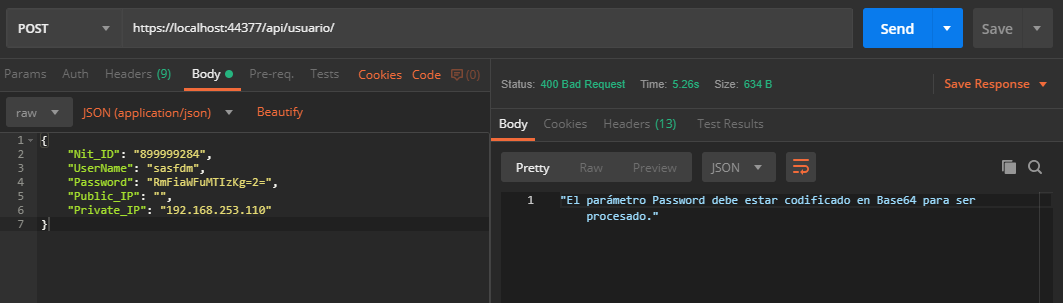
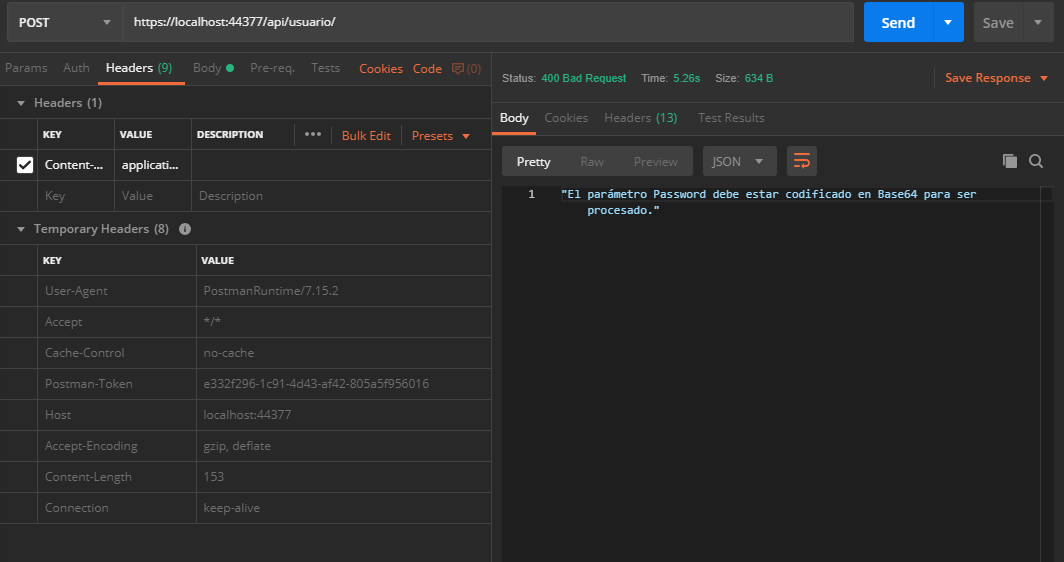
我没有在这一要求中增加任何其他内容。
由于米格尔·扎拉特(在西班牙原文中)请求使用Fiddler4验证请求,这个工具向我展示了如下内容:
邮递员:
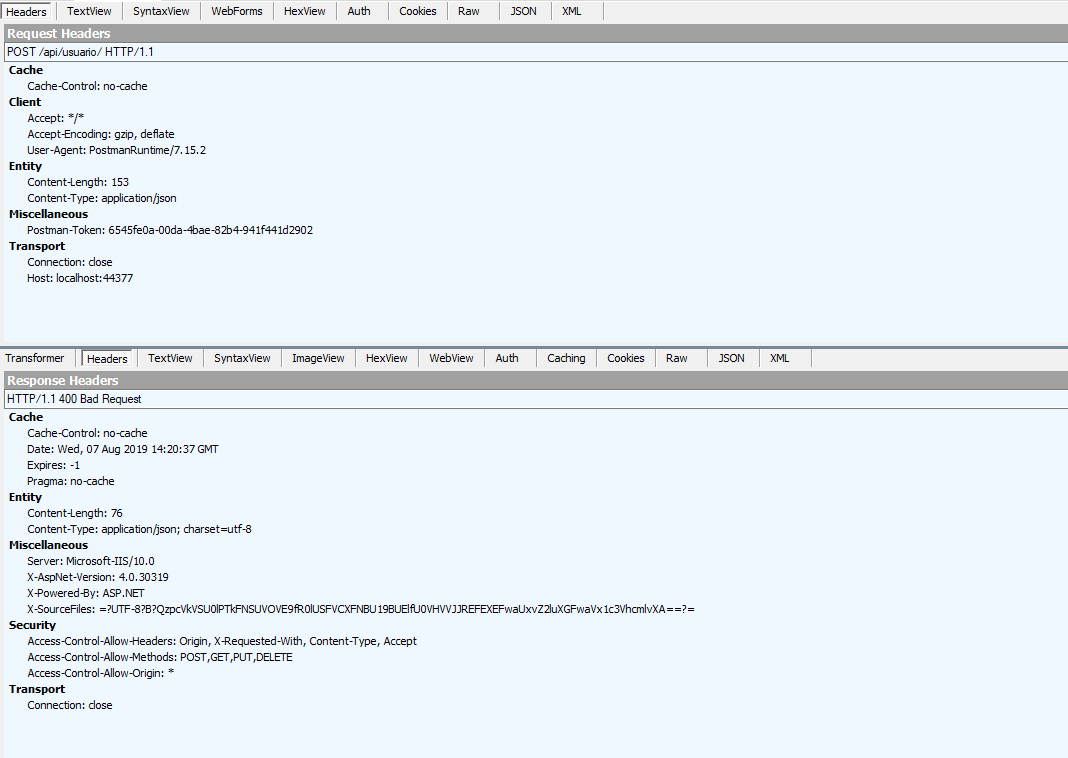
*来自前线:
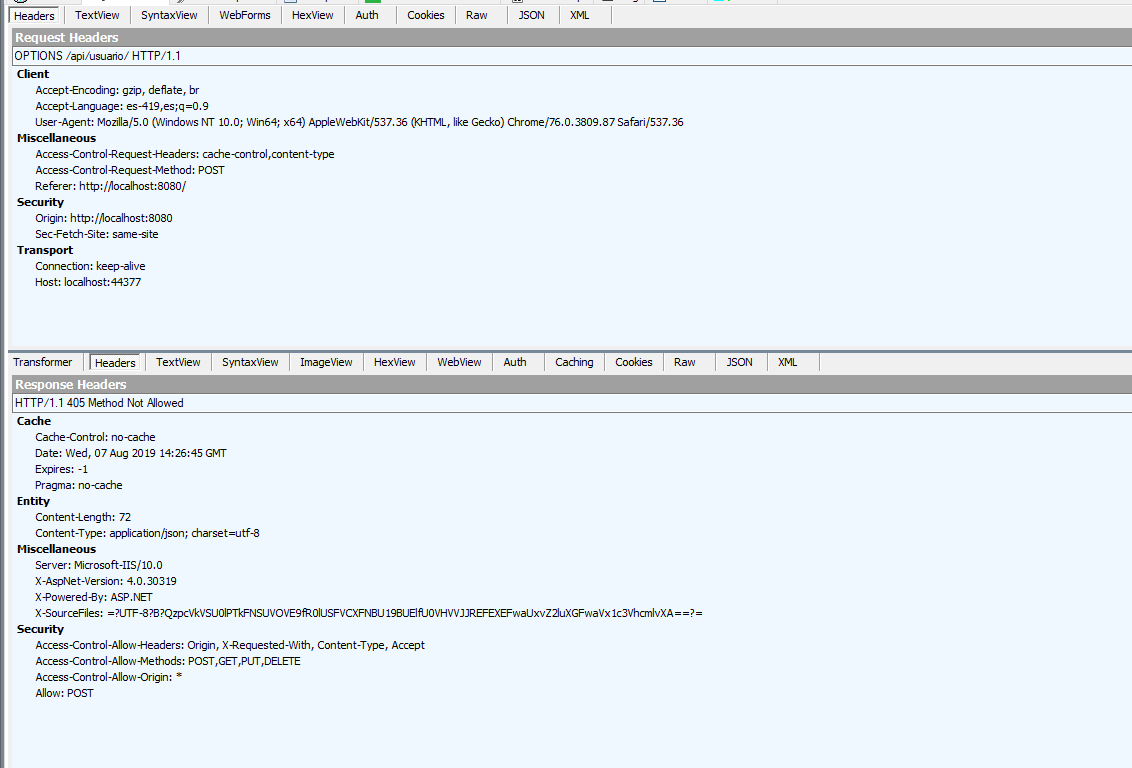
这似乎是结果之间最明显的差别:
邮递员:
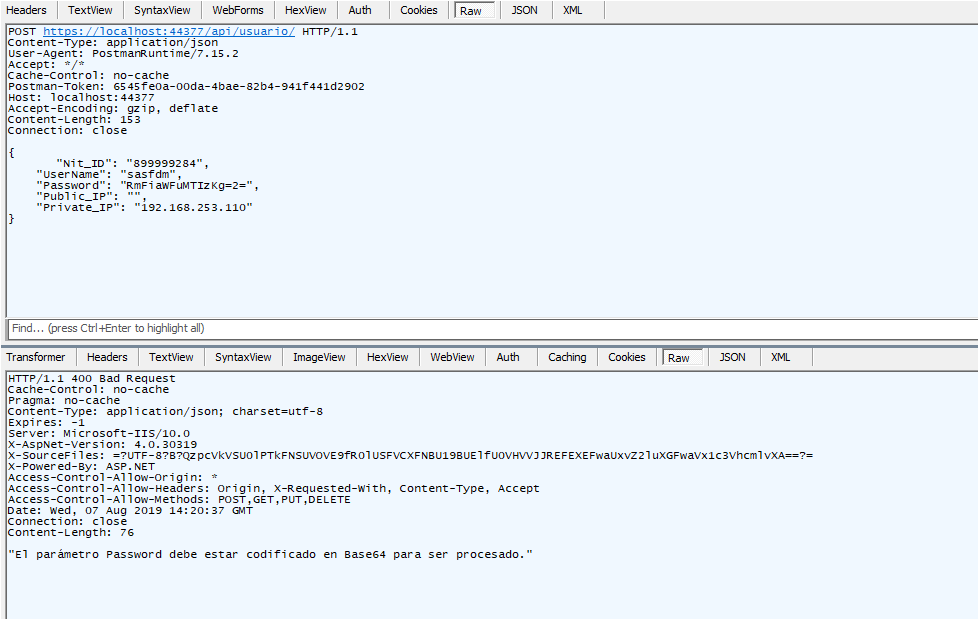
*前线:
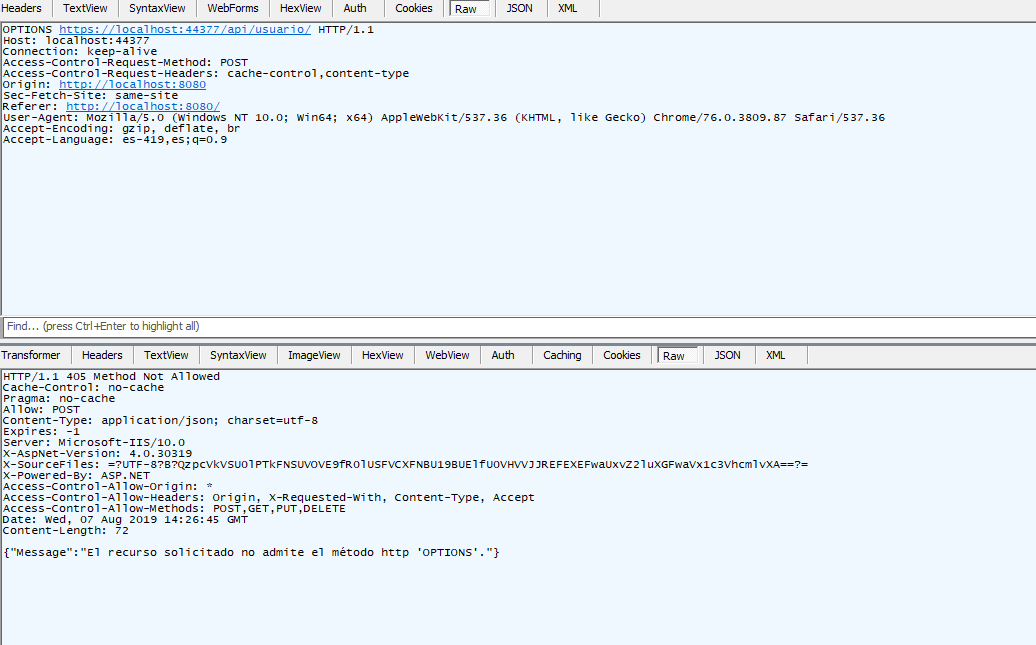
有趣的是,当我从web.config中删除标题<add name =" Access-Control-Allow-Origin "value =" * "/>时,邮递员继续在没有问题的情况下提出请求,但是我不能从我的前面发出任何请求,直到我再次放置它,但是失败仍然存在于帖子请求中。
来自谷歌Chrome控制台的卷曲:
CMD:
curl "https://localhost:44377/api/usuario/" -H "Accept: application/json, text/plain, */*" -H "cache-control: no-cache" -H "DNT: 1" -H "Referer: http://localhost:8080/" -H "User-Agent: Mozilla/5.0 (Windows NT 10.0; Win64; x64) AppleWebKit/537.36 (KHTML, like Gecko) Chrome/76.0.3809.87 Safari/537.36" -H "Sec-Fetch-Mode: cors" -H "Content-Type: application/json" --data-binary "^{^\^"Nit_ID^\^":^\^"899999284^\^",^\^"UserName^\^":^\^"sasfdm^\^",^\^"Password^\^":^\^"NDU0NjU0NjU0^\^",^\^"Public_IP^\^":^\^"181.49.144.244^\^",^\^"Private_IP^\^":^\^"192.168.253.102^\^"^}" --compressed·巴什:
curl 'https://localhost:44377/api/usuario/' -H 'Accept: application/json, text/plain, */*' -H 'cache-control: no-cache' -H 'DNT: 1' -H 'Referer: http://localhost:8080/' -H 'User-Agent: Mozilla/5.0 (Windows NT 10.0; Win64; x64) AppleWebKit/537.36 (KHTML, like Gecko) Chrome/76.0.3809.87 Safari/537.36' -H 'Sec-Fetch-Mode: cors' -H 'Content-Type: application/json' --data-binary '{"Nit_ID":"899999284","UserName":"sasfdm","Password":"NDU0NjU0NjU0","Public_IP":"181.49.144.244","Private_IP":"192.168.253.102"}' --compressedCMD:所有人:
curl "https://localhost:44377/api/usuario/1032494911" -H "Accept: application/json, text/plain, */*" -H "Referer: http://localhost:8080/" -H "DNT: 1" -H "User-Agent: Mozilla/5.0 (Windows NT 10.0; Win64; x64) AppleWebKit/537.36 (KHTML, like Gecko) Chrome/76.0.3809.87 Safari/537.36" -H "Sec-Fetch-Mode: cors" --compressed &
curl "https://localhost:44377/api/usuario/tipodocumento/899999284/1032494911" -H "Accept: application/json, text/plain, */*" -H "Referer: http://localhost:8080/" -H "DNT: 1" -H "User-Agent: Mozilla/5.0 (Windows NT 10.0; Win64; x64) AppleWebKit/537.36 (KHTML, like Gecko) Chrome/76.0.3809.87 Safari/537.36" -H "Sec-Fetch-Mode: cors" --compressed &
curl "https://localhost:44377/api/usuario/" -H "Accept: application/json, text/plain, */*" -H "cache-control: no-cache" -H "DNT: 1" -H "Referer: http://localhost:8080/" -H "User-Agent: Mozilla/5.0 (Windows NT 10.0; Win64; x64) AppleWebKit/537.36 (KHTML, like Gecko) Chrome/76.0.3809.87 Safari/537.36" -H "Sec-Fetch-Mode: cors" -H "Content-Type: application/json" --data-binary "^{^\^"Nit_ID^\^":^\^"899999284^\^",^\^"UserName^\^":^\^"sasfdm^\^",^\^"Password^\^":^\^"MTIzNDU2Nzg5^\^",^\^"Public_IP^\^":^\^"181.49.144.244^\^",^\^"Private_IP^\^":^\^"192.168.253.102^\^"^}" --compressed
*打击所有人:
curl 'https://localhost:44377/api/usuario/1032494911' -H 'Accept: application/json, text/plain, */*' -H 'Referer: http://localhost:8080/' -H 'DNT: 1' -H 'User-Agent: Mozilla/5.0 (Windows NT 10.0; Win64; x64) AppleWebKit/537.36 (KHTML, like Gecko) Chrome/76.0.3809.87 Safari/537.36' -H 'Sec-Fetch-Mode: cors' --compressed ;
curl 'https://localhost:44377/api/usuario/tipodocumento/899999284/1032494911' -H 'Accept: application/json, text/plain, */*' -H 'Referer: http://localhost:8080/' -H 'DNT: 1' -H 'User-Agent: Mozilla/5.0 (Windows NT 10.0; Win64; x64) AppleWebKit/537.36 (KHTML, like Gecko) Chrome/76.0.3809.87 Safari/537.36' -H 'Sec-Fetch-Mode: cors' --compressed ;
curl 'https://localhost:44377/api/usuario/' -H 'Accept: application/json, text/plain, */*' -H 'cache-control: no-cache' -H 'DNT: 1' -H 'Referer: http://localhost:8080/' -H 'User-Agent: Mozilla/5.0 (Windows NT 10.0; Win64; x64) AppleWebKit/537.36 (KHTML, like Gecko) Chrome/76.0.3809.87 Safari/537.36' -H 'Sec-Fetch-Mode: cors' -H 'Content-Type: application/json' --data-binary '{"Nit_ID":"899999284","UserName":"sasfdm","Password":"MTIzNDU2Nzg5","Public_IP":"181.49.144.244","Private_IP":"192.168.253.102"}' --compressed错误在于如何正确地将数据发送到POST方法,因为如果创建了一个不允许数据的POST方法,那么它所消耗的是什么而没有问题,当它接收到参数时没有问题,那么如何正确地发送这些数据?使用Axios?的数据
当我不像[FromBody] InfoEntryValidateUserClass data那样在API中放置参数时,let resultApi = await axios.post (url);命令就能工作。
如果我将[FromBody] InfoEntryValidateUserClass data作为参数添加到API中,并使用JSON.stringify ({...})发送数据,则在发送的数据中接收null,但如果不使用它,则再次出现错误Access to XMLHttpRequest at 'https: // localhost: 44377 / api / user /' from origin 'http: // localhost: 8080' has been blocked by CORS policy。
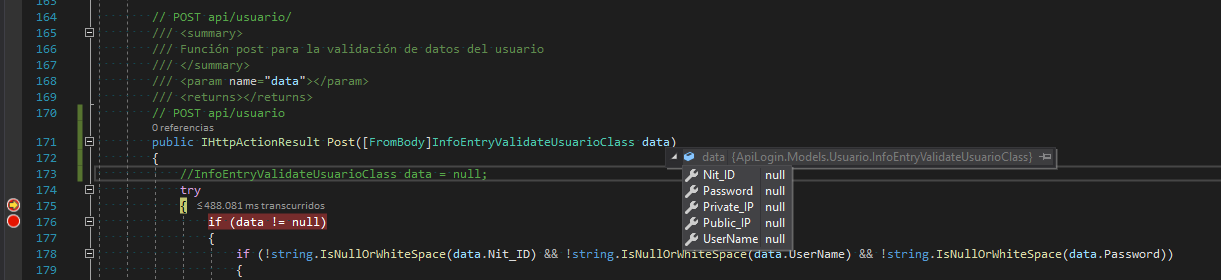
错误在于如何发送API正在等待的数据,我所引用的类如下:
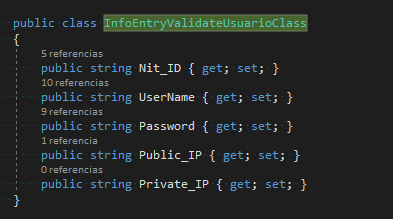
public class InfoEntryValidateUsuarioClass
    {
        public string Nit_ID { get; set; }
        public string UserName { get; set; }
        public string Password { get; set; }
        public string Public_IP { get; set; }
        public string Private_IP { get; set; }
    }
我发送的数据如下:
let data = JSON.stringify({
    Nit_ID: this.userInfo.nit_ID.ID,
    UserName: this.userInfo.userName.ID,
    Password: btoa(this.password),
    Public_IP: this.publicIP,
    Private_IP: this.localIP
});回答 1
Stack Overflow用户
发布于 2019-08-08 17:07:51
在验证了几件事情之后,在许多人的帮助下,在打开的聊天中,我们发现解决方案是直接在API中的web.config和CORS配置中实现的。
将以下内容添加到web.config中:
<system.webServer>
     <handlers>
          <remove name="ExtensionlessUrlHandler-Integrated-4.0" />
          <remove name="OPTIONSVerbHandler" />
          <remove name="TRACEVerbHandler" />
          <add name="ExtensionlessUrlHandler-Integrated-4.0" path="*." verb="*" type="System.Web.Handlers.TransferRequestHandler" preCondition="integratedMode,runtimeVersionv4.0" />
     </handlers>
        <httpProtocol>
          <customHeaders>
            <add name="Access-Control-Allow-Headers" value="Origin, X-Requested-With, Content-Type, Accept, Authorization" />
            <add name="Access-Control-Allow-Methods" value="POST,GET,OPTIONS,PUT,DELETE" />
          </customHeaders>
        </httpProtocol>
</system.webServer>并且在WebApiConfig.cs文件中添加了包
using System.Web.Http.Cors;为了增加CORS的安全性,放置在那里的是:
public static class WebApiConfig
    {
        public static void Register(HttpConfiguration config)
        {
            // Configuración y servicios de API web

            //Configuración para verificar la seguridad del CORS
            var corsAttr = new EnableCorsAttribute("*", "*", "*");
            config.EnableCors(corsAttr);

            // Rutas de API web
            config.MapHttpAttributeRoutes();

            config.Routes.MapHttpRoute(
                name: "DefaultApi",
                routeTemplate: "api/{controller}/{id}",
                defaults: new { id = RouteParameter.Optional }
            );
        }
    }
Axios应用程序的整个问题,无论是GET还是POST,都已经奏效了。
当我只需要在帖子中发送数据时,我就这样做了:
let data = {
    Nit_ID: this.userInfo.nit_ID.ID,
    UserName: this.userInfo.userName.ID,
    Password: btoa(this.password),
    Public_IP: this.publicIP,
    Private_IP: this.localIP
};
//Verificamos los datos del usuario
let resultApi = await axios.post(
     "https://localhost:44377/api/usuario",
     data
);
let result = resultApi.data;
为了用轴在标头中发送数据,我这样做了:
let data = {
    Nit_ID: this.userInfo.nit_ID.ID,
    UserName: this.userInfo.userName.ID,
    Code: this.verificationCode
};
console.log(localStorage.getItem("DoubleFactorToken"));
let headers = {
    Authorization: localStorage.getItem("DoubleFactorToken")
};
let resultApi = await axios.post(
     "https://localhost:44377/api/usuario/verifydoublefactorcode",
     data,
     { headers: headers }
);

console.log(resultApi.data);
非常感谢所有花时间合作的人。
https://stackoverflow.com/questions/57397250
复制相似问题
腾讯云开发者

Copyright © 2013 - 2026 Tencent Cloud. All Rights Reserved. 腾讯云 版权所有
深圳市腾讯计算机系统有限公司 ICP备案/许可证号:粤B2-20090059  粤公网安备44030502008569号
腾讯云计算(北京)有限责任公司 京ICP证150476号 | 京ICP备11018762号