
用户如何向QDoubleSpinBox输入无穷大值?
我试图在Python3.7中用QDoubleSpinBox设置一个PyQt5,它可以接受从-np.inf到np.inf的一系列值。我还希望用户将这些值设置为-np.inf或np.inf。我/用户将如何做到这一点?
在调整QDoubleSpinBox的最小值和最大值之后,可以在代码中设置值,并在显示框中显示"-inf“或"inf”。
from PyQt5.QtWidgets import QDoubleSpinBox

[...]

dsbTest = QDoubleSpinBox()

# first set the desired range
dsbTest.setRange(-np.inf, np.inf)

# set the value to positive infinity, successfully
dsbTest.setValue(np.inf)
但是,在将其更改为任何其他值(假设为5 )之后,我发现自己无法将"-inf“或"inf”返回到GUI中。
当我键入"i“或"inf”时,不接受输入,我的意思是,显示的当前值与5没有变化。
回答 2
Stack Overflow用户
发布于 2019-08-08 11:21:24
最后我就这样做了,做了一个子类。
class InftyDoubleSpinBox(QDoubleSpinBox):

    def __init__(self):
        super(QDoubleSpinBox, self).__init__()

        self.setMinimum(-np.inf)
        self.setMaximum(np.inf)

    def keyPressEvent(self, e: QtGui.QKeyEvent):

        if e.key() == QtCore.Qt.Key_Home:
            self.setValue(self.maximum())
        elif e.key() == QtCore.Qt.Key_End:
            self.setValue(self.minimum())
        else:
            super(QDoubleSpinBox, self).keyPressEvent(e)
我在开头设置最小和最大值为-np.inf,np.inf。在keyPressEvent中,将捕获主按钮和结束按钮,将值设置为最小或最大。
对于任何其他键,QDoubleSpinBox都会像往常一样响应,就像调用基函数一样。
这也适用于调用init()之后分配的其他min/max值。这对我的案子来说是可取的。
Stack Overflow用户
发布于 2022-02-23 02:40:33
float("inf")、float("INF")、float("Inf")、float("inF")或float("infinity")创建了一个float对象,该对象保存无穷大
float("-inf")、float("-INF")、float("-Inf")或float("-infinity")创建一个包含负无穷大的浮点对象。
我们可以将-infinity设置为最小值,将+infinity设置为最大值为QDoubleSpinBox
box = QDoubleSpinBox()
box.setMinimum(float("-inf"))
box.setMaximum(float("inf"))
来源:
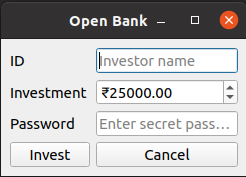
import sys

from PySide6.QtWidgets import QMainWindow, QApplication, QDoubleSpinBox, QWidget, QFormLayout, QLineEdit, QPushButton


def getDoubleSpinBox() -> QDoubleSpinBox:
    box = QDoubleSpinBox()
    box.setPrefix("₹")
    box.setMinimum(float("-inf"))
    box.setMaximum(float("inf"))
    box.setSingleStep(0.05)
    box.setValue(25_000)
    return box


def getLineEdit(placehoder: str, password: bool = False):
    lineEdit = QLineEdit()
    lineEdit.setPlaceholderText(placehoder)
    if password:
        lineEdit.setEchoMode(QLineEdit.Password)
    return lineEdit


class MainWindow(QMainWindow):
    def __init__(self):
        super().__init__()
        self.initUI()

    def initUI(self):
        self.setWindowTitle("Open Bank")
        self.widget = QWidget()
        self.widgetLayout = QFormLayout()
        self.widgetLayout.addRow("ID", getLineEdit(placehoder="Investor name"))
        self.widgetLayout.addRow("Investment", getDoubleSpinBox())
        self.widgetLayout.addRow("Password", getLineEdit(placehoder="Enter secret password", password=True))
        self.widgetLayout.addRow(QPushButton("Invest"), QPushButton("Cancel"))
        self.widget.setLayout(self.widgetLayout)
        self.setCentralWidget(self.widget)


if __name__ == "__main__":
    app = QApplication(sys.argv)
    win = MainWindow()
    win.show()
    sys.exit(app.exec())
窗口:
https://stackoverflow.com/questions/57395061
复制相似问题
腾讯云开发者

Copyright © 2013 - 2026 Tencent Cloud. All Rights Reserved. 腾讯云 版权所有
深圳市腾讯计算机系统有限公司 ICP备案/许可证号:粤B2-20090059  粤公网安备44030502008569号
腾讯云计算(北京)有限责任公司 京ICP证150476号 | 京ICP备11018762号