
Wamp64服务器的问题
因此,直到昨天的Windows,我才能顺利地运行Wamp64服务器。然而,今天它给出了一条“运行中的两个服务中的一个”消息。
调查表明,MySQL 8.0.14正在运行,但Apache2.4.23没有运行。
到目前为止,我尝试过的是:
- 重新启动计算机并重新启动Wamp
- 完全关闭计算机并重新启动Wamp
- 点击Wamp菜单中的“开始/恢复服务”
- 点击Wamp菜单中的“安装服务”(然后启动/恢复服务)
- 点击Wamp菜单中的“卸载服务”和“安装服务”(然后启动/恢复服务)
- 做这两件事并重新启动
- 研究Apache错误日志:
[Fri Aug 02 18:30:25.703267 2019] [core:warn] [pid 1376:tid 620] AH00098: pid file D:/wamp64/bin/apache/apache2.4.23/logs/httpd.pid overwritten -- Unclean shutdown of previous Apache run?
[Fri Aug 02 18:30:25.711267 2019] [auth_digest:notice] [pid 1376:tid 620] AH01757: generating secret for digest authentication ...- 在此之前在日志中进行调查:
[Thu Aug 01 18:33:16.532470 2019] [mpm_winnt:notice] [pid 22072:tid 660] AH00422: Parent: Received shutdown signal -- Shutting down the server.
[Thu Aug 01 18:33:18.849146 2019] [mpm_winnt:notice] [pid 28536:tid 588] AH00364: Child: All worker threads have exited.
[Thu Aug 01 18:33:24.784874 2019] [mpm_winnt:notice] [pid 22072:tid 660] AH00430: Parent: Child process 28536 exited successfully.- 谷歌搜索这些错误,看看我是否能找到任何东西(不幸的是,相对不成功)
- 禁用Skype (释放端口80)并重新执行上面的大部分内容
- 从管理命令行运行以下命令:
apacha2.4.23\bin\httpd.exe -k install
apacha2.4.23\bin\httpd.exe -k start
apacha2.4.23\bin\httpd.exe -k wampapache64 -k start
apacha2.4.23\bin\httpd.exe -e warn
这无疑启动了服务,但随后立即给出了错误,即没有正确关闭。
任何建议都会非常感谢,我有一个大型的本地wiki安装通过Wamp,我真的不想失去它的访问。
其他信息
- Wamp64
- Wampserver 3.1.7
- phpMyAdmin 4.8.4
- MySQL 8.0.14
- Apache 2.4.23
- 系统
- 操作系统: Microsoft 10主页
- 版本: 10.0.18362构建18362
- 系统类型: x64
- 可用物理内存: 11.2 GB
- 磁盘上可用的空间:19.3GB( C:),115 GB ( D:,安装Wamp的地方)
谢谢!
编辑1:
正如所建议的,这是问题开始的当天的错误信息:
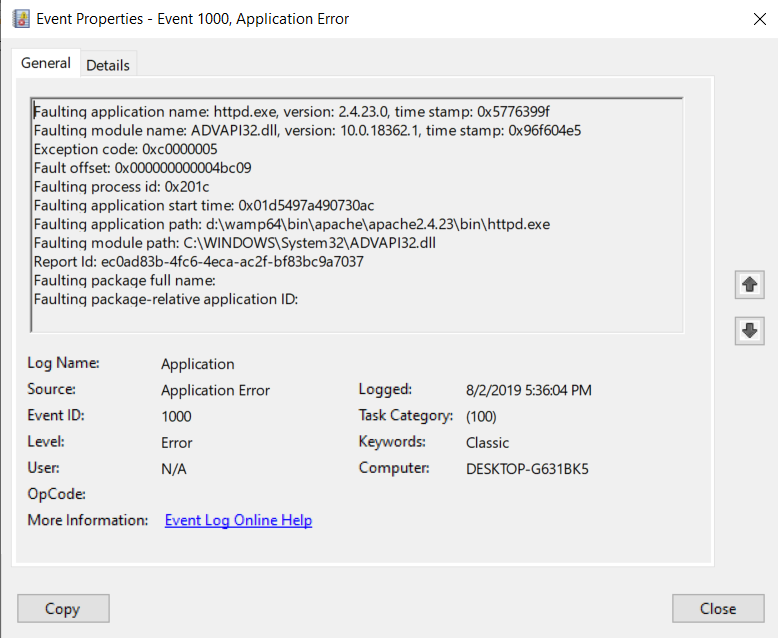
从今天起,还有一个:
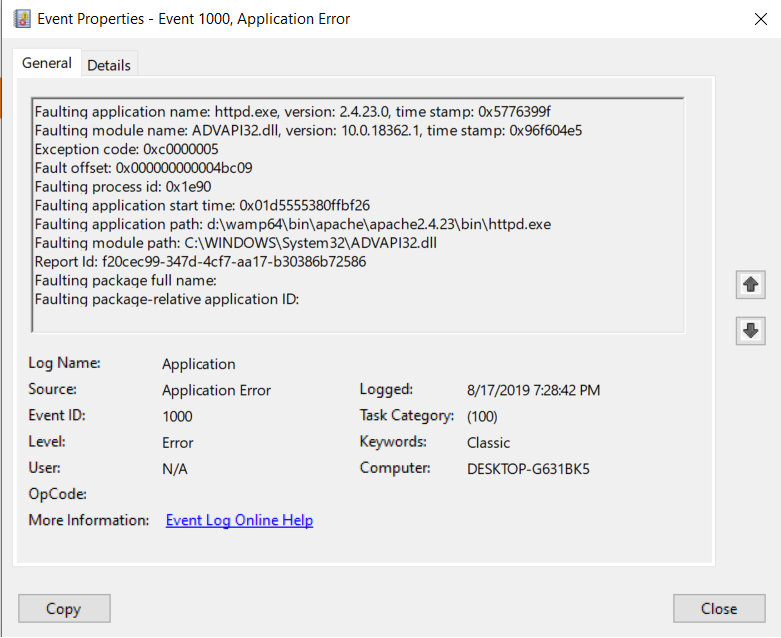
编辑2:
因此,关于下面的一个很好的答案,我做了以下工作(不幸的是,我仍然注意到这是有效的,但这似乎是一种进步):
我运行了以下操作,没有任何错误:
.\wamp64\bin\apache\apache2.4.23\bin\httpd.exe -k wampapache64 -k start
.\wamp64\bin\apache\apacha2.4.23\bin\httpd.exe -e warn
接下来我跑了:
.\wamp64\bin\apache\apache2.4.23\bin\httpd.exe -k stop
The 'Apache2.4' service is not started.

.\wamp64\bin\apache\apache2.4.23\bin\httpd.exe -k uninstall
Removing the 'Apache2.4' service
The 'Apache2.4' service has been removed successfully.
然后我重新启动我的电脑。
在此之后,我从Checks VC++ packages installed下载了http://wampserver.aviatechno.net/#vcpackages文件(check_vcredist)。运行它注意到,VisualC++ 2015-2019 x86最低运行时- 14.22.27821和VisualC++ 2015-2019 x64最低运行时- 14.22.27821没有安装,所以我从相同的URL (VC 2015-2019 (VC16 x86) 14.22.27821和VC 2015-2019 (VC16 x64) 12.22.22.27821)安装它们。
然后,我重新启动我的PC并运行WAMP64,不幸的是,这仍然导致了一个1 of 2 services running错误。
但是,在日志文件(apache_error.log)中仍然有一个类似的错误:
Starting the 'Apache2.4' service
The 'Apache2.4' service is running.
ore:warn] [pid 12936:tid 548] AH00098: pid file D:/wamp64/bin/apache/apache2.4.23/logs/httpd.pid overwritten -- Unclean shutdown of previous Apache run?
[Thu Aug 22 14:47:59.335006 2019] [auth_digest:notice] [pid 12936:tid 548] AH01757: generating secret for digest authentication ...
[Thu Aug 22 14:48:34.000409 2019] [core:warn] [pid 31212:tid 584] AH00098: pid file D:/wamp64/bin/apache/apache2.4.23/logs/httpd.pid overwritten -- Unclean shutdown of previous Apache run?
编辑3:
现在我得到了以下信息:
.\wamp64\bin\apache\apache2.4.23\bin\httpd.exe -k wampapache64 -k start
[Thu Aug 22 15:13:02.139389 2019] [mpm_winnt:error] [pid 6824:tid 484] (OS 2)The system cannot find the file specified.  : AH00436: No installed service named "Apache2.4".
.\wamp64\bin\apache\apache2.4.23\bin\httpd.exe -k wampapache64 -k start
[Thu Aug 22 15:13:28.453760 2019] [mpm_winnt:error] [pid 1348:tid 488] (OS 2)The system cannot find the file specified.  : AH00436: No installed service named "Apache2.4".
.\wamp64\bin\apache\apache2.4.23\bin\httpd.exe -k stop
[Thu Aug 22 15:13:40.899096 2019] [mpm_winnt:error] [pid 11400:tid 164] (OS 2)The system cannot find the file specified.  : AH00436: No installed service named "Apache2.4".
.\wamp64\bin\apache\apache2.4.23\bin\httpd.exe -k uninstall
[Thu Aug 22 15:14:13.829391 2019] [mpm_winnt:error] [pid 13820:tid 468] (OS 2)The system cannot find the file specified. : AH00436: No installed service named "Apache2.4".回答 3
Stack Overflow用户
发布于 2019-08-19 09:08:05
好的,你应该做的第一件事是放慢速度,找出一个问题,然后再用散弹枪修复它。
不确定您按照什么顺序执行操作,但是当您执行以下命令时
apacha2.4.23\bin\httpd.exe -k install
apacha2.4.23\bin\httpd.exe -k start
apacha2.4.23\bin\httpd.exe -k wampapache64 -k start
apacha2.4.23\bin\httpd.exe -e warn
你肯定开始混淆这个问题了。
这条线
apacha2.4.23\bin\httpd.exe -k install将Apache安装为服务,但使用服务名"Apache2.4“,换句话说,您现在将安装2个Apache服务。一个名为"Apache2.4“,另一个名为"wampapache64”<- -这个名为WAMPServer的正确名称。
这样做的另一个问题是,新服务"Apache2.4“将与"Autostart”属性集一起安装,因此它将在每个引导过程中自动启动。因此,自从您这样做之后,当您尝试启动WAMPServer时,这个版本的Apache就已经在运行了,当然您不能同时使用端口80来保存2服务,所以WAMPServers版本的Apache (wampapache64)将无法启动。--这可能解释了“运行两个服务中的一个”的情况
这条线
apacha2.4.23\bin\httpd.exe -k start将启动新的"Apache2.4“服务。
这两条线
apacha2.4.23\bin\httpd.exe -k wampapache64 -k start
apacha2.4.23\bin\httpd.exe -e warn
应该产生错误吗?
因此,为了回到正确的WAMPServer设置,您应该停止并删除"Apache2.4“服务,如下所示
wamp64\bin\apache\apacha2.4.23\bin\httpd.exe -k stop
wamp64\bin\apache\apacha2.4.23\bin\httpd.exe -k uninstall
注意:所有这些功能都是由
wampmanager菜单执行的left click wampmanager -> Apache -> Service Manager -> Remove Serviceleft click wampmanager -> Apache -> Service Manager -> Install Service最好是坚持单独使用这些。
现在重新启动电脑,只是为了确定!然后尝试启动WAMPServer。现在查看\wamp64\logs文件夹中的"apache_error.log“,并启动事件查看器并查看该事件查看器,看看WAMPServer版本的Apache生成了哪些错误。
如果您报告了任何错误,我们可以开始调试Windows之后实际发生的情况。
在这些情况下,检查是否安装了所有MSVC运行时库总是一个好主意。我不知道为什么Windows升级会删除其中的任何一个,但让我们首先检查它们。 因此,请下载“检查已安装的VC++包”实用工具,如果您以前已经下载了这个工具,可以在WAMPServer备份回购底部找到它,再下载一次,它会随着新的MSVC运行时的发布而改变,所以获得最新的最佳版本总是更好。
Stack Overflow用户
发布于 2021-11-16 04:43:06
意外地单击了PHP7.2“之前Apache运行的不干净关闭?”
单击WAMP -> PHP ->版本-> 7.3
被启动了。PHP7.3模块不能返回到7.2并导致Apache死亡。
Stack Overflow用户
发布于 2019-10-18 20:06:41
这是最奇怪的事,我不建议你这样做.但这件事起作用了。
我复制了整个WAMP文件夹。然后我卸载到原来的文件夹中。然后我复制了所有的MySQL 8.0.14内容,重新安装了MySQL 8.0.14。还有..。啊,真灵。我只需要切换到WAMP菜单中的8.0.14服务,它马上就取消了。
我不知道为什么这样做,也不知道它是如何工作的,但它做到了,第二次,我立即SQL抛出了我的完整数据库,我正在迁移到一个不同的,非WAMP平台。我非常抱歉,我不能提供具体的发生情况。但是,我接受RiggsFolly的回答,因为我认为他的建议在大多数情况下都是可行的。
https://stackoverflow.com/questions/57334161
复制相似问题
腾讯云开发者

Copyright © 2013 - 2026 Tencent Cloud. All Rights Reserved. 腾讯云 版权所有
深圳市腾讯计算机系统有限公司 ICP备案/许可证号:粤B2-20090059  粤公网安备44030502008569号
腾讯云计算(北京)有限责任公司 京ICP证150476号 | 京ICP备11018762号