
Codenvy中命令的正确格式
Codenvy是一个IDE,当您工作的环境进入睡眠状态时,它会删除所有在gitignore中的文件。所以每次我开始在Codenvy工作我都需要把这些文件放回去。这是一个麻烦,因此我试图为这个添加在Codenvy中称为命令(脚本)的内容。
我有以下几点:
1. cp vars-user-portal/variables.env user-portal/variables.env
2.
3. cp vars-user-portal/serviceAccountKey.json user-portal/serviceAccountKey.json
4.
5. cp vars-user-portal/.env user-portal/client/.env
6.
7. cd user-portal && npm install
8.
9. cd user-portal/client && npm install
10.
11. xdg-open user-portal/client/.env
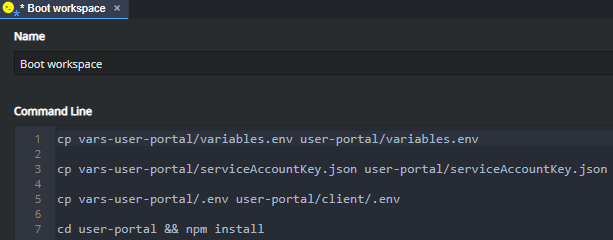
当我运行这个命令时,我得到了输出:
/bin/bash: line 1: $'\r': command not found
/bin/bash: line 3: $'\r': command not found
/bin/bash: line 5: $'\r': command not found

Usage: npm <command>
...
Did you mean one of these?
    install
    uninstall
    unstar

/bin/bash: line 7: $'\r': command not found

Usage: npm <command>
...

/bin/bash: line 9: $'\r': command not found
xdg-open: file '.env' does not exist
我的印象是,当一行中有空格时,它会将其视为单独的命令。你知道我怎么能让这个剧本起作用吗?
回答 1
Stack Overflow用户
发布于 2019-08-02 18:29:12
您的文件很可能有\r\n行结束,应该将其更改为\n行结束。
使用命令行sed实用工具转换文件的简单方法如下所示。
sed -i 's/\r\n/\n/g' "./path/to/file" (未检测)。
通常,Windows应用程序使用“回车”和“行提要”字符终止文本文件中的行,通常作为转义代码\r\n编写。
另一方面,类Unix的系统只使用行提要来终止行,或者以行结束作为新的行尾,而Unix只使用“line”字符\n。
请参阅:http://www.cs.toronto.edu/~krueger/csc209h/tut/line-endings.html
注意:
另外值得一提的是,如果脚本是可执行的,则应该始终将其添加到脚本的顶部,或者如果要单独来源,则不要添加一个。#!/bin/bash用于bash脚本,#!/bin/sh用于可移植或符合POSIX的脚本。
https://stackoverflow.com/questions/57331611
复制相似问题
腾讯云开发者

Copyright © 2013 - 2026 Tencent Cloud. All Rights Reserved. 腾讯云 版权所有
深圳市腾讯计算机系统有限公司 ICP备案/许可证号:粤B2-20090059  粤公网安备44030502008569号
腾讯云计算(北京)有限责任公司 京ICP证150476号 | 京ICP备11018762号