
如何破除最终形式的字段?
这是一个非常常见的查询,但我对新的final-form库有点困惑。我以前使用过redux-form,但是这个新版本太不一样了。
我的需求很简单,我想在用户写一些文本时分派一个搜索,但是我想在字段中添加一个throttle。
下面是使用lib react-final-form-listeners的第一次尝试,但正如您将看到的那样,当您在文本字段中写入时,该选项不起作用:/
https://codesandbox.io/embed/react-final-form-simple-example-khkof
回答 3
Stack Overflow用户
发布于 2019-08-03 06:16:50
首先,我鼓励您在不使用模糊包层的情况下完成所有这些工作。这将帮助您真正理解流,但是,当输入发生变化时,可以使用以下方法调用函数:
- 删除(用户停止输入500 for时只执行一次)
- 节流阀(然后分批执行每500)
- 正常(在每次输入更新时执行)
在本例中,我只是在render方法之外创建了一个已取消的函数。当使用类而不是钩子时,这种情况会有所不同:
钩子:
const handleSearch = debounce(searchText => { ... }, 500);类(或者您可以在constructor中删除类字段,或者工作):
class Example extends Component {
  handleSearch = debounce(searchText => { ... }, 500)

  render = () => { ... }
}工作示例(在打开代码框控制台时键入):

取消执行、节流执行和正常执行之间的区别:
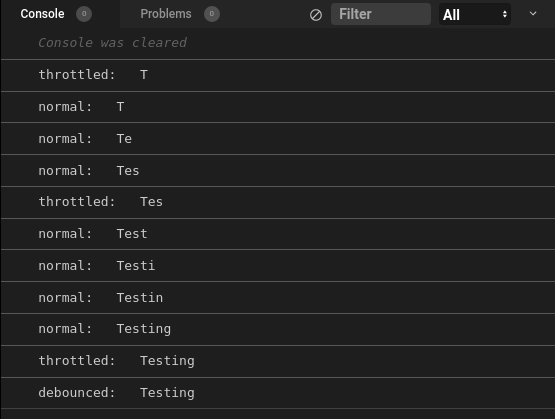
与上面一样,减去react-final-form和react-final-form-listeners (在项目中少了两个依赖项!):
工作示例(在打开代码框控制台时键入):
Stack Overflow用户
发布于 2020-03-19 08:07:18
您的解决方案有多个问题:
- 使用
debounce而不是throttle。 - 在表单之外创建已取消的函数,以防止其在每个重登或更改上重新分配。
- 调用表单提交操作,而不是提交处理程序
handleSubmit
修改并使用您的示例:
Stack Overflow用户
发布于 2022-01-10 18:32:14
这里有一个回忆录的脱节版本:
export default function DebouncedMemoizedField({
  milliseconds = 400,
  validate,
  ...props
}) {
  const timeout = useRef(null);
  const lastValue = useRef(null);
  const lastResult = useRef(null);

  const validateField = (value, values, meta) => new Promise((resolve) => {
    if (timeout.current) {
      timeout.current();
    }

    if (value !== lastValue.current) {
      const timerId = setTimeout(() => {
        lastValue.current = value;
        lastResult.current = validate(value, values, meta);
        resolve(lastResult.current);
      }, milliseconds);

      timeout.current = () => {
        clearTimeout(timerId);
        resolve(true);
      };
    } else {
      resolve(lastResult.current);
    }
  });

  return <Field validate={validateField} {...props} />;
}
用法:
<MemoizedDebouncedValidationField
  name="username"
  validate={(value) => (value === 'jim' ? 'Username exists' : undefined)}
  render={({ input, meta }) => (
    <>
      <input {...input} />
      {(meta.touched && meta.error) && <p>Error</p>}
    </>
  )}
/>https://stackoverflow.com/questions/57329357
复制相似问题
腾讯云开发者

Copyright © 2013 - 2026 Tencent Cloud. All Rights Reserved. 腾讯云 版权所有
深圳市腾讯计算机系统有限公司 ICP备案/许可证号:粤B2-20090059  粤公网安备44030502008569号
腾讯云计算(北京)有限责任公司 京ICP证150476号 | 京ICP备11018762号