
PDFViewer SWIFT 4 Xcode 10.3
这是我的密码。我有一个文件"dreamGirls.pdf“
import UIKit
import PDFKit

var pdfView : PDFView!

    func createPDFViewer() {
        let path = Bundle.main.path(forResource: "dreamGirls", ofType: "pdf")
        let url = URL(fileURLWithPath: path!)
        let pdfDocument = PDFDocument(url:url)

        self.pdfView.document = pdfDocument
        self.pdfView.autoScales = true
        self.pdfView.displayMode = .singlePageContinuous
        self.pdfView.displayDirection = .vertical

        let width = self.view.frame.width
        let height = self.view.frame.height - 100
        self.pdfView.frame = CGRect(x: 0, y: 100, width: width, height: height)
        self.pdfView.backgroundColor = .red
        self.view.addSubview(self.pdfView)
    }
我还尝试了以下几点:
func createPDFViewer() {

    let fileToShow = Bundle.main.url(forResource: "dreamGirls", withExtension: "pdf")
    let documentToShow = PDFDocument(url: fileToShow!)

    self.pdfView.document = documentToShow
    self.pdfView.autoScales = true
    self.pdfView.displayMode = .singlePageContinuous
    self.pdfView.displayDirection = .vertical

    let width = self.view.frame.width
    let height = self.view.frame.height - 100
    self.pdfView.frame = CGRect(x: 0, y: 100, width: width, height: height)
    self.pdfView.backgroundColor = .red
    self.view.addSubview(self.pdfView)
}
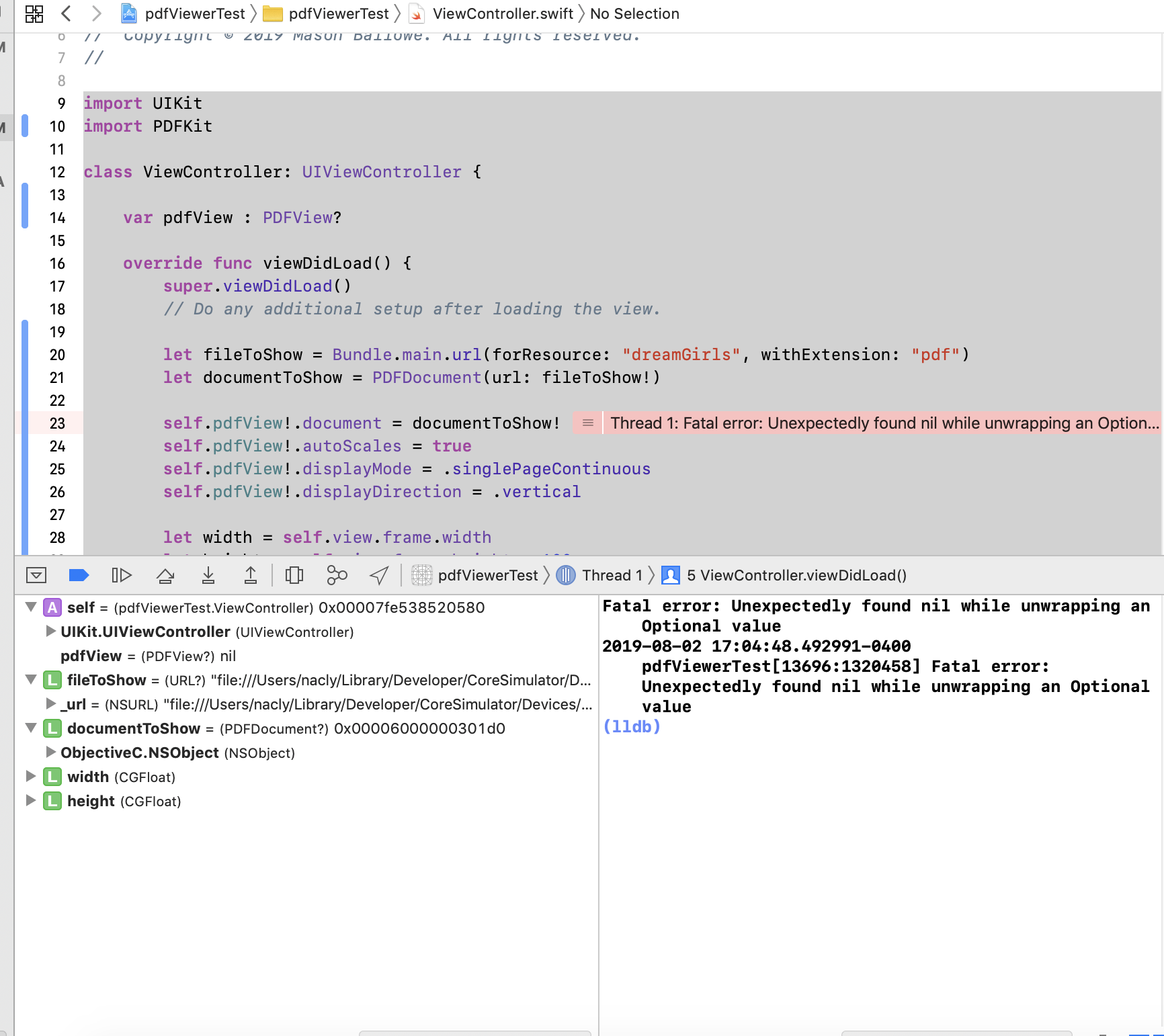
错误输出:致命错误:在隐式展开可选值时意外找到零
pdfView PDFView?无
我也试了一下,得到了同样的错误:
import UIKit
import PDFKit

class ViewController: UIViewController {

    var pdfView : PDFView?

    override func viewDidLoad() {
        super.viewDidLoad()
        // Do any additional setup after loading the view.

        let fileToShow = Bundle.main.url(forResource: "dreamGirls", withExtension: "pdf")
        let documentToShow = PDFDocument(url: fileToShow!)

        self.pdfView!.document = documentToShow!
        self.pdfView!.autoScales = true
        self.pdfView!.displayMode = .singlePageContinuous
        self.pdfView!.displayDirection = .vertical

        let width = self.view.frame.width
        let height = self.view.frame.height - 100
        self.pdfView!.frame = CGRect(x: 0, y: 100, width: width, height: height)
        self.pdfView!.backgroundColor = .red
        self.view.addSubview(self.pdfView!)


    }


}
自pdfViewerTest.ViewController 0x00007fe538520580 UIKit.UIViewController UIViewController
pdfView PDFView?无 fileToShow网址?"file:///Users/nacly/Library/Developer/CoreSimulator/Devices/C92B8B59-90C5-4509-A848-99D0B39A4469/data/Containers/Bundle/Application/7D0B63DF-F265-48DB-8887-D0563FD45FDA/pdfViewerTest.app/dreamGirls.pdf“"file:///Users/nacly/Library/Developer/CoreSimulator/Devices/C92B8B59-90C5-4509-A848-99D0B39A4469/data/Containers/Bundle/Application/7D0B63DF-F265-48DB-8887-D0563FD45FDA/pdfViewerTest.app/dreamGirls.pdf”0x0000600002638120 documentToShow PDFDocument? 0x000060000301d0 ObjectiveC.NSObject NSObject
宽度CGFloat高度CGFloat
我还尝试了以下方法,以防PDFView未被初始化:
import UIKit
import PDFKit

class ViewController: UIViewController {

    var pdfView : PDFView?

    override func viewDidLoad() {
        super.viewDidLoad()
        // Do any additional setup after loading the view.
        self.pdfView = PDFView()
        let fileToShow = Bundle.main.url(forResource: "dreamGirls", withExtension: "pdf")
        let documentToShow = PDFDocument(url: fileToShow!)

        self.pdfView!.document = documentToShow!
        self.pdfView!.autoScales = true
        self.pdfView!.displayMode = .singlePageContinuous
        self.pdfView!.displayDirection = .vertical

        let width = self.view.frame.width
        let height = self.view.frame.height - 100
        self.pdfView!.frame = CGRect(x: 0, y: 100, width: width, height: height)
        self.pdfView!.backgroundColor = .red
        self.view.addSubview(self.pdfView!)


    }
它返回以下错误:
pdfViewerTest16863:1994476 *终止应用程序,原因是:“CALayer位置包含NaN: nan”*第一次抛出调用堆栈:
回答 1
Stack Overflow用户
发布于 2019-08-05 19:33:18
好吧,我解决了。由于几何形状不好,我不得不在"viewDiDAppear“而不是"viewDiDLoad”中调用。
https://stackoverflow.com/questions/57295082
复制相似问题
腾讯云开发者

Copyright © 2013 - 2026 Tencent Cloud. All Rights Reserved. 腾讯云 版权所有
深圳市腾讯计算机系统有限公司 ICP备案/许可证号:粤B2-20090059  粤公网安备44030502008569号
腾讯云计算(北京)有限责任公司 京ICP证150476号 | 京ICP备11018762号