
图像下载和缓存问题
图像下载和缓存问题
提问于 2019-07-29 09:45:49
我正在从服务器下载图像并在collectionView中显示。我正在缓存图像,这样用户就可以得到快速的服务器响应,并且不会出现UI中的故障。在没有下载图像之前,我也添加了占位符图像。
但是在我的输出中,图像是在其他单元格中复制的,图像没有正确地在NSCache中缓存。
下面是代码
class ViewController: UIViewController, UICollectionViewDelegate, UICollectionViewDataSource, UICollectionViewDelegateFlowLayout {

    @IBOutlet weak var colView: UICollectionView!

    var imageCache = NSCache<NSString, UIImage>()
    var arrURLs = [
        "https://homepages.cae.wisc.edu/~ece533/images/airplane.png",
        "https://homepages.cae.wisc.edu/~ece533/images/arctichare.png",
        "https://homepages.cae.wisc.edu/~ece533/images/baboon.png",
        "https://homepages.cae.wisc.edu/~ece533/images/barbara.png",
        "https://homepages.cae.wisc.edu/~ece533/images/boat.png",
        "https://homepages.cae.wisc.edu/~ece533/images/cat.png",
        "https://homepages.cae.wisc.edu/~ece533/images/fruits.png",
        "https://homepages.cae.wisc.edu/~ece533/images/frymire.png",
        "https://homepages.cae.wisc.edu/~ece533/images/girl.png",
        "https://homepages.cae.wisc.edu/~ece533/images/goldhill.png",
        "https://homepages.cae.wisc.edu/~ece533/images/lena.png",
        "https://homepages.cae.wisc.edu/~ece533/images/monarch.png",
        "https://homepages.cae.wisc.edu/~ece533/images/mountain.png",
        "https://homepages.cae.wisc.edu/~ece533/images/peppers.png",
        "https://homepages.cae.wisc.edu/~ece533/images/pool.png",
        "https://homepages.cae.wisc.edu/~ece533/images/sails.png",
        "https://homepages.cae.wisc.edu/~ece533/images/serrano.png",
        "https://homepages.cae.wisc.edu/~ece533/images/tulips.png",
        "https://homepages.cae.wisc.edu/~ece533/images/watch.png",
        "https://homepages.cae.wisc.edu/~ece533/images/zelda.png"
    ]


func downloadImage(url: URL, imageView: UIImageView, placeholder : UIImage) {

    imageView.image = placeholder // Set default placeholder..

    // Image is set if cache is available
    if let cachedImage = imageCache.object(forKey: url.absoluteString as NSString) {
        imageView.image = cachedImage
    } else {
        // Reset the image to placeholder as the URLSession fetches the new image
        imageView.image = placeholder
        URLSession.shared.dataTask(with: url) { (data, response, error) in
            guard error == nil else  {
                // You should be giving an option to retry the image here
                imageView.image = placeholder
                return
            }

            if let respo  = response as? HTTPURLResponse {

                print("Status Code : ", respo.statusCode)

                if let imageData = data, let image = UIImage(data: imageData) {
                    self.imageCache.setObject(image, forKey: url.absoluteString as NSString)
                    // Update the imageview with new data
                    DispatchQueue.main.async {
                        imageView.image = image
                    }
                } else {
                    // You should be giving an option to retry the image here
                    imageView.image = placeholder
                }
            }
            }.resume()
    }
}


    func collectionView(_ collectionView: UICollectionView, layout collectionViewLayout: UICollectionViewLayout, sizeForItemAt indexPath: IndexPath) -> CGSize {
        let w = self.view.bounds.width - 30

        return CGSize(width: w, height: w + 60)
    }

    func collectionView(_ collectionView: UICollectionView, numberOfItemsInSection section: Int) -> Int {
        return arrURLs.count
    }

    func collectionView(_ collectionView: UICollectionView, cellForItemAt indexPath: IndexPath) -> UICollectionViewCell {
        let cell = collectionView.dequeueReusableCell(withReuseIdentifier: "DummyCollectionViewCell", for: indexPath) as! DummyCollectionViewCell

        let str = arrURLs[indexPath.item]
        let url = URL(string: str)

        downloadImage(url: url!) { (img) in
            DispatchQueue.main.async {
                cell.imgView.image = img ?? UIImage(named: "placeholder")
            }
        }

        return cell
    }
}
输出GIF
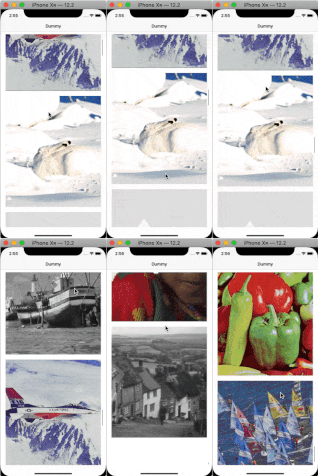
由于堆栈上的大小限制,上面的gif质量很低。如果您需要检查gif的全部大小,请参阅:https://imgur.com/tcjMWgc
回答 5
Stack Overflow用户
回答已采纳
发布于 2019-07-29 11:41:24
我认为问题在您的响应处理程序中,您正在为您请求的url设置缓存,而不是从响应中为url设置缓存,我稍微修改了您的代码,尝试,希望它能帮助您。
func downloadImage(url: URL, imageView: UIImageView, placeholder: UIImage? = nil, row: Int) {
    imageView.image = placeholder
    imageView.cacheUrl = url.absoluteString + "\(row)"
    if let cachedImage = imageCache.object(forKey: url.absoluteString as NSString) {
        imageView.image = cachedImage
    } else {
        URLSession.shared.dataTask(with: url) { (data, response, error) in
            guard
                let response = response as? HTTPURLResponse,
                let imageData = data,
                let image = UIImage(data: imageData),
                let cacheKey = response.url?.absoluteString,
                let index = self.arrURLs.firstIndex(of: cacheKey)
                else { return }
            DispatchQueue.main.async {
                if cacheKey + "\(index)" != imageView.cacheUrl { return }
                imageView.image = image
                self.imageCache.setObject(image, forKey: cacheKey as NSString)
            }
            }.resume()
    }
}
和
var associateObjectValue: Int = 0
extension UIImageView {

    fileprivate var cacheUrl: String? {
        get {
            return objc_getAssociatedObject(self, &associateObjectValue) as? String
        }
        set {
            return objc_setAssociatedObject(self, &associateObjectValue, newValue, objc_AssociationPolicy.OBJC_ASSOCIATION_RETAIN)
        }
    }
}
更新:
Stack Overflow用户
发布于 2019-07-30 09:44:33
USE THIS IMAGE LOADER EXTENSION

let imageCache = NSCache<AnyObject, AnyObject>()

class ImageLoader: UIImageView {

    var imageURL: URL?

    let activityIndicator = UIActivityIndicatorView()

    func loadImageWithUrl(_ url: URL) {

        // setup activityIndicator...
        activityIndicator.color = .darkGray

        addSubview(activityIndicator)
        activityIndicator.translatesAutoresizingMaskIntoConstraints = false
        activityIndicator.centerXAnchor.constraint(equalTo: centerXAnchor).isActive = true
        activityIndicator.centerYAnchor.constraint(equalTo: centerYAnchor).isActive = true

        imageURL = url

        image = nil
        activityIndicator.startAnimating()

        // retrieves image if already available in cache
        if let imageFromCache = imageCache.object(forKey: url as AnyObject) as? UIImage {

            self.image = imageFromCache
            activityIndicator.stopAnimating()
            return
        }

        // image does not available in cache.. so retrieving it from url...
        URLSession.shared.dataTask(with: url, completionHandler: { (data, response, error) in

            if error != nil {
                print(error as Any)
                self.activityIndicator.stopAnimating()
                return
            }

            DispatchQueue.main.async(execute: {

                if let unwrappedData = data, let imageToCache = UIImage(data: unwrappedData) {

                    if self.imageURL == url {
                        self.image = imageToCache
                    }

                    imageCache.setObject(imageToCache, forKey: url as AnyObject)
                }
                self.activityIndicator.stopAnimating()
            })
        }).resume()
    }
}

            ** design controller  **

                 import UIKit

                class ImageController: UIViewController, UICollectionViewDelegate, UICollectionViewDataSource, UICollectionViewDelegateFlowLayout {

            private let cellId = "cellId"

                lazy var imagesSliderCV: UICollectionView = {

                    let layout = UICollectionViewFlowLayout()
                    layout.scrollDirection = .vertical
                    let cv = UICollectionView(frame: .zero, collectionViewLayout: layout)
                    cv.translatesAutoresizingMaskIntoConstraints = false
                    cv.backgroundColor = .white
                    cv.showsHorizontalScrollIndicator = false
                    cv.delegate = self
                    cv.dataSource = self
                    cv.isPagingEnabled = true
                    cv.register(ImageSliderCell.self, forCellWithReuseIdentifier: self.cellId)
                    return cv
                }()

             //
                // Mark:- CollectionView Methods........
                //
                var arrURLs = [
                    "https://homepages.cae.wisc.edu/~ece533/images/airplane.png",
                    "https://homepages.cae.wisc.edu/~ece533/images/arctichare.png",
                    "https://homepages.cae.wisc.edu/~ece533/images/baboon.png",
                    "https://homepages.cae.wisc.edu/~ece533/images/barbara.png",
                    "https://homepages.cae.wisc.edu/~ece533/images/boat.png",
                    "https://homepages.cae.wisc.edu/~ece533/images/cat.png",
                    "https://homepages.cae.wisc.edu/~ece533/images/fruits.png",
                    "https://homepages.cae.wisc.edu/~ece533/images/frymire.png",
                    "https://homepages.cae.wisc.edu/~ece533/images/girl.png",
                    "https://homepages.cae.wisc.edu/~ece533/images/goldhill.png",
                    "https://homepages.cae.wisc.edu/~ece533/images/lena.png",
                    "https://homepages.cae.wisc.edu/~ece533/images/monarch.png",
                    "https://homepages.cae.wisc.edu/~ece533/images/mountain.png",
                    "https://homepages.cae.wisc.edu/~ece533/images/peppers.png",
                    "https://homepages.cae.wisc.edu/~ece533/images/pool.png",
                    "https://homepages.cae.wisc.edu/~ece533/images/sails.png",
                    "https://homepages.cae.wisc.edu/~ece533/images/serrano.png",
                    "https://homepages.cae.wisc.edu/~ece533/images/tulips.png",
                    "https://homepages.cae.wisc.edu/~ece533/images/watch.png",
                    "https://homepages.cae.wisc.edu/~ece533/images/zelda.png"
                ]

                func collectionView(_ collectionView: UICollectionView, numberOfItemsInSection section: Int) -> Int {

                    return arrURLs.count
                }

                func collectionView(_ collectionView: UICollectionView, cellForItemAt indexPath: IndexPath) -> UICollectionViewCell {

                    let cell = collectionView.dequeueReusableCell(withReuseIdentifier: cellId, for: indexPath) as! ImageSliderCell


                    let ImagePath = arrURLs[indexPath.item]
                       if  let strUrl = ImagePath.addingPercentEncoding(withAllowedCharacters: .urlFragmentAllowed),
                        let imgUrl = URL(string: strUrl) {

                        cell.frontImg.loadImageWithUrl(imgUrl)
                    }
                    return cell
                }

                func collectionView(_ collectionView: UICollectionView, layout collectionViewLayout: UICollectionViewLayout, sizeForItemAt indexPath: IndexPath) -> CGSize {

                    return CGSize(width: screenWidth, height: 288)
                }

                func collectionView(_ collectionView: UICollectionView, layout collectionViewLayout: UICollectionViewLayout, minimumLineSpacingForSectionAt section: Int) -> CGFloat {

                    return 0
                }


        func setupAutoLayout(){

                NSLayoutConstraint.activate([

                    imagesSliderCV.leftAnchor.constraint(equalTo: view.leftAnchor),
                    imagesSliderCV.rightAnchor.constraint(equalTo: view.rightAnchor),
                    imagesSliderCV.topAnchor.constraint(equalTo: view.topAnchor),
                    imagesSliderCV.bottomAnchor.constraint(equalTo: view.bottomAnchor),

                    ])

            }
        }

    **collectionView cell **

    import UIKit

    class ImageSliderCell: UICollectionViewCell {

        //
        let frontImg: ImageLoader = {

            let img = ImageLoader()
            img.translatesAutoresizingMaskIntoConstraints = false
            img.contentMode = .scaleAspectFill
            img.clipsToBounds = true
            return img
        }()

        //
        override init(frame: CGRect) {
            super.init(frame: frame)

            addSubview(frontImg)
            setupAutolayout()
        }

        func setupAutolayout(){

            frontImg.leftAnchor.constraint(equalTo: leftAnchor, constant: 8).isActive = true
            frontImg.rightAnchor.constraint(equalTo: rightAnchor, constant: -8).isActive = true
            frontImg.topAnchor.constraint(equalTo: topAnchor, constant: 8).isActive = true
            frontImg.bottomAnchor.constraint(equalTo: bottomAnchor, constant: -8).isActive = true
        }

        required init?(coder aDecoder: NSCoder) {
            fatalError("init(coder:) has not been implemented")
        }
    }
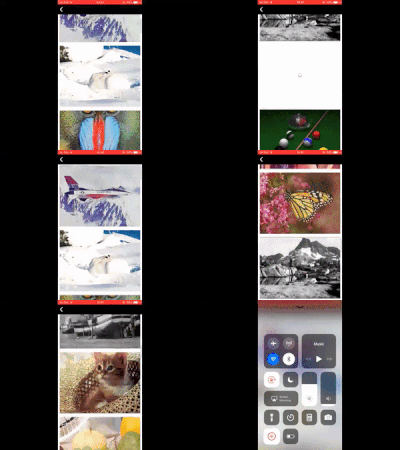
产出:-
Stack Overflow用户
发布于 2019-07-29 10:00:46
那是因为细胞是可重用的。
上单元格被重用,但是单元格没有更新图像,因为单元格的图像已经设置好了。
您应该扩展UIImage以更新单元格的图像
就像这样:
扩展UIImageView {
func loadImageNone(_ urlString: String) {

    if let cacheImage = imageCache.object(forKey: urlString as NSString) {
        self.run(with: cacheImage)
        return
    } else {
        URLSession.shared.dataTask(with: url) { (data, response, error) in
            guard error == nil else  {
                completion(nil)
                return
            }

            if let respo  = response as? HTTPURLResponse {
                if let imageData = data, let image = UIImage(data: imageData) {

                  imageCache.setObject(image, forKey: urlString as NSString)

                  DispatchQueue.main.async {
                         self.image = image
                  }
                }
            }
        }.resume()
   }

func run(with image: UIImage) {
    UIView.transition(with: self,
                      duration: 0.5,
                      options: [],
                      animations: { self.image = image },
                      completion: nil)
     }
}页面原文内容由Stack Overflow提供。腾讯云小微IT领域专用引擎提供翻译支持
原文链接:
https://stackoverflow.com/questions/57251174
复制相关文章
相似问题
腾讯云开发者

Copyright © 2013 - 2026 Tencent Cloud. All Rights Reserved. 腾讯云 版权所有
深圳市腾讯计算机系统有限公司 ICP备案/许可证号:粤B2-20090059  粤公网安备44030502008569号
腾讯云计算(北京)有限责任公司 京ICP证150476号 | 京ICP备11018762号