
将MQTTnet与Azure IoT集线器连接起来
将MQTTnet与Azure IoT集线器连接起来
提问于 2019-07-24 09:34:46
我已经创建了一个传递信息的设备。现在,我想通过使用MQTTnet版本2.4.0将它们发送到一个Azure IoT集线器,因为.NET目标框架位于4.5版,而不是我决定更改的。
我的问题是:
- 有没有其他或更好的方法来做这件事?
- 我最喜欢吃什么MqttClientOption?
- 要将连接到集线器的值设置为哪些参数
我尝试了ClientId/用户名/密码的几乎每一个值的组合,如下所述:https://learn.microsoft.com/en-us/azure/iot-hub/iot-hub-mqtt-support#using-the-mqtt-protocol-directly-as-a-device
但他们都不是为我工作的
我在项目之外尝试过,并在当前的框架上构建了一个类似的设备,它与较新版本的MQTTnet完美地工作在一起。
遗憾的是,在大约10秒之后,我没有收到任何错误消息,只有一个MqttCommunicationTimedOutException。
谢谢你的帮助,我在这个问题上已经困了将近一个星期了。
回答 1
Stack Overflow用户
回答已采纳
发布于 2019-07-26 07:06:55
下面的代码片段是一个模拟device1的工作示例,它使用MQTT协议通过MQTTnet版本2.4.0库直接访问Azure IoT集线器:
using MQTTnet;
using MQTTnet.Core;
using MQTTnet.Core.Client;
using MQTTnet.Core.Packets;
using MQTTnet.Core.Protocol;
using System;
using System.Text;

namespace ConsoleApp1
{
    class Program
    {
        static void Main(string[] args)
        {
            var options = new MqttClientTcpOptions()
            {
                Server = "myIoTHub.azure-devices.net",
                Port = 8883,
                ClientId = "device1",
                UserName = "myIoTHub.azure-devices.net/device1/api-version=2018-06-30",
                Password = "SharedAccessSignature sr=myIoTHub.azure-devices.net%2Fdevices%2Fdevice1&sig=****&se=1592830262",
                ProtocolVersion = MQTTnet.Core.Serializer.MqttProtocolVersion.V311,
                TlsOptions = new MqttClientTlsOptions() { UseTls = true },
                CleanSession = true
            };

            var factory = new MqttClientFactory();
            var mqttClient = factory.CreateMqttClient();

            // handlers
            mqttClient.Connected += delegate (object sender, EventArgs e)
            {
                Console.WriteLine("Connected");
            };
            mqttClient.Disconnected += delegate (object sender, EventArgs e)
            {
                Console.WriteLine("Disconnected");
            };
            mqttClient.ApplicationMessageReceived += delegate (object sender, MqttApplicationMessageReceivedEventArgs e)
            {
                Console.WriteLine(Encoding.ASCII.GetString(e.ApplicationMessage.Payload));
            };

            mqttClient.ConnectAsync(options).Wait();

            // subscribe on the topics
            var topicFilters = new[] {
                new TopicFilter("devices/device1/messages/devicebound/#", MqttQualityOfServiceLevel.AtLeastOnce),
                new TopicFilter("$iothub/twin/PATCH/properties/desired/#", MqttQualityOfServiceLevel.AtLeastOnce),
                new TopicFilter("$iothub/methods/POST/#", MqttQualityOfServiceLevel.AtLeastOnce)
            };
            mqttClient.SubscribeAsync(topicFilters).Wait();


            // publish message
            var topic = $"devices/device1/messages/events/$.ct=application%2Fjson&$.ce=utf-8";
            var payload = Encoding.ASCII.GetBytes("Hello IoT Hub");
            var message = new MqttApplicationMessage(topic, payload, MqttQualityOfServiceLevel.AtLeastOnce, false);
            mqttClient.PublishAsync(message);

            Console.Read();
        }
    }
}
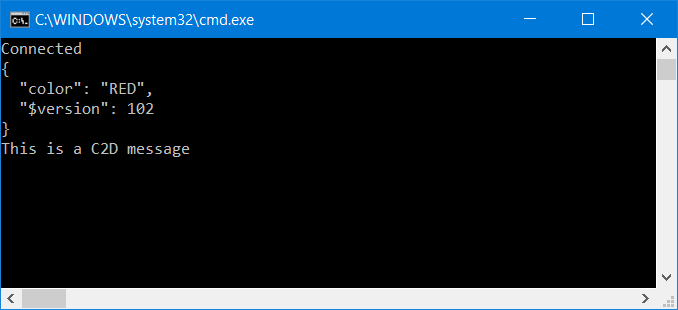
下面的屏幕片段显示了用于更新所需的孪生属性颜色和接收C2D消息的输出示例
页面原文内容由Stack Overflow提供。腾讯云小微IT领域专用引擎提供翻译支持
原文链接:
https://stackoverflow.com/questions/57179735
复制相关文章
相似问题
腾讯云开发者

Copyright © 2013 - 2026 Tencent Cloud. All Rights Reserved. 腾讯云 版权所有
深圳市腾讯计算机系统有限公司 ICP备案/许可证号:粤B2-20090059  粤公网安备44030502008569号
腾讯云计算(北京)有限责任公司 京ICP证150476号 | 京ICP备11018762号