
MySQL不是从XAMP和HeidiSQL开始的
我不能用XAMPP启动MySQL,也不会出现任何错误。因此,如果我单击" start ",就会得到消息"01:26:41 mysql试图启动MySQL服务.“,仅此而已。
问题可能是,因为我还安装了HeidiSQL,这是MariaDB附带的。我知道他们都使用相同的端口(3306),我试图将MariaDB端口更改为3308。
这是my.ini的内容。
[mysqld]
port= 3306
socket = "C:/xampp/mysql/mysql.sock"
basedir = "C:/xampp/mysql"
tmpdir = "C:/xampp/tmp"
datadir = "C:/xampp/mysql/data"
pid_file = "mysql.pid"
# enable-named-pipe
key_buffer = 16M
max_allowed_packet = 1M
table_cache = 64
sort_buffer_size = 512K
net_buffer_length = 8K
read_buffer_size = 256K
read_rnd_buffer_size = 512K
myisam_sort_buffer_size = 8M
log_error = "mysql_error.log"

datadir=C:/Program Files/MariaDB 10.3/data
port=3308
innodb_buffer_pool_size=2033M
character-set-server=utf8
[client]
port=3308
plugin-dir=C:/Program Files/MariaDB 10.3/lib/plugin
mysql_error.log
2019-07-24  1:18:11 0 [Note] InnoDB: Mutexes and rw_locks use Windows interlocked functions
2019-07-24  1:18:11 0 [Note] InnoDB: Uses event mutexes
2019-07-24  1:18:11 0 [Note] InnoDB: Compressed tables use zlib 1.2.11
2019-07-24  1:18:11 0 [Note] InnoDB: Number of pools: 1
2019-07-24  1:18:11 0 [Note] InnoDB: Using SSE2 crc32 instructions
2019-07-24  1:18:11 0 [Note] InnoDB: Initializing buffer pool, total size = 16M, instances = 1, chunk size = 16M
2019-07-24  1:18:11 0 [Note] InnoDB: Completed initialization of buffer pool
2019-07-24  1:18:11 0 [Note] InnoDB: Starting crash recovery from checkpoint LSN=1791378
2019-07-24  1:18:11 0 [Note] InnoDB: 128 out of 128 rollback segments are active.
2019-07-24  1:18:11 0 [Note] InnoDB: Removed temporary tablespace data file: "ibtmp1"
2019-07-24  1:18:11 0 [Note] InnoDB: Creating shared tablespace for temporary tables
2019-07-24  1:18:11 0 [Note] InnoDB: Setting file 'C:\xampp\mysql\data\ibtmp1' size to 12 MB. Physically writing the file full; Please wait ...
2019-07-24  1:18:11 0 [Note] InnoDB: File 'C:\xampp\mysql\data\ibtmp1' size is now 12 MB.
2019-07-24  1:18:11 0 [Note] InnoDB: Waiting for purge to start
2019-07-24  1:18:11 0 [Note] InnoDB: 10.3.16 started; log sequence number 1791387; transaction id 163
2019-07-24  1:18:11 0 [Note] InnoDB: Loading buffer pool(s) from C:\xampp\mysql\data\ib_buffer_pool
2019-07-24  1:18:11 0 [Note] InnoDB: Buffer pool(s) load completed at 190724  1:18:11
2019-07-24  1:18:11 0 [Note] Plugin 'FEEDBACK' is disabled.
2019-07-24  1:18:11 0 [Note] Server socket created on IP: '::'.
2019-07-24  1:18:11 0 [Note] Reading of all Master_info entries succeeded
2019-07-24  1:18:11 0 [Note] Added new Master_info '' to hash table
2019-07-24  1:18:11 0 [Note] mysql\bin\mysqld.exe: ready for connections.
Version: '10.3.16-MariaDB' socket: '' port: 3307 mariadb.org binary distribution我试过that questions的所有答案,但没有一个对我有用。
不仅仅是XAMPP,我甚至连HeidiSQL的连接都找不到。错误信息是:
无法连接到'127.0.0.1‘(10061)上的MySQL服务器
我已经卸载了它们,XAMPP和HeidiSQL,并再次安装了它们。即使这样也没什么用。任何帮助都将不胜感激!
回答 1
Stack Overflow用户
发布于 2019-07-24 17:21:47
HeidiSQL只需通过端口3306连接到您的MySQL实例,但是它不监听任何端口,因此它不会像您所说的那样使用任何端口。
因此,您的问题是未启动MySQL服务。
您的my.ini看起来好像已经有两个服务在运行:
- 一个来自C:\Program \MariaDB10.3\
- 一个来自C:\xampp\mysql\
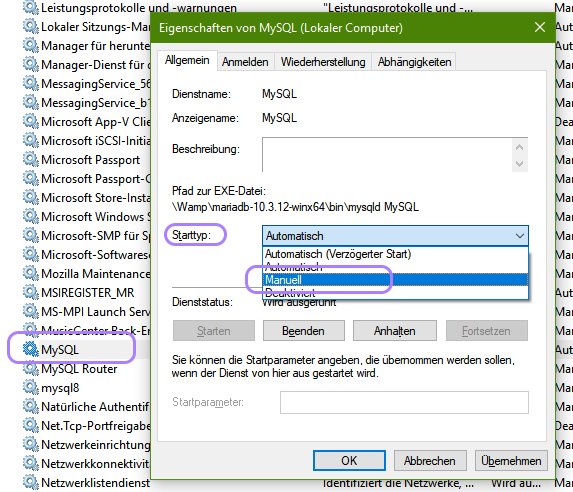
查看您的服务控制面板,例如从开始菜单中运行services.msc。然后,注意名为"MySQL“或"MariaDB”的服务,或者其中包含某个版本号的服务。
您的my.ini在[mysqld]部分中包含两个端口定义,这可能意味着您的Xamp/MySQL仍然需要端口3306,而忽略了后面的3308。如果您的MariaDB服务仍在运行,这将再次解释为什么您的服务没有启动。
不知道安装MariaDB的意图,我建议卸载它,或者至少将服务启动选项更改为manually
https://stackoverflow.com/questions/57173760
复制相似问题
腾讯云开发者

Copyright © 2013 - 2026 Tencent Cloud. All Rights Reserved. 腾讯云 版权所有
深圳市腾讯计算机系统有限公司 ICP备案/许可证号:粤B2-20090059  粤公网安备44030502008569号
腾讯云计算(北京)有限责任公司 京ICP证150476号 | 京ICP备11018762号