
Azure DevOps中的码头错误,但不是本地的?
我在试着运行这个文件:
FROM mcr.microsoft.com/dotnet/core/sdk:2.2 AS build
WORKDIR /app

COPY . ./
ADD https://github.com/ufoscout/docker-compose-wait/releases/download/2.5.0/wait /wait
#RUN chmod +x /wait
RUN /bin/bash -c 'ls -la /wait; chmod +x /wait; ls -la /wait'

CMD /wait && dotnet test --logger trx --results-directory /var/temp /p:CollectCoverage=true /p:CoverletOutputFormat=cobertura && mv /app/tests/Ardalis.Specification.UnitTests/coverage.cobertura.xml /var/temp/coverage.unit.cobertura.xml && mv /app/tests/Ardalis.Specification.IntegrationTests/coverage.cobertura.xml /var/temp/coverage.integration.cobertura.xml
它在我的本地Windows机器上工作得很好(上面的第6-7行显示了运行命令)。
但是,当我将脚本作为Azure管道构建的一部分运行时,我会得到以下错误:
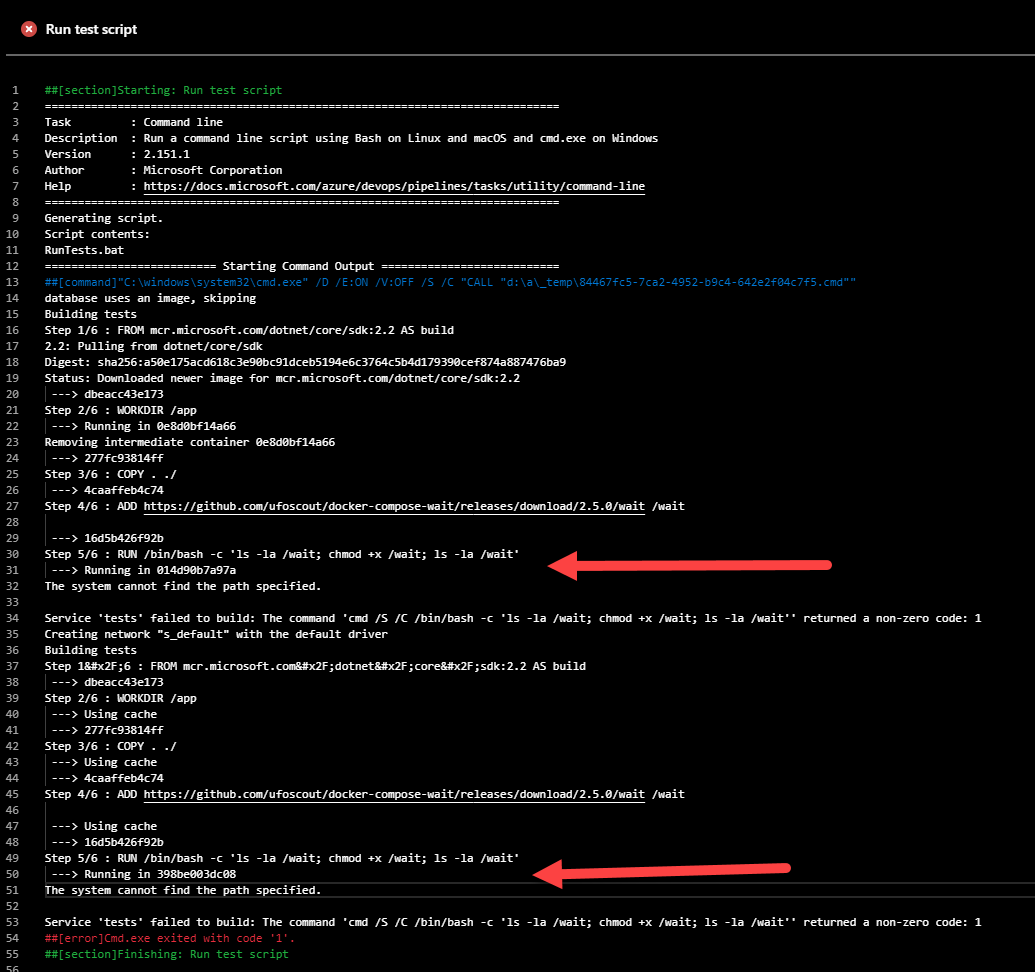
我不知道为什么它在Azure DevOps上的表现与我的本地(windows)机器不同。构建服务器是'windows-2019'映像。它是作为docker-组合的一部分运行的,如果它对此文件有帮助的话:
version: '3.4'

services:
  tests:
    build:
      context: .
      dockerfile: Dockerfile
    environment:
      WAIT_HOSTS: database:1433
    volumes:
        - ./TestResults:/var/temp

  database:
    image: mcr.microsoft.com/mssql/server:2017-CU8-ubuntu
    environment:
        SA_PASSWORD: "P@ssW0rd!"
ACCEPT_EULA: "Y"您可以在这里看到完整的构建跟踪:构建/结果?buildId=32
您可以在这里查看蔚蓝管道和完整源代码:https://github.com/ardalis/Specification/pull/1
回答 2
Stack Overflow用户
发布于 2019-07-23 18:29:52
显然,windows构建代理默认使用Docker for Windows ( Ubuntu代理为Linux使用Docker )。在dockerfile或docker-组合文件中指定容器所需的操作系统(据我所知)是不容易的。我能够通过在本地切换到Windows容器来解决路径问题。为了解决Azure DevOps上的问题,我将vm切换到ubuntu,并修改了构建脚本以使用linux (仍在进行中,但与这个问题无关)。
Stack Overflow用户
发布于 2019-07-24 02:57:54
在本地Windows机器上,您可以同时运行Windows和Linux容器。然而,不是同时。您可以在Windows和Linux容器之间切换,方法是右键单击托盘中的Docker图标,然后从菜单中选择“切换到Windows/Linux容器.”
你知道你在本地机器上使用哪种类型的容器吗?我猜是Linux容器。切换到Windows容器后,您将得到与Azure DevOps管道相同的错误。bash不会在Windows上运行(我的意思是没有虚拟化)。
Azure Windows代理总是运行DevOps容器。不可能运行Linux容器,因为它们需要Windows上的Hyper-V,Azure不支持这一点。您应该在Ubuntu构建代理上构建Linux容器。
提示:如果您想在Windows和Linux之间共享脚本,请使用PowerShell核心。这样,Windows和Linux可以使用相同的构建脚本。
https://stackoverflow.com/questions/57165183
复制相似问题
腾讯云开发者

Copyright © 2013 - 2026 Tencent Cloud. All Rights Reserved. 腾讯云 版权所有
深圳市腾讯计算机系统有限公司 ICP备案/许可证号:粤B2-20090059  粤公网安备44030502008569号
腾讯云计算(北京)有限责任公司 京ICP证150476号 | 京ICP备11018762号