
多个of图不工作的jqui_sortable与do.call
多个of图不工作的jqui_sortable与do.call
提问于 2019-07-22 14:53:38
为了使我的多点应用程序尽可能“免费”,我到目前为止已经建立了一种很好的方法来构建1:n的g图。
- 自动缩放
- 自动排列
- 把它们放大
- 使它们可点击
- 给出正确定位的悬停消息
每个绘图在其div中还会在其上方设置几个按钮,以使用户能够:-保存它们-让绘图n全屏-从页面中删除绘图
以及用户构建自己的新plots以添加到自动布局页面的功能。
我正在尝试的下一个步骤是整合shinyjqui功能,但在那里我遇到了一些(预期的?)障碍
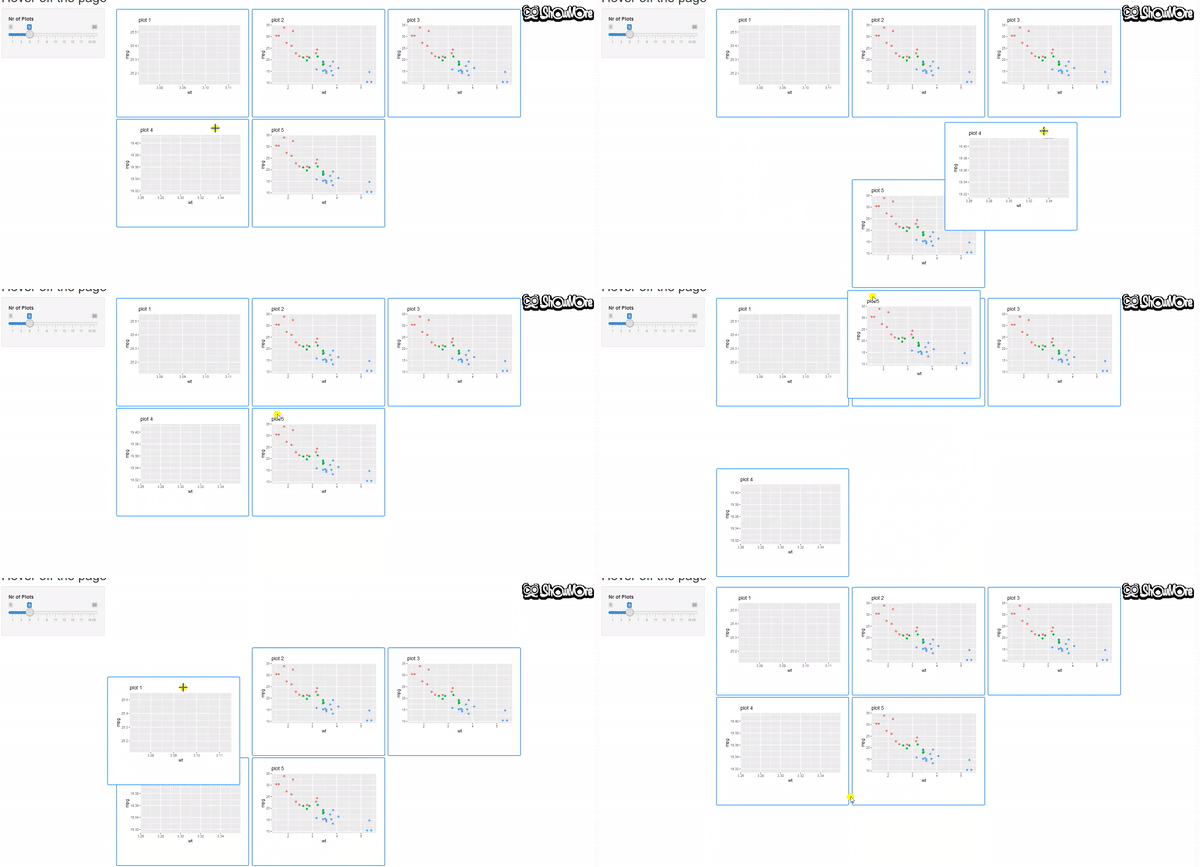
首先:应用程序中的jqui_sortable包装器成功地允许用户拿起鼠标的子图,但是当用户把它放到某个地方时,实际上不会改变布局。当用户删除plot对象时,图就返回到正常的顺序。我遵循了jqui页面上的例子
第二个可能无法克服的问题是,鼠标在div中的按住、地块内或其外部的单击具有相同的效果,它触发了jqui_sortable的提升,从而“推翻了单击-拖动来缩放ggplot对象。在理想的场景中,当单击plot (但在div内)和ggplot2的brush”时,我想触发jqui_sortable。
require('shiny')
require('ggplot2')
require('shinyjqui')

ui <- pageWithSidebar(

  headerPanel("reorganize page"),
  sidebarPanel(width = 2,
               sliderInput(inputId = 'NrOfPlots', label = 'Nr of Plots', min = 1, max = 20, value = 1)
  ),
  mainPanel(

    uiOutput('FP1PlotMultiplot'),

    style = 'width:1250px'
      )
    )

server <- function(input, output, session) {
  ranges <- reactiveValues()

  observe({
  lapply(1:input$NrOfPlots, function(i) {
  output[[paste0('FP1Plot_', i)]] <- renderPlot({
    p <- ggplot(mtcars, aes(wt, mpg, color = as.factor(cyl))) + geom_point() +
      theme(legend.position = "none") +
      ggtitle(paste('plot', i))

    if(!is.null(ranges[[paste('FP1Plot', i, 'x', sep = '_')]]) & !is.null(ranges[[paste('FP1Plot', i, 'y', sep = '_')]])) {
      p <- p + coord_cartesian(xlim = ranges[[paste('FP1Plot', i, 'x', sep = '_')]], ylim = ranges[[paste('FP1Plot', i, 'y', sep = '_')]] )
    }

    p

})
  })
  })

  output$FP1PlotMultiplot<- renderUI({

    n <- input$NrOfPlots

    n_cols <- if(n == 1) {
      1
    } else if (n %in% c(2,4)) {
      2
    } else if (n %in% c(3,5,6,9)) {
      3
    } else {
      4
    }

    Pwidth <- 1000/n_cols
    Pheight <- 450/ceiling(n/n_cols) # calculate number of rows
    Pwidth2 <- Pwidth+40
    Pheight2 <- Pheight+80

    plot_output_list <- list()

    for(i in 1:input$NrOfPlots) {
      plot_output_list <- append(plot_output_list,list(
        div(id = paste0('div', 'FP1Plot_', i),
            wellPanel(
              plotOutput(paste0('FP1Plot_', i),
                         width = Pwidth,
                         height = Pheight,
                         dblclick =  paste('FP1Plot' , i, 'dblclick', sep = '_'),
                         brush = brushOpts(
                           id =  paste('FP1Plot', i, 'brush', sep = '_'),
                           resetOnNew = TRUE
                         )
              ),
              style = paste('border-color:#339fff; border-width:2px; background-color: #fff; width:',  Pwidth2, 'px; height:', Pheight2, 'px', sep = '')),
            style = paste('display: inline-block; margin: 2px; width:', Pwidth2, 'px; height:', Pheight2, 'px', sep = ''))

      ))
    }
    jqui_sortable(do.call(tagList, plot_output_list))

  })

    lapply(1:20, function(i) {

  observeEvent(input[[paste('FP1Plot', i, 'brush', sep = '_')]], {
    brush <- input[[paste('FP1Plot', i, 'brush', sep = '_')]]

    if (!is.null(brush)) {
      ranges[[paste('FP1Plot', i, 'x', sep = '_')]] <- c(brush$xmin, brush$xmax)
      ranges[[paste('FP1Plot', i, 'y', sep = '_')]] <- c(brush$ymin, brush$ymax)
    }
  })

  observeEvent(input[[paste('FP1Plot', i, 'dblclick', sep = '_')]], {

    ranges[[paste('FP1Plot', i, 'x', sep = '_')]] <- NULL
    ranges[[paste('FP1Plot', i, 'y', sep = '_')]] <- NULL

  })
    })

}

shinyApp(ui, server)回答 1
Stack Overflow用户
回答已采纳
发布于 2019-07-22 15:18:32
可排序元素必须在div中。做:
jqui_sortable(do.call(function(...) div(id="allplots", ...),
plot_output_list))页面原文内容由Stack Overflow提供。腾讯云小微IT领域专用引擎提供翻译支持
原文链接:
https://stackoverflow.com/questions/57148639
复制相关文章
相似问题
腾讯云开发者

Copyright © 2013 - 2026 Tencent Cloud. All Rights Reserved. 腾讯云 版权所有
深圳市腾讯计算机系统有限公司 ICP备案/许可证号:粤B2-20090059  粤公网安备44030502008569号
腾讯云计算(北京)有限责任公司 京ICP证150476号 | 京ICP备11018762号