
如何在列内放置自动大小的图像?
如何在列内放置自动大小的图像?
提问于 2019-07-22 13:22:44
我有一个有两列的行,并希望在其中一个全尺寸的列中放置一个图像。
import React from 'react';
import { mapping, light as lightTheme } from '@eva-design/eva';
import { View, ImageBackground, Image, StyleSheet } from 'react-native';
import { ApplicationProvider, Layout } from 'react-native-ui-kitten';
import { Input, InputProps } from 'react-native-ui-kitten';
import { Text, Button } from 'react-native-ui-kitten';

const App = () => (
    <ApplicationProvider
        mapping={mapping}
        theme={lightTheme}>
        <View style={styles.box}>
            <View style={{width: '50%', backgroundColor: 'powderblue'}}>
                <Image
                resizeMode="contain"
                source={require('../ProjectName/assets/image.jpg')}
                style={styles.canvas} />
            </View>
            <View style={{width: '50%', backgroundColor: 'skyblue'}}>
                <Input />
                <Button />
            </View>
        </View>
    </ApplicationProvider>
);

const styles = StyleSheet.create({
    box: {
        flex: 1,
        flexDirection: 'row',
        width: 'auto',
        maxHeight: 200,
        backgroundColor: 'red',
    },
    canvas: {
        width: '100%',
    },
});

export default App;
结构:
- ApplicationProvider
-
- 视图
-
-
- 视图
-
-
-
-
- 图像
-
-
-
-
- 视图
-
-
-
-
- 输入
-
-
-
-
-
- 按钮
-
-
我的形象在列和框之外
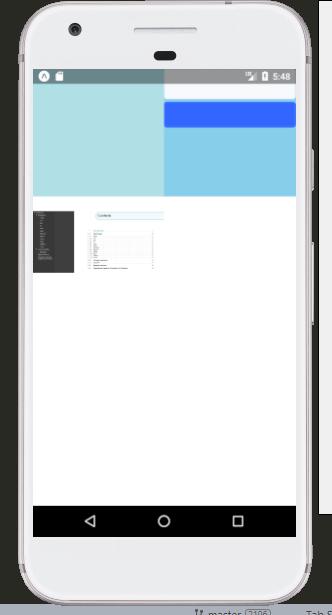
好了!
请引导我修理它。
回答 1
Stack Overflow用户
回答已采纳
发布于 2019-07-22 14:07:05
import React, { Component } from 'react';
import {
    Platform,
    StyleSheet,
    Image,
    Text,
    View,
    ImageBackground
} from 'react-native';

export default class App extends Component<{}> {
    render() {
        return (
            <View style={{flex: 1, flexDirection: 'column', backgroundColor: 'black'}}>
                <View style={{flex: 1/3, height: 100, flexDirection: 'row', backgroundColor: 'red'}}>
                    <View style={{flex: 1/2, backgroundColor: 'yellow'}}>
                        <Image style={{flex: 1, width: '100%', height: 'auto'}} source={require('./assets/image.png')}/>
                    </View>
                    <View style={{flex: 1/2, backgroundColor: 'pink'}}>

                    </View>
                </View>
            </View>
        );
    }
}页面原文内容由Stack Overflow提供。腾讯云小微IT领域专用引擎提供翻译支持
原文链接:
https://stackoverflow.com/questions/57147032
复制相关文章
相似问题
腾讯云开发者

Copyright © 2013 - 2026 Tencent Cloud. All Rights Reserved. 腾讯云 版权所有
深圳市腾讯计算机系统有限公司 ICP备案/许可证号:粤B2-20090059  粤公网安备44030502008569号
腾讯云计算(北京)有限责任公司 京ICP证150476号 | 京ICP备11018762号