
关于选择文本和下拉列表的验证。如果使用一种,则必须同时使用两种。
关于选择文本和下拉列表的验证。如果使用一种,则必须同时使用两种。
提问于 2019-07-19 14:05:03
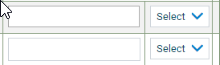
有一个文本框和一个下拉列表框。如果选中textbox,则显示下拉列表的验证,这意味着也应该选择下拉列表,如果选择了下拉列表,则显示textbox的验证,这意味着如果没有选中textbox,也应该选择textbox,则不要显示任何验证。我想要mvc中的Model类的条件。
<table class="simple">
<thead>
      <tr>
          <th  colspan="2">Heading  </th>
      </tr>
</thead>

<tbody>
<tr>
        <td>
           @Html.TextBoxFor(model.prop2,new
           {@class = "form- control font-9 p-1" })
       </td>
       <td>
          @(Html.Kendo().DropDownListFor(m =>
          m.prop1))
         .DataTextField("Type")
         .DataValueField("Id")
         .OptionLabel(PleaseSelect)
         .HtmlAttributes(new { @class = "form-control" }))
  </td>
</tr>
      <tr>
        <td>
           @Html.TextBoxFor(model.prop4,new
           {@class = "form- control font-9 p-1" })
       </td>
        <td>
           @(Html.Kendo().DropDownListFor(m =>
           m.prop3))
          .DataTextField("Type")
          .DataValueField("Id")
          .OptionLabel(PleaseSelect)
          .HtmlAttributes(new { @class = "form-control" }))
      </td>
    </tr>
  </tbody>
</table>
模型类是-
    public class ViewModel
    {
         public int? prop1 { get; set; }

         public decimal? prop2 { get; set; }

         public int? prop3 { get; set; }

         public decimal? prop4 { get; set; }
}回答 2
Stack Overflow用户
发布于 2019-07-19 20:33:32
创建一个新类
public class Custom : ValidationAttribute
{
    protected override ValidationResult IsValid(object value, ValidationContext validationContext)
    {
        //Get your model and do magic!
        var model = (yourmodel)validationContext.ObjectInstance;
        //Your condtions
        if ((model.prop1== null && model.prop2 == null) || (model.prop1!= null && model.prop2 != null))
        {
            return ValidationResult.Success;
        }
        else
        {
            return new ValidationResult("You must select both of them");
        }

    }
}
现在添加您的自定义注释
public class RefractionFinalViewModel
{
     [custom]
     [Display(Name = "Select type")]
     public int? prop1 { get; set; }

     public decimal? prop2 { get; set; }

     public int? prop3 { get; set; }

     public decimal? prop4 { get; set; }
}
视图
@Html.LabelFor(m => m.prop3 )
@Html.DropDownListFor(m => m.prop3 , new SelectList(your items, "Id", "type"), "", new { @class = "form-control" })
@Html.ValidationMessageFor(m => m.prop3 )
或者你可以使用万无一失的软件包。
[RequiredIf("prop2!= null", ErrorMessage = "prop1")]
public int? prop1{ get; set; }
[RequiredIf("prop1> 0", ErrorMessage = "prop2")]
public decimal? prop2{ get; set; }
[RequiredIf("prop4!= null", ErrorMessage = "prop3")]
public int? prop3{ get; set; }
[RequiredIf("prop3> 0", ErrorMessage = "prop4")]
public decimal? prop4{ get; set; }Stack Overflow用户
发布于 2019-07-22 09:10:15
简单地说,我在模型类上应用了验证。
[RequiredIf("prop2!= null", ErrorMessage = "prop1 required")]
public int? prop1{ get; set; }

[RequiredIf("prop1> 0", ErrorMessage = "prop2 required")]
public decimal? prop2{ get; set; }

[RequiredIf("prop4!= null", ErrorMessage = "prop3 required")]
public int? prop3{ get; set; }

[RequiredIf("prop3> 0", ErrorMessage = "prop4 required")]
public decimal? prop4{ get; set; }页面原文内容由Stack Overflow提供。腾讯云小微IT领域专用引擎提供翻译支持
原文链接:
https://stackoverflow.com/questions/57114189
复制相关文章
相似问题
腾讯云开发者

Copyright © 2013 - 2026 Tencent Cloud. All Rights Reserved. 腾讯云 版权所有
深圳市腾讯计算机系统有限公司 ICP备案/许可证号:粤B2-20090059  粤公网安备44030502008569号
腾讯云计算(北京)有限责任公司 京ICP证150476号 | 京ICP备11018762号