
Elasticsearch 7.2集群会议未分配的碎片
Elasticsearch 7.2集群会议未分配的碎片
提问于 2019-07-19 06:45:14
我想使用7.2版本构建一个三个节点的Elasticsearch集群,但是有些事情是出乎意料的。
我有三台虚拟机: 192.168.7.2、192.168.7.3、192.168.7.4,它们在、中的主要配置
- 192.168.7.2:
cluster.name: ucas
node.name: node-2
network.host: 192.168.7.2
http.port: 9200
discovery.seed_hosts: ["192.168.7.2", "192.168.7.3", "192.168.7.4"]
cluster.initial_master_nodes: ["node-2", "node-3", "node-4"]
http.cors.enabled: true
http.cors.allow-origin: "*"- 192.168.7.3:
cluster.name: ucas
node.name: node-3
network.host: 192.168.7.3
http.port: 9200
discovery.seed_hosts: ["192.168.7.2", "192.168.7.3", "192.168.7.4"]
cluster.initial_master_nodes: ["node-2", "node-3", "node-4"]- 192.168.7.4:
cluster.name: ucas
node.name: node-4
network.host: 192.168.7.4
http.port: 9200
discovery.seed_hosts: ["192.168.7.2", "192.168.7.3", "192.168.7.4"]
cluster.initial_master_nodes: ["node-2", "node-3", "node-4"]
启动每个节点时,创建一个包含3个碎片和0个副本的索引,然后向索引中写入一些文档,集群看起来正常:
PUT moive
{
  "settings": {
    "number_of_shards": 3,
    "number_of_replicas": 0
  }
}


PUT moive/_doc/3
{
  "title":"title 3"
}
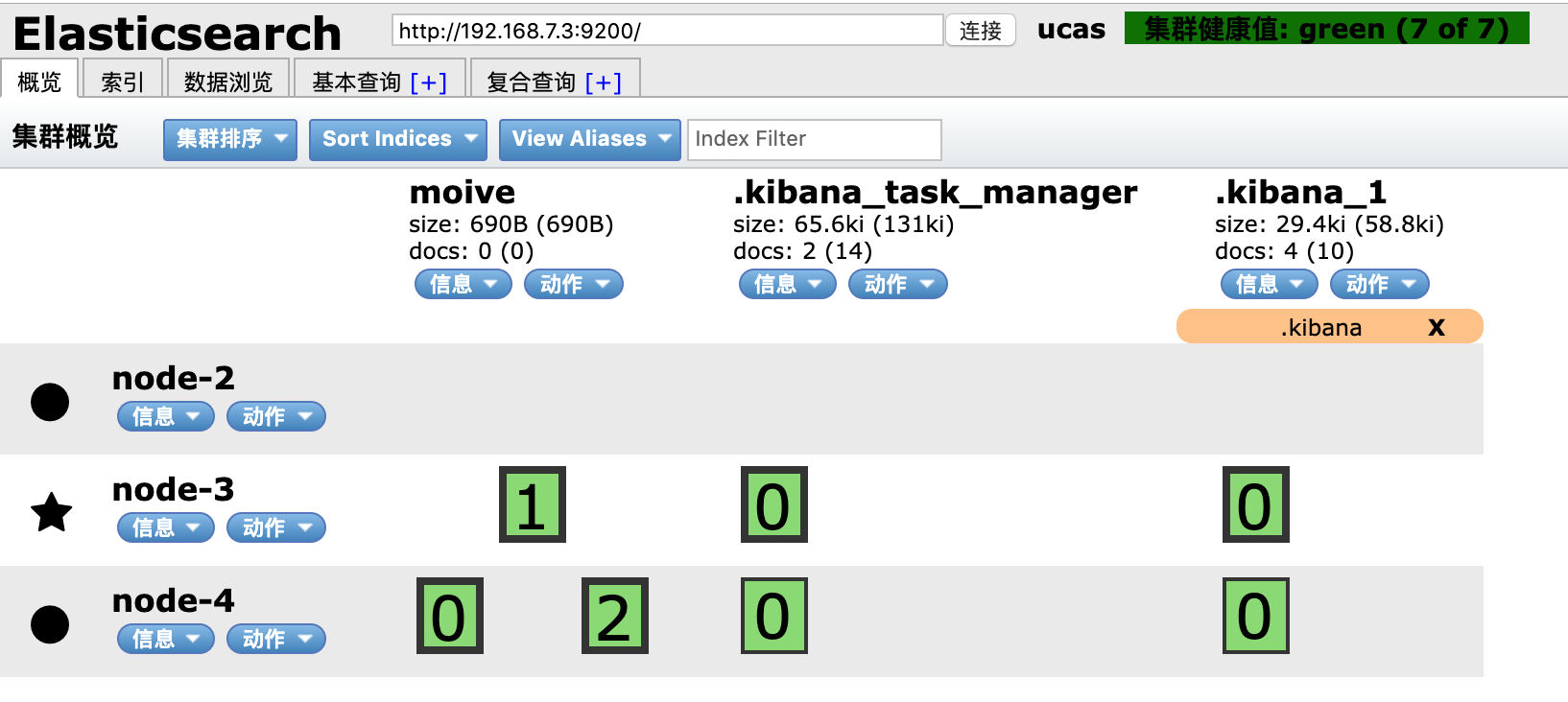
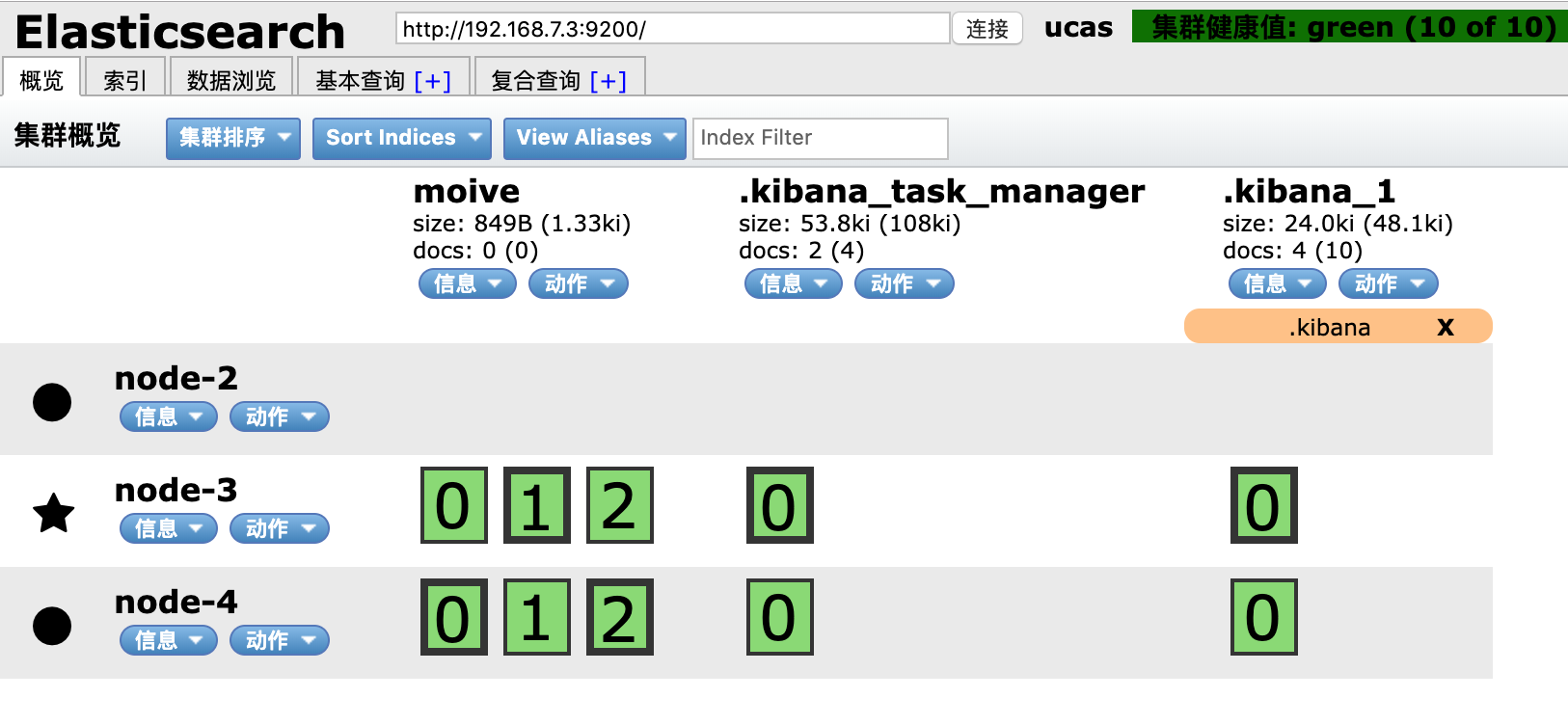
然后,将movie副本设置为1:
PUT moive/_settings
{
  "number_of_replicas": 1
}
一切进展顺利,但当我将movie副本设置为2时:
PUT moive/_settings
{
  "number_of_replicas": 2
}
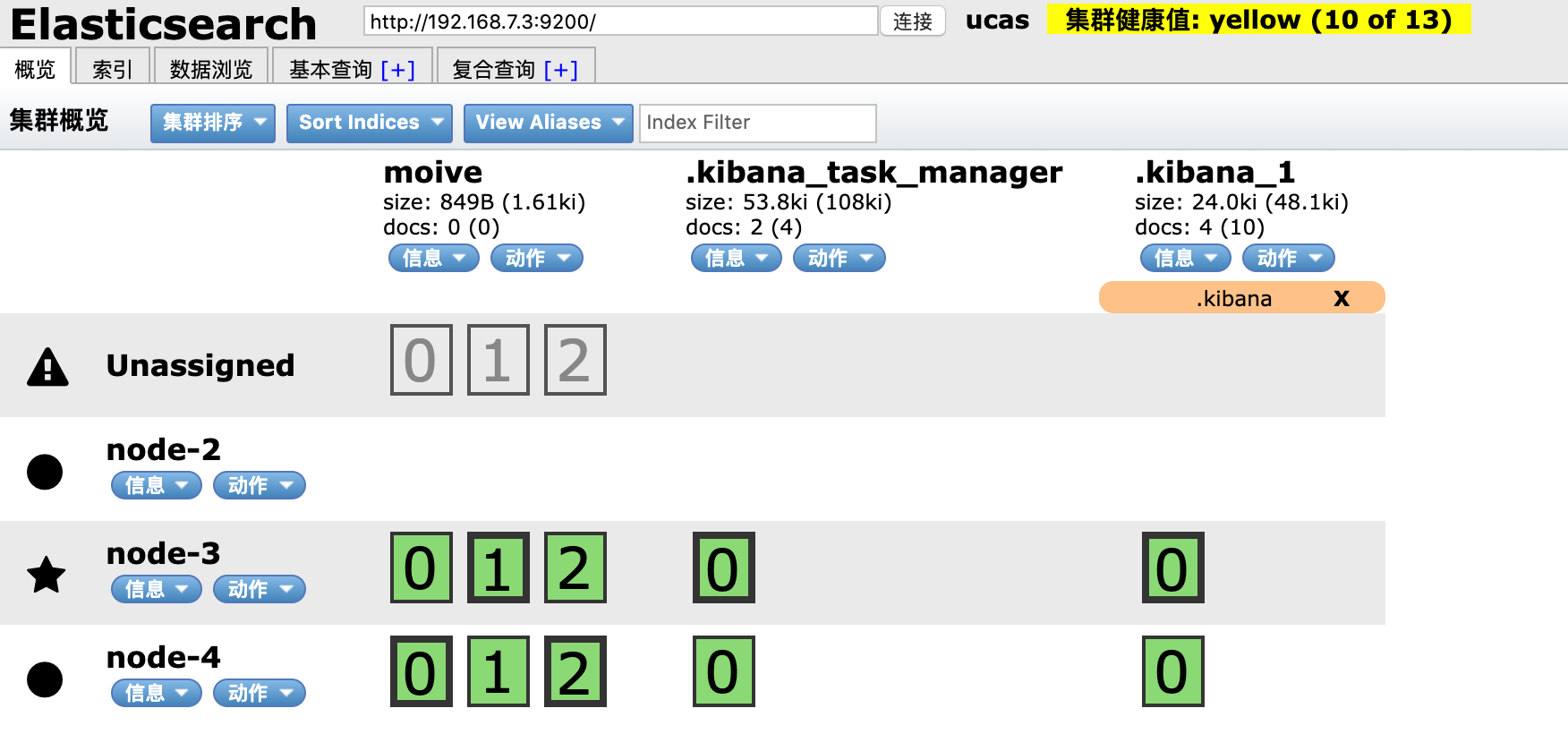
新副本不能分配给node2。
我不知道哪一步是不对的,请帮助并谈谈。
回答 1
Stack Overflow用户
回答已采纳
发布于 2019-07-19 06:53:30
首先,找出为什么不能使用explain命令分配碎片的原因:
GET _cluster/allocation/explain?pretty


{
  "index" : "moive",
  "shard" : 2,
  "primary" : false,
  "current_state" : "unassigned",
  "unassigned_info" : {
    "reason" : "NODE_LEFT",
    "at" : "2019-07-19T06:47:29.704Z",
    "details" : "node_left [tIm8GrisRya8jl_n9lc3MQ]",
    "last_allocation_status" : "no_attempt"
  },
  "can_allocate" : "no",
  "allocate_explanation" : "cannot allocate because allocation is not permitted to any of the nodes",
  "node_allocation_decisions" : [
    {
      "node_id" : "kQ0Noq8LSpyEcVDF1POfJw",
      "node_name" : "node-3",
      "transport_address" : "192.168.7.3:9300",
      "node_attributes" : {
        "ml.machine_memory" : "5033172992",
        "ml.max_open_jobs" : "20",
        "xpack.installed" : "true"
      },
      "node_decision" : "no",
      "store" : {
        "matching_sync_id" : true
      },
      "deciders" : [
        {
          "decider" : "same_shard",
          "decision" : "NO",
          "explanation" : "the shard cannot be allocated to the same node on which a copy of the shard already exists [[moive][2], node[kQ0Noq8LSpyEcVDF1POfJw], [R], s[STARTED], a[id=Ul73SPyaTSyGah7Yl3k2zA]]"
        }
      ]
    },
    {
      "node_id" : "mNpqD9WPRrKsyntk2GKHMQ",
      "node_name" : "node-4",
      "transport_address" : "192.168.7.4:9300",
      "node_attributes" : {
        "ml.machine_memory" : "5033172992",
        "ml.max_open_jobs" : "20",
        "xpack.installed" : "true"
      },
      "node_decision" : "no",
      "store" : {
        "matching_sync_id" : true
      },
      "deciders" : [
        {
          "decider" : "same_shard",
          "decision" : "NO",
          "explanation" : "the shard cannot be allocated to the same node on which a copy of the shard already exists [[moive][2], node[mNpqD9WPRrKsyntk2GKHMQ], [P], s[STARTED], a[id=yQo1HUqoSdecD-SZyYMYfg]]"
        }
      ]
    },
    {
      "node_id" : "tIm8GrisRya8jl_n9lc3MQ",
      "node_name" : "node-2",
      "transport_address" : "192.168.7.2:9300",
      "node_attributes" : {
        "ml.machine_memory" : "5033172992",
        "ml.max_open_jobs" : "20",
        "xpack.installed" : "true"
      },
      "node_decision" : "no",
      "deciders" : [
        {
          "decider" : "disk_threshold",
          "decision" : "NO",
          "explanation" : "the node is above the low watermark cluster setting [cluster.routing.allocation.disk.watermark.low=85%], using more disk space than the maximum allowed [85.0%], actual free: [2.2790256709451573E-4%]"
        }
      ]
    }
  ]
}
我们可以看到节点-2的磁盘空间是满的:
[vagrant@node2 ~]$ df -h
Filesystem               Size  Used Avail Use% Mounted on
/dev/mapper/centos-root  8.4G  8.0G  480M  95% /
devtmpfs                 2.4G     0  2.4G   0% /dev
tmpfs                    2.4G     0  2.4G   0% /dev/shm
tmpfs                    2.4G  8.4M  2.4G   1% /run
tmpfs                    2.4G     0  2.4G   0% /sys/fs/cgroup
/dev/sda1                497M  118M  379M  24% /boot
none                     234G  149G   86G  64% /vagrant
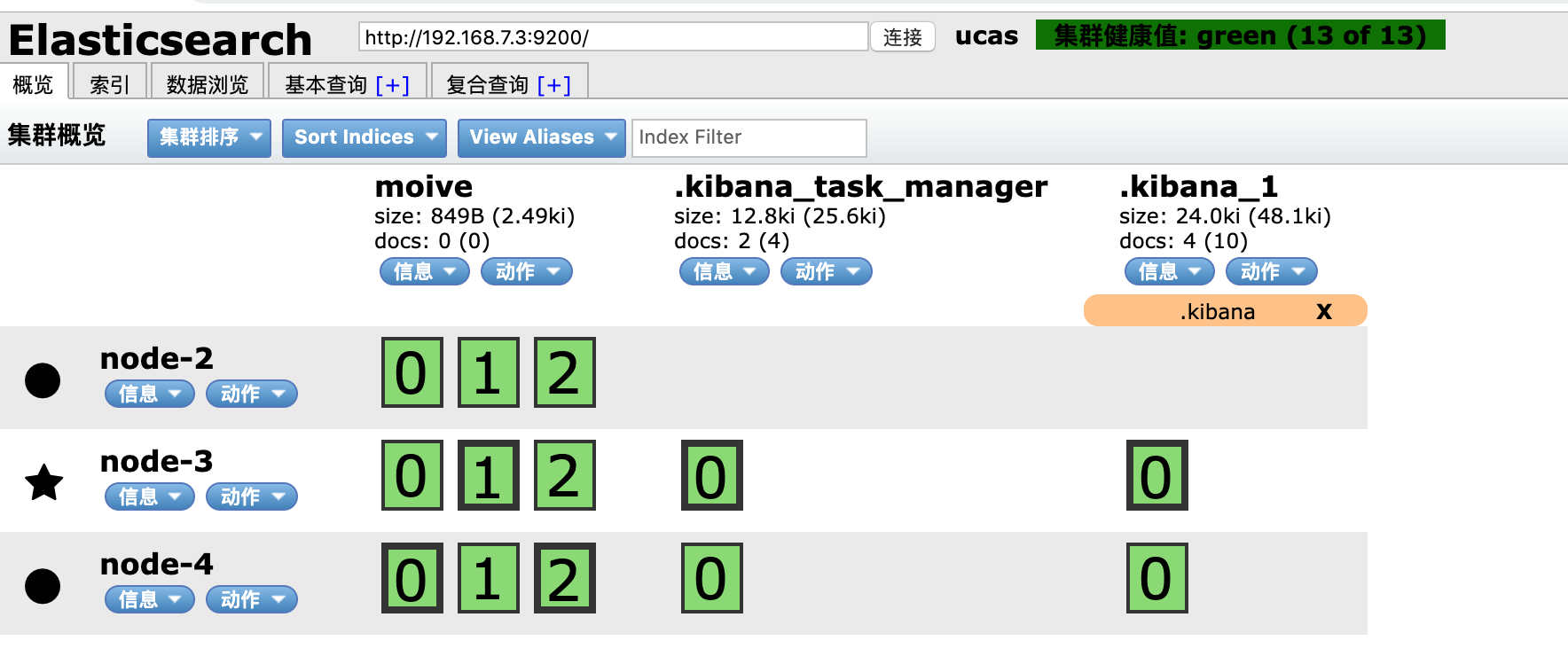
然后我清理磁盘空间,一切恢复正常:
页面原文内容由Stack Overflow提供。腾讯云小微IT领域专用引擎提供翻译支持
原文链接:
https://stackoverflow.com/questions/57106929
复制相关文章
相似问题
腾讯云开发者

Copyright © 2013 - 2026 Tencent Cloud. All Rights Reserved. 腾讯云 版权所有
深圳市腾讯计算机系统有限公司 ICP备案/许可证号:粤B2-20090059  粤公网安备44030502008569号
腾讯云计算(北京)有限责任公司 京ICP证150476号 | 京ICP备11018762号