
Azure Bot框架在线代码编辑器-接收错误:“未定义”或“空”的析构属性“applicationID”
我正在开发一个简单的,带有v4功能的聊天机器人。我从一个Echo机器人开始,并且正在连接到我的LUIS数据库。我已将应用程序设置更改为我的应用程序的相应键,但是,当我尝试运行bot时,我会得到以下错误:无法对“未定义”或“null”的属性“applicationId”进行析构,从而使我认为它在访问.env文件时遇到了问题。以下是我的bot.js代码:
const { ActivityHandler } = require('botbuilder');
const { BotFrameworkAdapter } = require('botbuilder');
const { LuisRecognizer } = require('botbuilder-ai');

class LuisBot {
    constructor(application, luisPredictionOptions) {
        this.luisRecognizer = new LuisRecognizer(application, luisPredictionOptions);
    }

    async onTurn(turnContext) {
    // Make API call to LUIS with turnContext (containing user message)
    const results = await this.luisRecognizer.recognize(turnContext);

    // Extract top intent from results
    const topIntent = results.luisResult.topScoringIntent;
    switch (topIntent.intent) {
        case 'Greeting':
            await turnContext.sendActivity('Hey! Ask me something to get started.');
            break;

        case 'UpdateInfo':
            await updateInfoIntent.handleIntent(turnContext);
            break;
        }
    }
}
这是我的index.js代码:
// Copyright (c) Microsoft Corporation. All rights reserved.
// Licensed under the MIT License.

const dotenv = require('dotenv');
const path = require('path');
const restify = require('restify');

// Import required bot services.
// See https://aka.ms/bot-services to learn more about the different parts of a bot.
const { BotFrameworkAdapter } = require('botbuilder');

// This bot's main dialog.
const { LuisBot } = require('./bot');

// Import required bot configuration.
const ENV_FILE = path.join(__dirname, '.env');

dotenv.config({ path: ENV_FILE });

// Create HTTP server
const server = restify.createServer();
server.listen(process.env.port || process.env.PORT || 3978, () => {
    console.log(`\n${ server.name } listening to ${ server.url }`);
    console.log(`\nGet Bot Framework Emulator: https://aka.ms/botframework-emulator`);
    console.log(`\nTo talk to your bot, open the emulator select "Open Bot"`);
});

const luisApplication = {
    applicationId: process.env.LuisAppId,
    endpointKey: process.env.LuisAuthoringKey,
    azureRegion: process.env.LuisAzureRegion
};

const luisPredictionOptions = {
    includeAllIntents: true,
    log: true,
    staging: false
};

// Create adapter.
// See https://aka.ms/about-bot-adapter to learn more about how bots work.

const adapter = new BotFrameworkAdapter({
    appId: process.env.MicrosoftAppId,
    appPassword: process.env.MicrosoftAppPassword,
    channelService: process.env.ChannelService,
    openIdMetadata: process.env.BotOpenIdMetadata
});


// Catch-all for errors.
adapter.onTurnError = async (context, error) => {
    // This check writes out errors to console log .vs. app insights.
    console.error(`\n [onTurnError]: ${ error }`);

    // Send a message to the user
    await context.sendActivity(`Oops. Something went wrong!`);
};

// Create the main dialog.
const bot = new LuisBot();

// Listen for incoming requests.
server.post('/api/messages', (req, res) => {
    adapter.processActivity(req, res, async (context) => {
        // Route to main dialog.
        await bot.run(context);
    });
});
显然,我是机器人框架和node.js的初学者,我已经阅读了大量的教程,所以任何帮助都是非常感谢的。
回答 2
Stack Overflow用户
发布于 2019-07-17 09:27:26
您必须错过.env文件中的相关参数。我这边有个测试,效果很好。下面是.env文件:
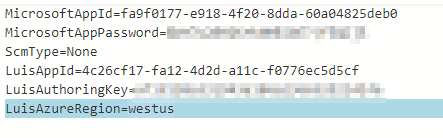
这里是bot2.js
const { ActivityHandler } = require('botbuilder');
const { BotFrameworkAdapter } = require('botbuilder');
const { LuisRecognizer } = require('botbuilder-ai');

class LuisBot {
    constructor(application, luisPredictionOptions) {
        this.luisRecognizer = new LuisRecognizer(application, luisPredictionOptions, true);
    }
    async onTurn(turnContext) {
        // Make API call to LUIS with turnContext (containing user message)
        try {
            const results = await this.luisRecognizer.recognize(turnContext);

            //console.log(results);
            // Extract top intent from results
            const topIntent = results.luisResult.topScoringIntent;
            switch (topIntent.intent) {
                case 'Greeting':
                    await turnContext.sendActivity('Hey! Ask me something to get started.');
                    break;

                case 'UpdateInfo':
                    await updateInfoIntent.handleIntent(turnContext);
                    break;
                default:
                    await turnContext.sendActivity('Hey!');
            }
        } catch (error) {
        }
    }
}
module.exports.LuisBot = LuisBot;
下面是index.js:
// Copyright (c) Microsoft Corporation. All rights reserved.
// Licensed under the MIT License.

const dotenv = require('dotenv');
const path = require('path');
const restify = require('restify');

// Import required bot services.
// See https://aka.ms/bot-services to learn more about the different parts of a bot.
const { BotFrameworkAdapter } = require('botbuilder');

// This bot's main dialog.
// const { EchoBot } = require('./bot');
const { LuisBot } = require('./bot2');

// Import required bot configuration.
const ENV_FILE = path.join(__dirname, '.env');
dotenv.config({ path: ENV_FILE });

// Create HTTP server
const server = restify.createServer();
server.listen(process.env.port || process.env.PORT || 3978, () => {
    console.log(`\n${ server.name } listening to ${ server.url }`);
    console.log(`\nGet Bot Framework Emulator: https://aka.ms/botframework-emulator`);
    console.log(`\nTo talk to your bot, open the emulator select "Open Bot"`);
});

// Create adapter.
// See https://aka.ms/about-bot-adapter to learn more about how bots work.
const adapter = new BotFrameworkAdapter({
    appId: process.env.MicrosoftAppId,
    appPassword: process.env.MicrosoftAppPassword,
    channelService: process.env.ChannelService,
    openIdMetadata: process.env.BotOpenIdMetadata
});

const luisApplication = {
    applicationId: process.env.LuisAppId,
    endpointKey: process.env.LuisAuthoringKey,
    azureRegion: process.env.LuisAzureRegion
};
const luisPredictionOptions = {
    includeAllIntents: true,
    log: true,
    staging: false
};

// Catch-all for errors.
adapter.onTurnError = async (context, error) => {
    // This check writes out errors to console log .vs. app insights.
    console.error(`\n [onTurnError]: ${ error }`);
    // Send a message to the user
    await context.sendActivity(`Oops. Something went wrong!`);
};

// Create the main dialog.
// const bot = new EchoBot();
// Create the main dialog.
const bot = new LuisBot(luisApplication, luisPredictionOptions);

// Listen for incoming requests.
server.post('/api/messages', (req, res) => {
    // console.log(process.env.LuisAppId);
    adapter.processActivity(req, res, async (context) => {
        // Route to main dialog.
        // console.log(process.env.LuisAppId);
        await bot.onTurn(context);
    });
});
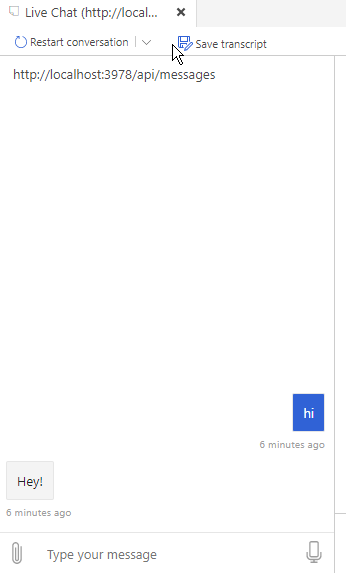
并在bot模拟器中进行测试:
Stack Overflow用户
发布于 2019-07-17 17:48:04
@MdFaridUddinKiron的答案太接近了!
您会得到这个错误,因为在index.js中,您没有将luisApplication传递给MyBot。
就像@MdFaridUddinKiron的回答一样,您应该有:
index.js
const bot = new LuisBot(luisApplication, luisPredictionOptions);而不是:
const bot = new LuisBot();您提到您是新来的(一般来说,对于编程来说),所以我将添加一些额外的帮助。
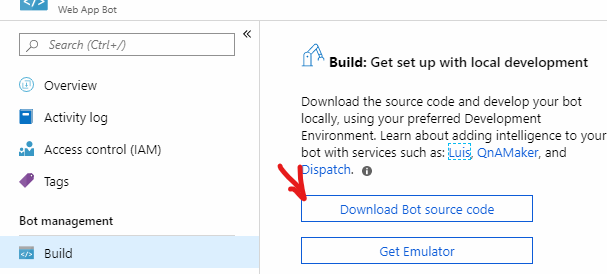
我强烈建议不要使用在线编辑器。VS码是免费和令人敬畏的!如果您使用它,它可能会向您显示一个错误,准确地指出了问题所在。您可以通过以下方式使用它编辑您的机器人:
- 下载和安装VS代码
- 在Azure Portal中,打开Web资源,然后转到Build > Download源代码:
- 解压缩并打开VS代码
当您完成编辑并且希望部署/发布回Azure的bot时,请遵循部署文档
之后,我建议学习如何正确地使用断点进行调试。我在这个答案中,在Debug下对它进行了一些细分。我在编程中学到这个WAYYY太晚了,它非常有用。
https://stackoverflow.com/questions/57068171
复制相似问题
腾讯云开发者

Copyright © 2013 - 2026 Tencent Cloud. All Rights Reserved. 腾讯云 版权所有
深圳市腾讯计算机系统有限公司 ICP备案/许可证号:粤B2-20090059  粤公网安备44030502008569号
腾讯云计算(北京)有限责任公司 京ICP证150476号 | 京ICP备11018762号