
运行win32函数的电子/节点-ffi错误
我试着从电子4调用Win32函数(节点10.x),得到一个错误,这个错误对我来说似乎很模糊。
我用的是这个代码:
import * as ffi from 'ffi';
import * as Struct from 'ref-struct';
import * as ref from "ref";

const
    ABM_NEW = 0x0,
    ABM_REMOVE = 0x1,
    ABM_QUERYPOS = 0x2,
    ABM_SETPOS = 0x3;

const RECT_Struct = new Struct({
   left: ref.types.long,
   top: ref.types.long,
   right: ref.types.long,
   bottom: ref.types.long
});

const APPBARDATA_Struct = new Struct({
    cbSize: ref.types.uint32,
    hWnd: ref.refType(ref.types.void),
    uCallbackMessage: ref.types.uint32,
    uEdge: ref.types.uint32,
    rc: ref.refType(RECT_Struct),
    lParam: ref.types.int64
});

export const shell32 = ffi.Library('shell32.dll', {
    SHAppBarMessage: [ 'pointer', [ 'int', 'pointer']]
});

export function registerAppBar(windowHandle: any) {
    let data = new APPBARDATA_Struct();
    data.cbSize = APPBARDATA_Struct.size;
    data.hWnd = windowHandle;
    data.uCallbackMessage = 1234;
    let res = shell32.SHAppBarMessage(ABM_NEW, data);
}
然后在电子背景下:
registerAppBar(mainWindow.getNativeWindowHandle());我得到的错误是"TypeError: error The参数1- writePointer:缓冲器实例,被期望为第三个参数“,我不知道为什么会发生这种情况。
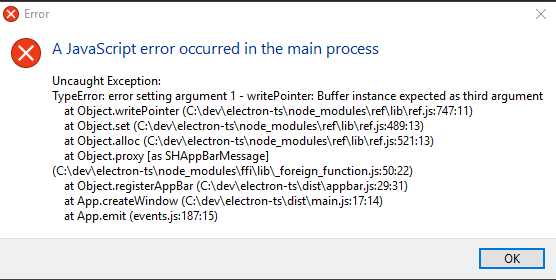
任何帮助/想法都是非常感谢的!
我要做的是按照https://learn.microsoft.com/en-us/windows/win32/shell/application-desktop-toolbars注册一个电子窗口,使其成为应用程序工具栏
回答 3
Stack Overflow用户
发布于 2019-07-16 03:15:27
需要传递给SHAppBarMessage的第二个参数是指向APPBARDATA_Struct的指针,请参见以下链接:https://github.com/node-ffi/node-ffi/wiki/Node-FFI-Tutorial#structs
var APPBARDATA_StructPtr = ref.refType('APPBARDATA_Struct');
export const shell32 = ffi.Library('shell32.dll', {
    SHAppBarMessage: [ 'pointer', [ 'int', 'APPBARDATA_StructPtr']]
});
...
let res = shell32.SHAppBarMessage(ABM_NEW, data.ref());此外,rc in APPBARDATA_Struct不是structPtr。
Stack Overflow用户
发布于 2019-07-16 07:47:38
通过使用Node ffi pointer to struct,我可以使用以下方法来工作:
export const shell32 = ffi.Library('shell32.dll', {
    SHAppBarMessage: [ 'pointer', [ 'int', APPBARDATA_Struct]]
});
类似于德雷克·沃在评论中的建议,但没有使用ref.refType。
现在,函数返回true :D
Stack Overflow用户
发布于 2021-07-02 06:16:42
我尝试制作类似的任务栏窗口,但ffi/ref/ref导入似乎不可取。我试着用ffi-napi,但是什么也没发生(没有错误,没有)。如何使这个工作与电子,注册电子windos作为任务栏,以便所有其他窗口将展开考虑到任务栏的大小?
import * as ffi from "ffi-napi";

const ref = require("ref-napi");
const Struct = require("ref-struct-di")(ref);

const ABM_NEW = 0;
const ABM_REMOVE = 0x1;
const ABM_QUERYPOS = 0x2;
const ABM_SETPOS = 0x3;

const ABEdgeLeft = 0;
const ABEdgeTop = 1;
const ABEdgeRight = 2;
const ABEdgeBottom = 3;
const ABEdgeFloat = 4;

const RECT_Struct = Struct({
  left: ref.types.long,
  top: ref.types.long,
  right: ref.types.long,
  bottom: ref.types.long,
});

const APPBARDATA_Struct = Struct({
  cbSize: ref.types.uint32,
  hWnd: ref.refType(ref.types.void),
  uCallbackMessage: ref.types.uint32,
  uEdge: ref.types.uint32,
  rc: ref.refType(RECT_Struct),
  lParam: ref.types.int64,
});

export const shell32 = ffi.Library("shell32.dll", {
  SHAppBarMessage: ["pointer", ["int", APPBARDATA_Struct]],
});

export function registerAppBar(windowHandle: Buffer): void {
  const data = new APPBARDATA_Struct();
  data.cbSize = APPBARDATA_Struct.size;
  data.edge = ABEdgeLeft;
  data.hWnd = windowHandle;
  data.uCallbackMessage = 1234;
  shell32.SHAppBarMessage(ABM_NEW, data);
}https://stackoverflow.com/questions/57041517
复制相似问题
腾讯云开发者

Copyright © 2013 - 2026 Tencent Cloud. All Rights Reserved. 腾讯云 版权所有
深圳市腾讯计算机系统有限公司 ICP备案/许可证号:粤B2-20090059  粤公网安备44030502008569号
腾讯云计算(北京)有限责任公司 京ICP证150476号 | 京ICP备11018762号