
安卓9上的java.lang.IllegalStateException
最近,我将API目标更新为28。我得做几个改变。除了IllegalStateException之外,我还会从大量的用户(8,396人)那里得到崩溃转储错误。
- 播放控制台崩溃
java.lang.RuntimeException: at android.app.ActivityThread.handleReceiver (ActivityThread.java:3584) at android.app.ActivityThread.access$1300 (ActivityThread.java:235) at android.app.ActivityThread$H.handleMessage (ActivityThread.java:1779) at android.os.Handler.dispatchMessage (Handler.java:106) at android.os.Looper.loop (Looper.java:214) at android.app.ActivityThread.main (ActivityThread.java:6981) at java.lang.reflect.Method.invoke (本地方法) at java.lang.reflect.Method.invokecom.android.internal.os.RuntimeInit$MethodAndArgsCaller.run (RuntimeInit.java:493) at com.android.internal.os.ZygoteInit.main (ZygoteInit.java:1445):java.lang.IllegalStateException: at android.app.ContextImpl.startServiceCommon (ContextImpl.java:1666) at android.app.ContextImpl.startService (ContextImpl.java:1611) at android.content.ContextWrapper.startService (ContextWrapper.java:677) at android.content.ContextWrapper.startService (ContextWrapper.java:677) at ch.corten.aha.worldclock.WorldClockWidgetProvider.onClockTick (WorldClockWidgetProvider.java:147) at ch.corten.aha.worldclock.ClockWidgetProvider.onReceive (ClockWidgetProvider.java:115) at android.app.ActivityThread.handleReceiver (ActivityThread.java:3575)
- WorldClockWidgetProvider.java:147报告在context.startService(服务);从下面的函数快照。
@覆盖受保护的无效onClockTick(上下文上下文){意向服务=新意图(上下文,WorldClockWidgetService.class);context.startService(服务);}
- ClockWidgetProvider.java:115,它的意思是“onClockTick(上下文);”从下面的函数快照。
@Override void onReceive(上下文上下文,意图){Log.e(标记,“onre有益的名称为Biswajit");super.onReceive(上下文,意图);if,PowerManager,CLOCK_TICK_ACTION.equals(intent.getAction()),{PowerManager pm = (PowerManager)if (pm.isScreenOn()) {onClockTick(上下文);}
所有报告的设备都是Android 9和API 29。
- Build.gradile片段
依赖关系{//编译'com.actionbarsherlock:actionbarsherlock:4.4.0@aar‘//编译'com.android.support:support-v4:19.1.0’implementation 'com.github.javiersantos:AppUpdater:2.7‘implementation 'com.google.code.gson:gson:2.8.2’implementation 'net.danlew:android.joda:2.9.4.1‘implementation 'com.google.android.gms:play-services-ads:9.8.0‘//noinspection实现'com.android.support:appcompat-v7:22.2.1’实现GradleCompatible }
- 被叫业务
导入android.content.Intent;公共类WorldClockWidgetService扩展IntentService { public WorldClockWidgetService() { super("WorldClockWidgetService");}
提出的解决方案?:
- 意图服务的上下文
公共类WorldClockWidgetService扩展了IntentService { public WorldClockWidgetService() {WorldClockWidgetService(“WorldClockWidgetService”);}@onHandleIntent(意图){ WorldClockWidgetProvider.updateTime(this);}}
它将被替换为
公共类WorldClockWidgetService扩展了JobIntentService { public WorldClockWidgetService() {WorldClockWidgetService(“WorldClockWidgetService”);}@onHandleWork(意图){ WorldClockWidgetProvider.updateTime(this);}}
错误:获取错误
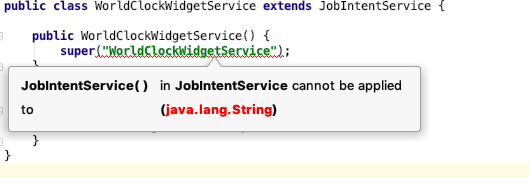
含量WorldClockWidgetProvider
public class WorldClockWidgetProvider extends ClockWidgetProvider {
private static final boolean SANS_JELLY_BEAN_MR1 = Build.VERSION.SDK_INT < Build.VERSION_CODES.JELLY_BEAN_MR1;

static {
    registerClockWidget(WorldClockWidgetProvider.class);
}

@Override
protected void updateAppWidget(Context context, AppWidgetManager appWidgetManager, int appWidgetId) {
    updateAppWidgetStatic(context, appWidgetManager, appWidgetId);
}

private static void updateAppWidgetStatic(Context context, AppWidgetManager appWidgetManager, int appWidgetId) {
    // Create an Intent to launch WorldClockActivity
    Intent intent = new Intent(context, WorldClockActivity.class);
    PendingIntent pendingIntent = PendingIntent.getActivity(context, 0, intent, 0);

    // Get the layout for the App Widget and attach an on-click listener
    // to the button
    RemoteViews views = new RemoteViews(context.getPackageName(), R.layout.world_clock_widget);
    views.setOnClickPendingIntent(R.id.app_widget, pendingIntent);

    // update view
    updateViews(context, views);

    // Tell the AppWidgetManager to perform an update on the current app widget
    appWidgetManager.updateAppWidget(appWidgetId, views);
}

private static final String[] PROJECTION = {
    Clocks.TIMEZONE_ID,
    Clocks.CITY
};

private static final int[] CITY_IDS = {
    R.id.city_text1,
    R.id.city_text2,
    R.id.city_text3,
    R.id.city_text4,
};

private static final int[] TIME_IDS = {
    R.id.time_text1,
    R.id.time_text2,
    R.id.time_text3,
    R.id.time_text4,
};

private static void updateViews(Context context, RemoteViews views) {
    SharedPreferences prefs = PreferenceManager.getDefaultSharedPreferences(context);
    boolean autoSort = prefs.getBoolean(context.getString(R.string.auto_sort_clocks_key), true);
    Cursor cursor = Clocks.widgetList(context, PROJECTION, autoSort);

    try {
        int n = 0;
        DateFormat df = android.text.format.DateFormat.getTimeFormat(context);
        long now = DateTimeUtils.currentTimeMillis();
        final int maxEntries = context.getResources().getInteger(R.integer.worldclock_widget_max_entries);
        while (cursor.moveToNext() && n < CITY_IDS.length
                && n < maxEntries) {
            String id = cursor.getString(cursor.getColumnIndex(Clocks.TIMEZONE_ID));
            String city = cursor.getString(cursor.getColumnIndex(Clocks.CITY));
            views.setTextViewText(CITY_IDS[n], city);
            DateTimeZone tz = DateTimeZone.forID(id);
            if (SANS_JELLY_BEAN_MR1) {
                views.setTextViewText(TIME_IDS[n], TimeZoneInfo.formatDate(df, tz, now));
            } else {
                TimeZone javaTimeZone = TimeZoneInfo.convertToJavaTimeZone(tz, now);
                views.setViewVisibility(TIME_IDS[n], View.VISIBLE);
                RemoteViewUtil.setTextClockTimeZone(views, TIME_IDS[n], javaTimeZone.getID());
            }
            n++;
        }
        int showEmptyText = (n == 0) ? View.VISIBLE : View.INVISIBLE;
        views.setViewVisibility(R.id.empty_text, showEmptyText);
        for (; n < CITY_IDS.length; n++) {
            views.setTextViewText(CITY_IDS[n], "");
            if (SANS_JELLY_BEAN_MR1) {
                views.setTextViewText(TIME_IDS[n], "");
            } else {
                views.setViewVisibility(TIME_IDS[n], View.INVISIBLE);
            }
        }
        boolean customColors = prefs.getBoolean(context.getString(R.string.use_custom_colors_key), false);
        int textColor = Color.WHITE;
        if (customColors) {
            int color = prefs.getInt(context.getString(R.string.background_color_key), Color.BLACK);
            RemoteViewUtil.setBackgroundColor(views, R.id.app_widget, color);
            textColor = prefs.getInt(context.getString(R.string.foreground_color_key), Color.WHITE);
        } else {
            RemoteViewUtil.setBackground(views, R.id.app_widget, R.drawable.appwidget_dark_bg);
        }
        for (int i = 0; i < CITY_IDS.length; i++) {
            views.setTextColor(CITY_IDS[i], textColor);
            views.setTextColor(TIME_IDS[i], textColor);
        }
    } finally {
        if (cursor != null) {
            cursor.close();
        }
    }
}

@Override
protected void onClockTick(Context context) {
    Intent service = new Intent(context, WorldClockWidgetService.class);
    context.startService(service);
}

static void updateTime(Context context) {
    // update on the hour
    final long minutes = System.currentTimeMillis() / (60000);
    if (minutes % 60 == 0) {
        Clocks.updateOrder(context);
    }
    // Get the widget manager and ids for this widget provider, then call the shared
    // clock update method.
    ComponentName thisAppWidget = new ComponentName(context.getPackageName(), WorldClockWidgetProvider.class.getName());
    AppWidgetManager appWidgetManager = AppWidgetManager.getInstance(context);
    int[] ids = appWidgetManager.getAppWidgetIds(thisAppWidget);
    for (int appWidgetID: ids) {
        updateAppWidgetStatic(context, appWidgetManager, appWidgetID);
    }
}
}
回答 1
Stack Overflow用户
发布于 2019-07-13 12:29:34
如以下链接所述:
https://developer.android.com/about/versions/oreo/android-8.0-changes#back-all
Android8.0 (API级别26)还包括对特定方法的以下更改: 如果针对Android8.0的应用程序试图在不允许创建后台服务的情况下使用该方法,
startService()方法现在会抛出一个IllegalStateException。
https://developer.android.com/about/versions/oreo/background.html
注意:
IntentService是一种服务,因此受到对后台服务的新限制。因此,许多依赖IntentService的应用程序在针对Android8.0或更高版本时不能正常工作。因此,Android 26.0.0引入了一个新的JobIntentService类,它提供了与IntentService相同的功能,但在运行Android8.0或更高版本时使用作业而不是服务。
因此,您需要查看JobIntentService & JobScheduler类,并用它替换旧的后台服务代码。
有关此类作业的示例,请参见https://developer.android.com/reference/android/support/v4/app/JobIntentService。
https://stackoverflow.com/questions/57017032
复制相似问题
腾讯云开发者

Copyright © 2013 - 2026 Tencent Cloud. All Rights Reserved. 腾讯云 版权所有
深圳市腾讯计算机系统有限公司 ICP备案/许可证号:粤B2-20090059  粤公网安备44030502008569号
腾讯云计算(北京)有限责任公司 京ICP证150476号 | 京ICP备11018762号