
Rmarkdown/Papaja中的文本(非语法)突出显示
我正在使用Papaja和Rmarkdown编写一份报告,我想在整个过程中突出显示各种文本。使用latex或纯Rmarkdown这样做很容易,但是当我使用Papaja的Knitr应用程序将报告编译为PDF时,我收到了一个“未定义的控制序列”错误。
关于一个Rmarkdown文件中的文本突出显示的类似问题在这里得到了回答:RMarkdown / pandoc fails to knit Pdf with latex color commands。我想知道是否存在使用Papaja的多个Rmarkdown文件的答案。
下面我将包括一个最小的例子。
1)名为papaja_file.Rmd的文件
---

# https://crsh.github.io/papaja_man/index.html

title             : "Some Title"
shorttitle        : "HEADER"

author:
  - name          : "Name R Here"
    affiliation   : "1"
    corresponding : yes    # Define only one corresponding author
    address       : "Include addresss"
    email         : "randomemail@usa.edu"

affiliation:
  - id            : "1"
    institution   : "Any University"


author_note: |
  ....

abstract: |
  Text here for abstract.

keywords          : "Keyword1, keyword2, keyword3"
bibliography      : ["references.bib"]

figsintext        : no
figurelist        : no
tablelist         : no
footnotelist      : no
lineno            : yes

lang              : "english"
class             : "man"
output            : papaja::apa6_pdf
---

```{r load_packages, include = FALSE}
图书馆(“papaja”)
```{r analysis_preferences}随机数产生种子
set.seed(42)
```{r global_options, include=FALSE}knitr::opts_chunk$set(fig.path =‘fig.path/’,fig.path=真,警告=假,消息=假)
```{r child = 'child_document.Rmd'}\newpage
# References
```{r create_references, echo = F}r_refs(file = "references.bib")
\setlength{\parindent}{-0.5in}
\setlength{\leftskip}{0.5in}
注意,它引用了单个子Rmarkdown文档。
2)带有文本的子文档,称为child_document.Rmd
---
output:
  pdf_document:
      includes:
          in_header: preamble.tex
---

One sentence without highlighting. \hl{Another with highlighting.}
( 3)序言,称为preamble.tex
\usepackage{color}
\usepackage{soul}
\definecolor{lightblue}{rgb}{0.90, 0.95, 1}
\sethlcolor{lightblue}
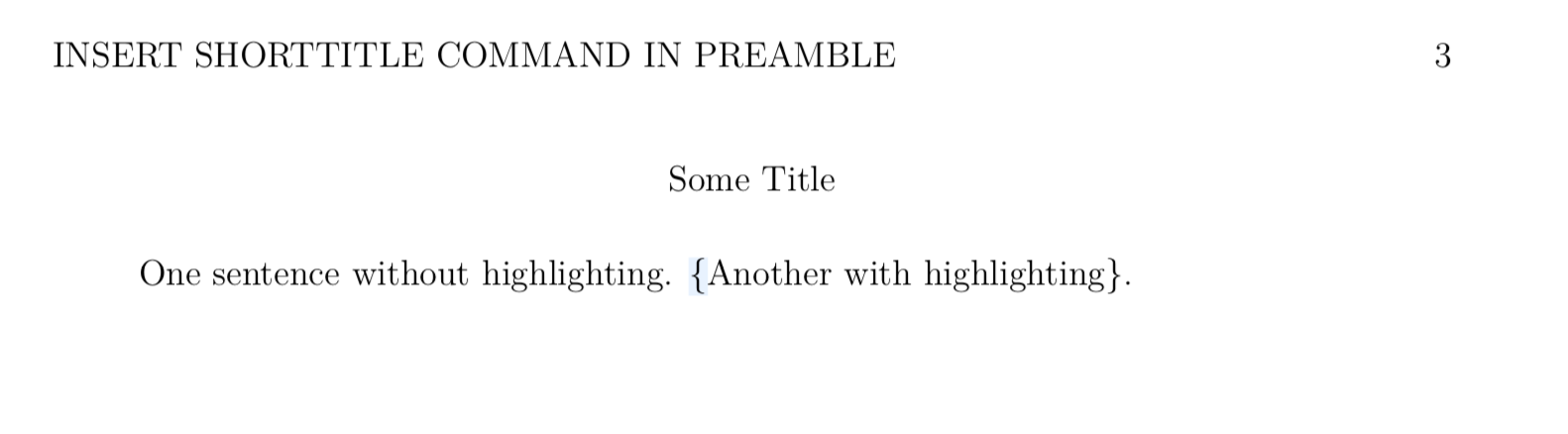
编织主papaja文件会产生错误。删除子文档中的\hl命令可以让pdf编译而不出问题。
将YAML头放在主papaja文档中而不是子文档中的结果:
回答 1
Stack Overflow用户
发布于 2019-07-16 18:15:03
不计算子文档中的YAML标题,c.f。
例如,主文档由YAML前端事务组成,包括子文档,这些子文档本身就是没有YAML前端问题的R文档。 man/tips-and-tricks.html#splitting-an-r-markdown-document
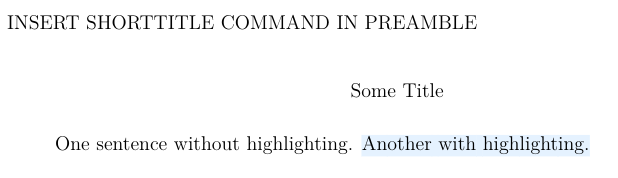
但是,您可以使用以下方法将preamble.tex包含在主文件中:
output:
  papaja::apa6_pdf:
    includes:
in_header: preamble.texc.f.https://github.com/rstub/stackoverflow/commit/a92a67d4721ee9c06e995b08adbf8cb89daebcb4
结果:
https://stackoverflow.com/questions/57014812
复制相似问题
腾讯云开发者

Copyright © 2013 - 2026 Tencent Cloud. All Rights Reserved. 腾讯云 版权所有
深圳市腾讯计算机系统有限公司 ICP备案/许可证号:粤B2-20090059  粤公网安备44030502008569号
腾讯云计算(北京)有限责任公司 京ICP证150476号 | 京ICP备11018762号