
使用SPFx Webpart与IE11、SharePoint 2016和Pannellum
我需要一些关于SPFx网络部件的专家知识,结合SharePoint 2016和InternetExplorer 11。想法是创建一个使用Pannellum来显示图像的web部件。在Firefox中,它已经开始工作了。但是,对于IE11,错误消息出现在控制台中:
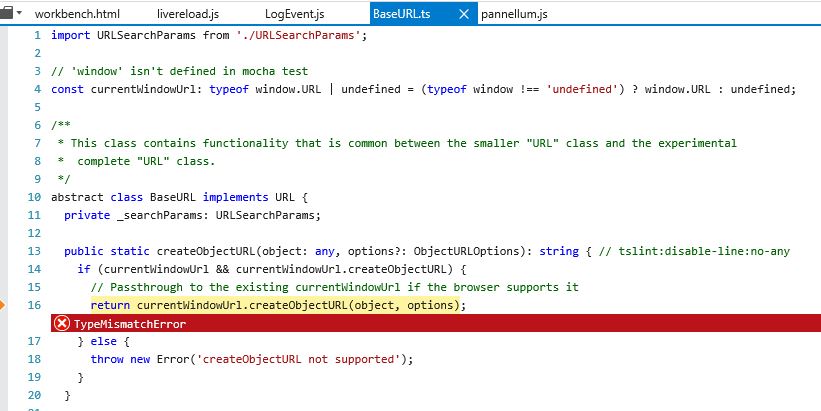
SCRIPT5022: TypeMismatchError BaseURL.ts (16,7)
SCRIPT5007: Die Eigenschaft "toString" eines undefinierten oder Nullverweises kann nicht abgerufen werden.
英文电文:The "toString" property of an undefined or null reference cannot be retrieved. LogEvent.js (26,1)
在开发工具中,我可以看到图像已经下载。但是,当with部件的代码试图以图像作为blob对象调用createObjectURL时,它会崩溃。
webpart是用Yeoman (3.1.0)创建的,用Gulp进行了测试。在webpart中执行Pannellum脚本,我使用了来自repo:https://github.com/SharePoint/sp-dev-fx-webparts/blob/dev/samples/react-script-editor/src/webparts/scriptEditor/ScriptEditorWebPart.ts的executeScript函数
我想我的问题与此有关:IE + XMLHttp + CreateObjectURL Error。
有人有这方面的经验吗?
下面是一些示例代码:
import { Version } from '@microsoft/sp-core-library';
import {
  BaseClientSideWebPart,
  IPropertyPaneConfiguration,
  PropertyPaneTextField
} from '@microsoft/sp-webpart-base';
import { escape } from '@microsoft/sp-lodash-subset';
import { SPComponentLoader } from '@microsoft/sp-loader';
import styles from './TestWebPart.module.scss';
import * as strings from 'TestWebPartStrings';

require('../../../node_modules/pannellum/build/pannellum.css');
require('../../../node_modules/pannellum/build/pannellum.js');

export default class TestWebPart extends BaseClientSideWebPart<ITestWebPartProps> {
  public render(): void {
    let innerHTML: string = `
    <script src="http://localhost:4321/node_modules/pannellum/build/pannellum.js"></script>
    <script>
      pannellum.viewer('panorama', {
        "type": "equirectangular",
        "panorama": "test2.jpg",
        "autoLoad": true
      });
    </script>
    <style>
      #panorama {
        width: 600px;
        height: 400px;
      }
    </style>
    <div id="panorama"></div>
    `;
    this.domElement.innerHTML = innerHTML;
    this.executeScript(this.domElement);
  }

  private evalScript(elem) {

    const data = (elem.text || elem.textContent || elem.innerHTML || '');
    const headTag = document.getElementsByTagName('head')[0] || document.documentElement;
    const scriptTag = document.createElement('script');

    scriptTag.type = 'text/javascript';
    if (elem.src && elem.src.length > 0) {
      return;
    }
    if (elem.onload && elem.onload.length > 0) {
      scriptTag.onload = elem.onload;
    }

    try {
      // doesn't work on ie...
      scriptTag.appendChild(document.createTextNode(data));
    } catch (e) {
      // IE has funky script nodes
      scriptTag.text = data;
    }

    headTag.insertBefore(scriptTag, headTag.firstChild);
    headTag.removeChild(scriptTag);
  }

  private nodeName(elem, name) {
    return elem.nodeName && elem.nodeName.toUpperCase() === name.toUpperCase();
  }

  // Finds and executes scripts in a newly added element's body.
  // Needed since innerHTML does not run scripts.
  //
  // Argument element is an element in the dom.
  private async executeScript(element: HTMLElement) {
    // Define global name to tack scripts on in case script to be loaded is not AMD/UMD

    if (!window['_spPageContextInfo']) {
      window['_spPageContextInfo'] = this.context.pageContext.legacyPageContext;
    }

    (<any>window).ScriptGlobal = {};

    // main section of function
    const scripts = [];
    const childrenNodes = element.childNodes;

    for (let i: number = 0; childrenNodes[i]; i++) {
      const child: any = childrenNodes[i];
      if (this.nodeName(child, 'script') &&
        (!child.type || child.type.toLowerCase() === 'text/javascript')) {
        scripts.push(child);
      }
    }

    const urls = [];
    const onLoads = [];
    for (let i: number = 0; scripts[i]; i++) {
      const scriptTag = scripts[i];
      if (scriptTag.src && scriptTag.src.length > 0) {
        urls.push(scriptTag.src);
      }
      if (scriptTag.onload && scriptTag.onload.length > 0) {
        onLoads.push(scriptTag.onload);
      }
    }

    let oldamd = undefined;
    if (window['define'] && window['define'].amd) {
      oldamd = window['define'].amd;
      window['define'].amd = undefined;
    }

    for (let i: number = 0; i < urls.length; i++) {
      try {
        let scriptUrl = urls[i];
        const prefix = scriptUrl.indexOf('?') === -1 ? '?' : '&';
        scriptUrl += prefix + 'cow=' + new Date().getTime();
        await SPComponentLoader.loadScript(scriptUrl, { globalExportsName: 'ScriptGlobal' });
      } catch (error) {
        if (console.error) {
          console.error(error);
        }
      }
    }
    if (oldamd) {
      window['define'].amd = oldamd;
    }

    for (let i: number = 0; scripts[i]; i++) {
      const scriptTag = scripts[i];
      if (scriptTag.parentNode) { scriptTag.parentNode.removeChild(scriptTag); }
      this.evalScript(scripts[i]);
    }
    // execute any onload people have added
    for (let i: number = 0; onLoads[i]; i++) {
      onLoads[i]();
    }
  }
}回答 2
Stack Overflow用户
发布于 2019-07-29 15:40:44
我还没有找到解决这个问题的办法。即使是在IE11中作为独立解决方案的其他全景观众,也无法将IE11、SharePoint 2016和SPFx Webpart相结合。
每次它和iframe一起在Sharepoint上工作。将其部署到SharePoint后,由于异常而停止工作。大多数例外都与安全有关。
最有希望的方法是照片球面查看器作为iframe。问题是,图像必须与其他js和HTML-文件一起进入CDN目录。否则,由于安全性和CORS (跨源资源共享),出现了例外情况。
Stack Overflow用户
发布于 2019-08-02 12:36:31
IE不支持URLSearchParams。在您的代码中添加以下代码段(多边形填充),最好是在构造函数()中:
(function (w) {

    w.URLSearchParams = w.URLSearchParams || function (searchString) {
        var self = this;
        self.searchString = searchString;
        self.get = function (name) {
            var results = new RegExp('[\?&]' + name + '=([^&#]*)').exec(self.searchString);
            if (results == null) {
                return null;
            }
            else {
                return decodeURI(results[1]) || 0;
            }
        };
        self.has = function (name) {
            var results = new RegExp('[\?&]' + name + '=([^&#]*)').exec(window.location.href);
            if (results == null) {
                return false;
            }
            else {
                return true;
            }
        }
    }

})(window);https://stackoverflow.com/questions/57004448
复制相似问题
腾讯云开发者

Copyright © 2013 - 2026 Tencent Cloud. All Rights Reserved. 腾讯云 版权所有
深圳市腾讯计算机系统有限公司 ICP备案/许可证号:粤B2-20090059  粤公网安备44030502008569号
腾讯云计算(北京)有限责任公司 京ICP证150476号 | 京ICP备11018762号