
使用coord_cartesian只夹紧一个轴
我试图绘制一个图,其中x轴值被裁剪(超过轴限值的截断),但y轴值不是。
问题:
- 这有可能是用ggplot吗?
- 怎么编码这个?
代码:
Z <- data.frame(X = c(1,2,3,4,5,6,7,8),
                Y = c(0,3,2,5,5.2,2,4,3))

# plotting with not filter (just toggle clip = on/off)
ggplot(Z, aes(x=X, y=Y)) +
   geom_line() +
   coord_cartesian(xlim = c(0, 7),
                   ylim = c(0, 5),
                   clip = 'off') +
   theme_bw() +
   scale_y_continuous(expand = c(0,0)) +
   theme(plot.margin = unit(c(0.5, 0.5, 0.5, 0.5), 'cm'))

# plotting filter
ggplot(Z[Z$X < 7, ], aes(x=X, y=Y)) +
   geom_line() +
   coord_cartesian(xlim = c(0, 7), ylim = c(0, 5), clip = 'off') +
   theme_bw() +
   scale_y_continuous(expand = c(0,0)) +
   theme(plot.margin = unit(c(0.5, 0.5, 0.5, 0.5), 'cm'))
输出(剪辑/打开/过滤X值):
我希望在x=6停止x轴,但是y值能够超出地块的边界。
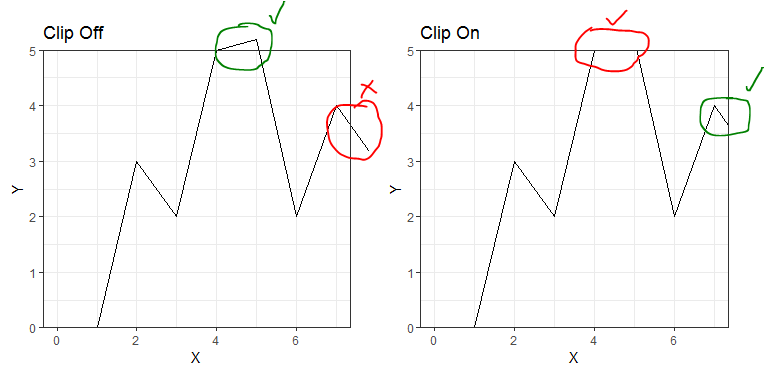
如果我过滤,那么x轴还不够远,尽管存在较高的x值。这也是我必须首先使用coord_cartesian的原因,因为scale_x_continuous和xlim在绘图时都忽略了所有未来的x轴时间,所以停止线比它们应该的时间早,就像描述的here一样。
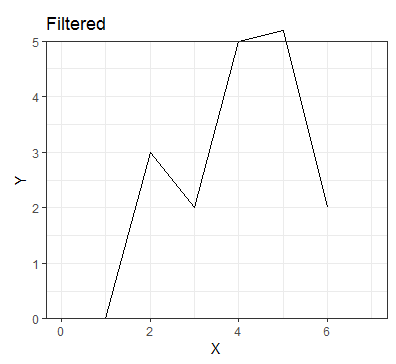
尝试:
我可以通过稍微增加y轴上限(在本例中为5.2)来达到我想要的效果,但是这个限制超出了我想要的范围,当我用我的实际数据绘制这个图时,它看起来很奇怪。
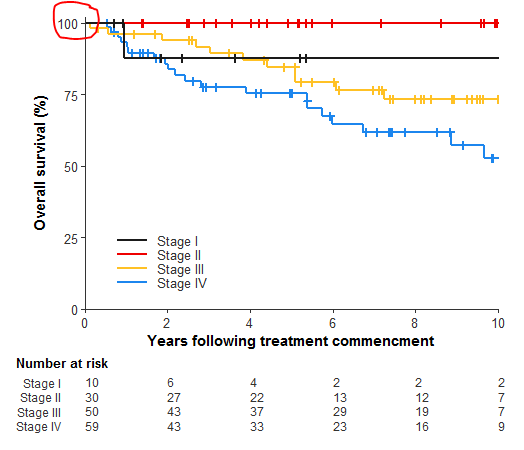
输出的实际绘图数据随y-极限的增加:
当绘制我的实际数据时,这条超过100标记的额外线是没有意义的,因为它永远不应该超过100%,这就是为什么我想避免这种解决办法。(出于安全原因,未为该地块添加数据/绘图代码)
回答 2
Stack Overflow用户
发布于 2019-07-12 07:34:47
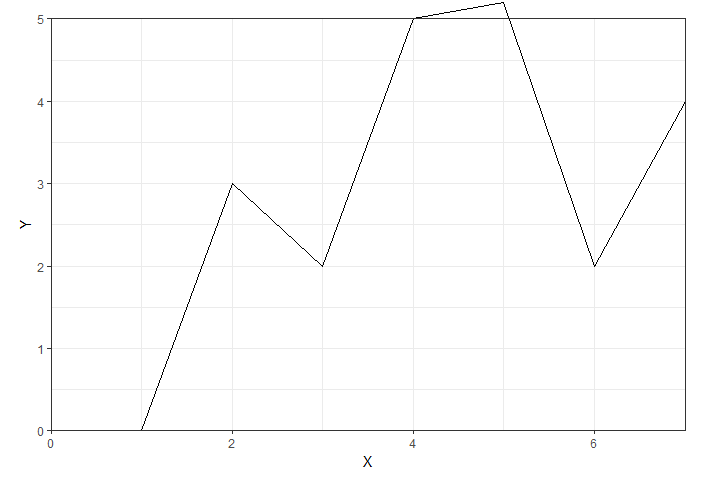
在这种情况下,您可以利用coord_cartesian(xlim = ...)和scale_x_continuous(limits = ...)的不同行为。和弦函数将做一个软剪辑,即他们绘制数据,然后剪辑。缩放函数将硬剪裁它,在绘制之前移除超出边界的值。您可以更精确地了解尺度函数的裁剪行为,方法是在该比例上设置一个oob参数。默认情况下,它将检查数据,即删除数据,但您可以使用scales函数中的squish()函数使其呈现出最极值的点。
ggplot(Z, aes(x=X, y=Y)) +
  geom_line() +
  coord_cartesian(ylim = c(0, 5),
                  clip = 'off') +
  theme_bw() +
  scale_y_continuous(expand = c(0,0)) +
  scale_x_continuous(limits = c(0, 7), expand = c(0,0), oob = scales::squish) +
  theme(plot.margin = unit(c(0.5, 0.5, 0.5, 0.5), 'cm'))
Stack Overflow用户
发布于 2019-07-12 06:04:50
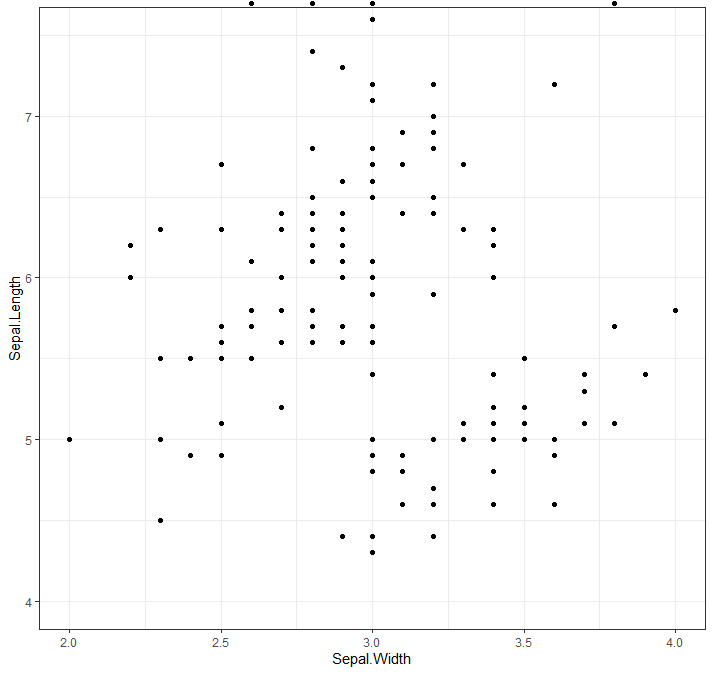
我可能误解了你的问题,但你就不能过滤一下你的数据吗?
library(tidyverse)

df <- iris # load data

ggplot(filter(df, Sepal.Width <= 4), aes(x = Sepal.Width, y = Sepal.Length)) + # plot data
    geom_point() +
    coord_cartesian(xlim = c(2, 4),    # set the x limits
                    ylim = c(4, 7.5),  # set the y limits
                    clip = 'off') +    # toggle on/off
    theme_bw()                         # make graph a little nicer
https://stackoverflow.com/questions/57000066
复制相似问题
腾讯云开发者

Copyright © 2013 - 2026 Tencent Cloud. All Rights Reserved. 腾讯云 版权所有
深圳市腾讯计算机系统有限公司 ICP备案/许可证号:粤B2-20090059  粤公网安备44030502008569号
腾讯云计算(北京)有限责任公司 京ICP证150476号 | 京ICP备11018762号