
向符合排序和筛选规则的工作表中添加图像
编辑:这可能是一个通用的Excel问题,我在这里跟踪它:https://superuser.com/questions/1457518/adding-images-to-excel-that-obey-both-filtering-and-sorting-rules
我正在生成工作表,其中一些行将具有嵌入它们的图像。根据我嵌入图像的方式,图像在其行的其余数据隐藏时不隐藏,或者在对工作表进行排序时图像不排序。
演示此问题的示例应用程序:https://github.com/dan-kirberger/poi-excel-image-issue -它生成两个工作表。每一个都证明了我的问题。还有一个带有预生成工作表的examples文件夹,如果您希望只查看生成的工作簿。
在应用任何排序/筛选之前,工作表如下所示:
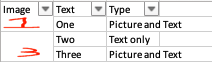
通过以下方式在工作表上启用排序/筛选:
sheet.setAutoFilter(new CellRangeAddress(sheet.getFirstRowNum(), sheet.getLastRowNum(), 0, 2));添加图像的代码(也在上面的github链接中):
        Drawing drawing = cell.getSheet().createDrawingPatriarch();
        XSSFClientAnchor anchor = new XSSFClientAnchor();
        anchor.setAnchorType(imageAnchorType);
        anchor.setCol1(cell.getColumnIndex());
        anchor.setRow1(cell.getRowIndex());
        Picture picture = drawing.createPicture(anchor, pictureId);
picture.resize(1, 1);在该片段中,imageAnchorType是决定因素,如果设置为MOVE_AND_RESIZE,则在使用筛选器中的排序功能时图像不会排序:
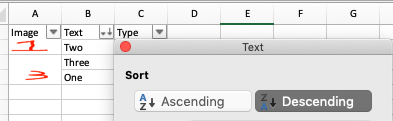
注意,图像不再匹配"Text“列。(图片为"1“的图像现在在文本”2“旁边)
如果imageAnchorType设置为MOVE_DONT_RESIZE,则图像排序适当,但在应用删除图像行的筛选器时,图像保留如下:
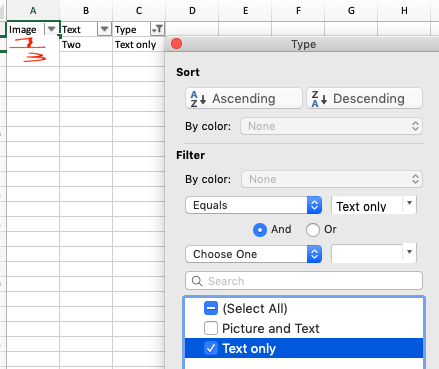
我们应用了一个过滤器来显示“只显示文本”的列,这样“一”和“三”行数据就消失了,但是它们的图像仍然存在。
还有其他我应该设置的属性来让它以我想要的方式工作吗?
回答 1
Stack Overflow用户
发布于 2019-07-09 07:28:28
问题不仅在于锚类型。为了同时提供排序和过滤,ClientAnchor.AnchorType.MOVE_AND_RESIZE是正确的。为了进行排序,移动必须是可能的,而过滤则必须是可能的(不可见行的行高为0)。
但是为了支持排序,图片也必须适合被排序的单元格中。它们不能突出单元格的大小,因为否则它们将不会与单元格一起排序。因此,picture.resize是不可能的,因为调整大小将图片调整为其本机大小,这可能会比图像锚定到的单元格的单元格大小大。
ClientAnchor提供以下设置:
setCol1是锚锚定的第一列。图片的左上角开始于该列的左侧边缘。
setDx1是将锚锚定在第一列左侧边缘的值。它将图片水平地从第一列的左边边缘移开。
setRow1,它是锚锚定的第一行。图片的左上角从那一行的上边缘开始。
setDy1是将锚锚定在第一行的上边缘的值。它将图片垂直地从第一行的顶部边缘移开。
setCol2是锚锚定的第二列。图片的右下角结束在该列的左边缘。
setDx2是将锚锚定在第二列左侧边缘的值。它将图片的右下角水平地移离第二列的左边缘。这将使画面水平扩大。
setRow2是锚锚定的第二行。这幅画的右下角结束在那一行的上边缘。
setDy1是将锚锚定在第二行的上边缘的值。它将图片的右下角垂直移出第二行的上边缘。这将使图片垂直延伸。
要支持排序,Row1和Row2必须是同一行。因此,在对该行进行排序时,图片属于该行。这意味着图片的高度只能由Dy2决定。图片高度必须与行高相适应。
下面的代码显示了一个示例。我从你的github下载的照片。
代码:
import java.io.InputStream;
import java.io.FileInputStream;
import java.io.FileOutputStream;
import org.apache.poi.util.IOUtils;
import org.apache.poi.ss.usermodel.Workbook;
import org.apache.poi.ss.usermodel.ClientAnchor;
import org.apache.poi.ss.util.CellRangeAddress;
import org.apache.poi.util.Units;
import org.apache.poi.xssf.usermodel.*;

class CreateExcelPictures {

 static String excelPath = "ExcelWithPictures.xlsx";
 static String[][] data = new String[][]{
  new String[]{"Image", "Text", "Type"},
  new String[]{"", "One", "One and Three"},
  new String[]{"", "Two", "Two only"},
  new String[]{"", "Three", "One and Three"}
 };
 static String[] pictureFileNames = new String[]{"one.png", "two.png", "three.png"};
 static int pictureWidthPx = 30;
 static int pictureHeightPx = 25;
 static XSSFWorkbook workbook;
 static XSSFSheet sheet;

 static void addImage(int col1, int row1, int col2, int row2,
  int dx1, int dy1, int dx2, int dy2,
  String imageFileName, ClientAnchor.AnchorType anchorType) throws Exception {

  InputStream imageInputStream = new FileInputStream(imageFileName);
  byte[] bytes = IOUtils.toByteArray(imageInputStream);
  int pictureId = workbook.addPicture(bytes, Workbook.PICTURE_TYPE_PNG);
  imageInputStream .close();

  XSSFClientAnchor anchor = workbook.getCreationHelper().createClientAnchor();
  anchor.setAnchorType(anchorType);
  // set Col1, Dx1, Row1, Dy1, Col2, Dx2, Row2, Dy2
  // only this determines the picture's size then
  anchor.setCol1(col1);
  anchor.setDx1(dx1);
  anchor.setRow1(row1);
  anchor.setDy1(dy1);
  anchor.setCol2(col2);
  anchor.setDx2(dx2);
  anchor.setRow2(row2);
  anchor.setDy2(dy2);

  XSSFDrawing drawing = sheet.createDrawingPatriarch();

  XSSFPicture picture = drawing.createPicture(anchor, pictureId);

 }

 public static void main(String args[]) throws Exception {

  workbook = new XSSFWorkbook();
  sheet = workbook.createSheet();
  int r = 0;
  for (String[] rowData : data) {
   XSSFRow row = sheet.createRow(r);
   int c = 0;
   for (String cellData : rowData) {
    XSSFCell cell = row.createCell(c++);
    cell.setCellValue(cellData);
   }
   if (r > 0) {
    float rowHeight = (float)Units.pixelToPoints(pictureHeightPx); // picture's height must fit into row height
    row.setHeightInPoints(rowHeight);
    addImage(0, r, 0, r, /*all fits in one cell*/
     /*Dx1 = 0 and Dy1 = 0, picture's top left edge starts on top left of the cell*/
     Units.pixelToEMU(0), Units.pixelToEMU(0),
     /*Dx2 is picture's width and Dy2 is picture's height, picture's bottom right edge ends on that point into the cell*/
     Units.pixelToEMU(pictureWidthPx), Units.pixelToEMU(pictureHeightPx),
     pictureFileNames[r-1], ClientAnchor.AnchorType.MOVE_AND_RESIZE);
   }
   r++;
  }

  sheet.setColumnWidth(2, 15*256);
  sheet.setAutoFilter(new CellRangeAddress(0, 3, 0, 2));

  FileOutputStream fos = new FileOutputStream(excelPath);
  workbook.write(fos);
  fos.close();
  workbook.close();

 }
}
结果:
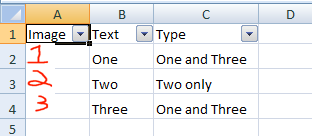
排序和过滤都是可能的。
https://stackoverflow.com/questions/56940480
复制相似问题
腾讯云开发者

Copyright © 2013 - 2026 Tencent Cloud. All Rights Reserved. 腾讯云 版权所有
深圳市腾讯计算机系统有限公司 ICP备案/许可证号:粤B2-20090059  粤公网安备44030502008569号
腾讯云计算(北京)有限责任公司 京ICP证150476号 | 京ICP备11018762号