
打开ngx-智能模式,而不禁用背景?
打开ngx-智能模式,而不禁用背景?
提问于 2019-07-03 16:21:26
我有两个ngx-smart-modals,用于在我的应用程序中添加一些特性。第一个包含一个表单,单击“添加”按钮,打开一个新的模式,其中包含最近从表单中添加的数据。就像这样:
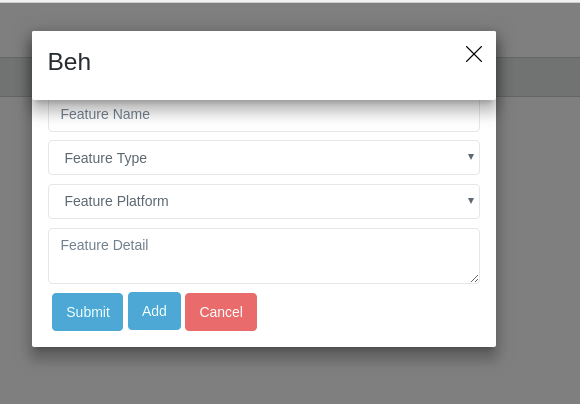
(模式"Beh“是弹出的第二个模式,"beh”目前只是一个虚拟文本,而且位置也需要更改,所以请暂时忽略它:)
我遇到的问题是,当我单击"Add“时,模式"Beh”在后台禁用表单,但我希望仍然启用它来添加更多数据。
是否有任何财产或方法可以帮助我实现这一点?在表单顶部禁用不可见层的东西?
我的代码:
详细组件( "beh“1)
import { Component, OnInit, ViewChild } from '@angular/core';
import { NgxSmartModalComponent } from 'ngx-smart-modal';

@Component({
  selector: 'app-detail-modal',
  templateUrl: './detail-modal.component.html',
  styleUrls: ['./detail-modal.component.scss']
})
export class DetailModalComponent implements OnInit {

  @ViewChild('detailModal') public detailModal: NgxSmartModalComponent;

  constructor() { }

  ngOnInit() {
    this.detailModal.dismissable = false;
    this.detailModal.backdrop = false;
    this.detailModal.escapable = false;
    this.detailModal.isVisible();
  }

  resetData() {
   // this.detailModal.setData(window.localStorage['feature']);
  }

}
创建模式(表单)
import { Component, OnInit, ViewChild, ViewContainerRef, AfterContentInit } from '@angular/core';
import { TranslatePipe } from 'src/app/pipes/translate/translate.pipe';
import { DynamicTextFieldService } from 'src/app/services/dynamic-loading/dynamic-text-field/dynamic-text-field.service';
import { FormGroup, FormBuilder, Validators } from '@angular/forms';
import { DynamicDropdownService } from 'src/app/services/dynamic-loading/dynamic-dropdown/dynamic-dropdown.service';
import { featureMeta, platform } from 'src/app/components/modals/create-feature-modal/featureMeta';
import { DynamicTextAreaService } from 'src/app/services/dynamic-loading/dynamic-text-area/dynamic-text-area.service';
import { NgxSmartModalComponent, NgxSmartModalService } from 'ngx-smart-modal';

@Component({
  selector: 'app-create-feature-modal',
  templateUrl: './create-feature-modal.component.html',
  styleUrls: ['./create-feature-modal.component.scss']
})

/**
* This class creates a featureModal component
*/
export class CreateFeatureModalComponent implements OnInit, AfterContentInit {

  /*constructor and other methods*/

  /**
  * initialize buildForm
  */
  ngOnInit() {
    this.buildForm();
  }


  /**
  * Add data (this is the opening function for the modal)
  */
  addData() {
    this.ngxsmartmodal.getModal('detailModal').open();
}表单模板
<app-detail-modal></app-detail-modal>
<ngx-smart-modal #featureModal [identifier]="'featureModal'">
  <h2 Align="center">{{"views[modal][feature][heading]" | translate }}</h2>
  <form [formGroup]="featureForm">
    <div #name class='feature'></div>
    <div #type class='feature'></div>
    <div #platform class='feature'></div>
    <div #detail class='feature'></div>
    <app-button description="{{ 'views[modal][feature][button][submit]' | translate }}" class="btn btn-primary btn-md submit" (callFunction)="setData()"></app-button>
    <app-button description="{{ 'views[modal][feature][button][add]' | translate }}" class="btn btn-primary btn-md submit" (callFunction)="addData()"></app-button>
    <app-button description="{{ 'views[modal][feature][button][cancel]' | translate }}" class="btn btn-danger btn-md cancel" (callFunction)="featureModal.close()"></app-button>
  </form>
</ngx-smart-modal>用于细节组件的模板
<ngx-smart-modal #detailModal [identifier]="'detailModal'" (onOpen)="resetData()">
  <div *ngIf="detailModal.hasData()">
    <h3>Beh</h3>
  </div>
</ngx-smart-modal>回答 1
Stack Overflow用户
回答已采纳
发布于 2019-07-08 11:03:09
这是modals的默认行为和预期行为。
请参阅模态窗口用户界面的定义
您的要求不是创建第二种模式,而是
- 如果您只想在第二个弹出窗口上显示一些文本或图像,请使用Toast消息
- 如果您想要添加第二格式,则两者位于相同的模式上。
- 如果你想要别的事告诉我。
页面原文内容由Stack Overflow提供。腾讯云小微IT领域专用引擎提供翻译支持
原文链接:
https://stackoverflow.com/questions/56874415
复制相关文章
相似问题
腾讯云开发者

Copyright © 2013 - 2026 Tencent Cloud. All Rights Reserved. 腾讯云 版权所有
深圳市腾讯计算机系统有限公司 ICP备案/许可证号:粤B2-20090059  粤公网安备44030502008569号
腾讯云计算(北京)有限责任公司 京ICP证150476号 | 京ICP备11018762号