
如何使用Vue-SweetAlert2 2在一个弹出窗口内验证多个用户输入
作为编码培训,现在我正在制作一个网页,您可以单击"Create“按钮,该按钮会触发一个弹出,在该按钮中,您应该填写6个数据输入,其输入方式不同,如文本、选择等(见下面的代码和附加图像)。
<template>
      <v-btn class="create-button" color="yellow" @click="alertDisplay">Create</v-btn>

    <br/>

    <p>Test result of createCustomer: {{ createdCustomer }}</p>
  </div>
</template>

<script>
  export default {
    data() {
      return {
        createdCustomer: null
      }
    },
    methods: {
      alertDisplay() {
        const {value: formValues} = await this.$swal.fire({
            title: 'Create private customer',
            html: '<input id="swal-input1" class="swal2-input" placeholder="Customer Number">' +
                '<select id="swal-input2" class="swal2-input"> <option value="fi_FI">fi_FI</option> <option value="sv_SE">sv_SE</option> </select>'
                 +
                '<input id="swal-input3" class="swal2-input" placeholder="regNo">' +
                '<input id="swal-input4" class="swal2-input" placeholder="Address">' +
                '<input id="swal-input5" class="swal2-input" placeholder="First Name">' +
                '<input id="swal-input6" class="swal2-input" placeholder="Last Name">'
                ,
            focusConfirm: false,
            preConfirm: () => {
                return [
                    document.getElementById('swal-input1').value,
                    document.getElementById('swal-input2').value,
                    document.getElementById('swal-input3').value,
                    document.getElementById('swal-input4').value,
                    document.getElementById('swal-input5').value,
                    document.getElementById('swal-input6').value
                ]
            }
        })
        if (formValues) {
            this.createdCustomer = this.$swal.fire(JSON.stringify(formValues));
            console.log(this.createdCustomer);
        }
      }
    }
  }
</script>
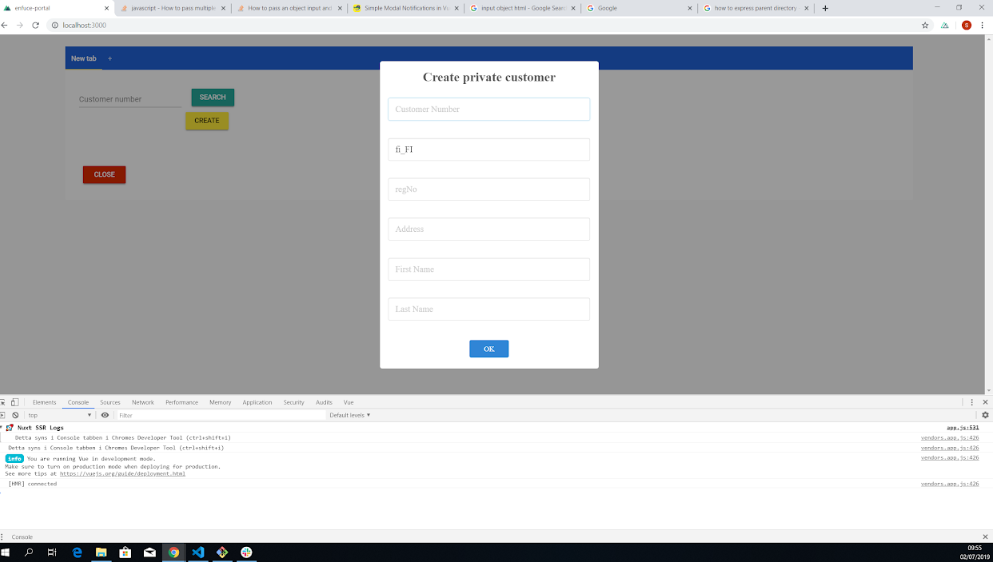
从技术上讲,它起作用了。当单击"create“按钮时,弹出窗口就会显示出来,您可以填写所有的6个空格并单击"OK”按钮。但是我想添加一些功能来检查用户输入是否有效,我的意思是
- 地址应在50个字符内
- firstName应该在20个字符内
- customerNumber应该包括字母和数字
诸若此类。
如果是C或Java,我可能会做一些类似的事情
if(length <= 50){
    // proceed
} else {
    // warn the user that the string is too long
}
但是,当使用Vue-SweetAlert2 2验证单个弹出中的多个输入时,我不知道如何做到这一点,而且我还没有找到任何解释得足够详细的页面。
如果它只是一个输入,也许您可以像这样使用inputValidor
const {value: ipAddress} = await Swal.fire({
    title: 'Enter an IP address',
    input: 'text',
    inputValue: inputValue,
    showCancelButton: true,
    inputValidator: (value) => {
        if (!value) {
            return 'You need to write something!'
        }
    }
})

if (ipAddress) {
  Swal.fire(`Your IP address is ${ipAddress}`)
}
,但此示例只涉及“一个输入”。此外,这只检查“是否给出了IP地址”(这意味着是否存在值,而且它并不真正检查IP地址的长度是否正确和/或输入字符串是否由数字/字母组成)。
另一方面,我要做的是“限制多个输入值(例如字符串的长度等)”“I单个弹出”。知道我该怎么做吗?
回答 1
Stack Overflow用户
发布于 2019-08-10 14:08:25
不幸的是,HTML标记限制输入(例如,必需的、模式等)不要工作(请参阅此问题),因此我发现有两种工作。
在链接问题中使用使用preConfirm
您可以使用preConfirm和if / 正则表达式语句来检查您的需求,如果他们不满意,您可以使用Swal.showValidationMessage(error)。
 const{value:formValue} = await Swal.fire({
      title: "Some multiple input",
      html:
        <input id="swal-input1" class="swal-input1" placeholder="name"> +
        <input id="swal-input2" class="swal-input2" placeholder="phone">,
      preConfirm: () => {
        if($("#swal-input1").val() !== "Joe"){
          Swal.showValidationMessage("your name must be Joe");
        } else if (!('[0-9]+'.test($("#swal-input2").val())){
          Swal.showValidationMessage("your phone must contain some numbers");
        }
      }
});
使用引导带
通过这种方式,引导在验证时进行检查,您需要在输入类中包含class="form-control",并修改少量的html代码。
如果某些条件失败,浏览器将按照每个字段在html代码中的顺序显示验证消息。
 const {value: formValue} = await Swal.fire({
        title: 'Some multiple inputs',
        html:
            '<form id="multiple-inputs">' +
                '<div class="form-group">' +
                    '<input type="text" class="form-control swal-input1" id="swal-input1" min=2 max=4 required>' +
                '</div>' +
                '<div class="form-group">' +
                    '<input type="text" class="form-control swal-input2" id="swal-input2" placeholder="Name" pattern="[A-Za-z]" required>' +
                '</div>' +
            '</form>',
});
我已经尝试过这两种解决方案,实际上只适用于Bootstrap3,但它也应该适用于最新的版本。
https://stackoverflow.com/questions/56849617
复制相似问题
腾讯云开发者

Copyright © 2013 - 2026 Tencent Cloud. All Rights Reserved. 腾讯云 版权所有
深圳市腾讯计算机系统有限公司 ICP备案/许可证号:粤B2-20090059  粤公网安备44030502008569号
腾讯云计算(北京)有限责任公司 京ICP证150476号 | 京ICP备11018762号