
如何在ModelEntity中用RealityKit编程添加素材?
如何在ModelEntity中用RealityKit编程添加素材?
提问于 2019-06-30 23:08:20
RealityKit的文档包括用于向ModelEntity添加材料的结构:OcclusionMaterial、SimpleMaterial和UnlitMaterial。
或者,您可以加载一个模型的材料附加到它。
我希望以编程方式将自定义material/texture添加到ModelEntity中。我如何才能在不将素材添加到Reality Composer或其他3D软件中的模型中实现这一点呢?
回答 1
Stack Overflow用户
回答已采纳
发布于 2019-07-02 09:36:37
更新日期:2022年6月14日
RealityKit材料
目前在RealityKit 2.0和RealityFoundation中有6种类型的材料:
- SimpleMaterial
- UnlitMaterial
- OcclusionMaterial (阅读本文了解如何设置SceneKit遮挡着色器)
- VideoMaterial (查看这个职位以了解如何设置它)
- PhysicallyBasedMaterial
- CustomMaterial
要应用这些材料,请使用以下逻辑:
import Cocoa
import RealityKit

class ViewController: NSViewController {
    @IBOutlet var arView: ARView!

    override func awakeFromNib() {
        let box = try! Experience.loadBox()

        var simpleMat = SimpleMaterial()
        simpleMat.color = .init(tint: .blue, texture: nil)
        simpleMat.metallic = .init(floatLiteral: 0.7)
        simpleMat.roughness = .init(floatLiteral: 0.2)

        var pbr = PhysicallyBasedMaterial()
        pbr.baseColor = .init(tint: .green, texture: nil)

        let mesh: MeshResource = .generateBox(width: 0.5,
                                             height: 0.5,
                                              depth: 0.5,
                                       cornerRadius: 0.02,
                                         splitFaces: true)

        let boxComponent = ModelComponent(mesh: mesh,
                                     materials: [simpleMat, pbr])

        box.steelBox?.children[0].components.set(boxComponent)
        box.steelBox?.orientation = Transform(pitch: .pi/4,
                                                yaw: .pi/4,
                                               roll: 0).rotation
        arView.scene.anchors.append(box)
    }
}
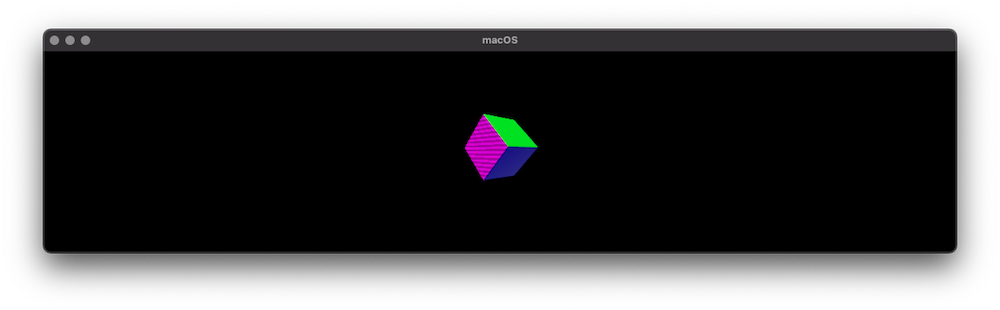
阅读这个职位,了解如何为RealityKit的着色器加载纹理。
如何创建类似SceneKit着色器的RealityKit着色器
我们知道在SceneKit中有5种不同的阴影模型,所以我们可以使用RealityKit的SimpleMaterial、PhysicallyBasedMaterial和UnlitMaterial生成我们已经习惯的所有这五种着色器。
让我们看看它是什么样子的:
SCNMaterial.LightingModel.blinn           – SimpleMaterial(color: . gray,
                                                        roughness: .float(0.5),
                                                       isMetallic: false)

SCNMaterial.LightingModel.lambert         – SimpleMaterial(color: . gray,
                                                        roughness: .float(1.0),
                                                       isMetallic: false)

SCNMaterial.LightingModel.phong           – SimpleMaterial(color: . gray,
                                                        roughness: .float(0.0),
                                                       isMetallic: false)

SCNMaterial.LightingModel.physicallyBased – PhysicallyBasedMaterial()


// all three shaders (`.constant`, `UnlitMaterial` and `VideoMaterial `)
// don't depend on lighting
SCNMaterial.LightingModel.constant        – UnlitMaterial(color: .gray)
– VideoMaterial(avPlayer: avPlayer)页面原文内容由Stack Overflow提供。腾讯云小微IT领域专用引擎提供翻译支持
原文链接:
https://stackoverflow.com/questions/56828648
复制相关文章
相似问题
腾讯云开发者

Copyright © 2013 - 2026 Tencent Cloud. All Rights Reserved. 腾讯云 版权所有
深圳市腾讯计算机系统有限公司 ICP备案/许可证号:粤B2-20090059  粤公网安备44030502008569号
腾讯云计算(北京)有限责任公司 京ICP证150476号 | 京ICP备11018762号