
如何用pytmx正确显示旋转对象?
经过很多研究,我没有找到答案,当我试图用pytmx在游戏中显示对象时,结果是完全失效的,因为x,y随旋转而变化。我试着用矩阵旋转,但是为了这个,我需要知道原始中心。我不知道怎么找到它,因为瓷砖在旋转后送我,x,y.
因此,我的目标是简单地用pytmx在游戏中显示对象块。
import numpy
import math

angle = math.radians(-117.57) #rotation get with tiled, set - for cancel rotation
center_x = 148 #how to get this ?
center_y = 747 #and this
x = 126.82 #get with tiled
y = 679.54 #get with tiled

id_rotation = [ [math.cos(angle), -math.sin(angle)],
                [math.sin(angle), math.cos(angle)] ]
R = numpy.matrix(id_rotation)

id_position = [ [x - center_x],
                [y - center_y] ]
B = numpy.matrix(id_position)

id_center = [ [center_x],
              [center_y] ]
C = numpy.matrix(id_center)

print(numpy.dot(R, B) + C) #return original position before rotation
如果我只使用pygame.transform.rotate:
if isinstance(layer, pytmx.TiledObjectGroup):
        for object in layer:
            if (object.image):
                assets_surface = pygame.Surface((object.width, object.height), pygame.SRCALPHA)
                assets_surface.blit(object.image, (0, 0))
                assets_surface_rotate = pygame.transform.rotate(assets_surface, -object.rotation)
                rdc.blit(assets_surface_rotate, (object.x, object.y))
对于平铺物体,我取错了x,y的位置:
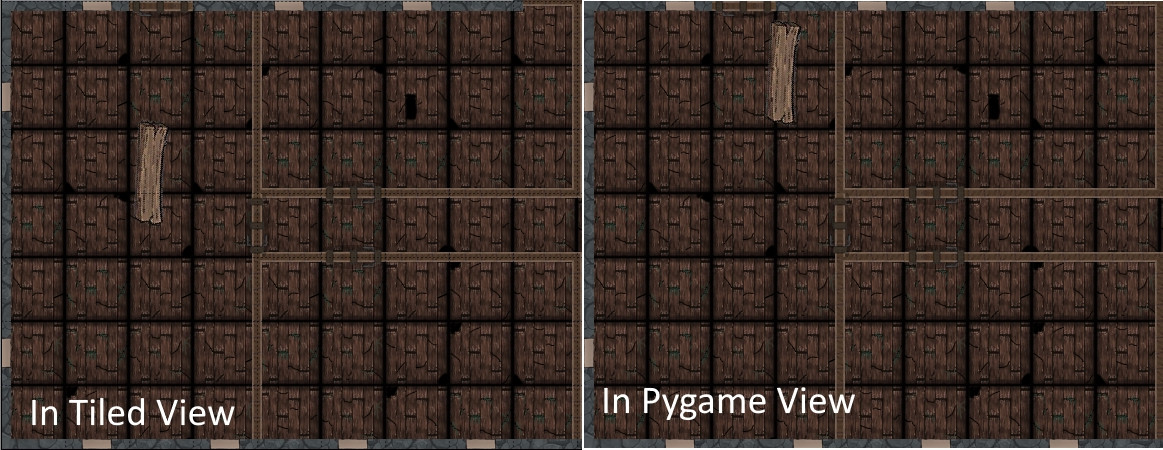
回答 2
Stack Overflow用户
发布于 2019-06-29 19:42:23
好的,如果有人需要的话,我找到了解决方案:
elif isinstance(layer, pytmx.TiledObjectGroup):
        for Object in layer:
            if (Object.image):
                if Object.rotation != 0:
                    angle = math.radians(-Object.rotation)
                    center_x = Object.centerX
                    center_y = Object.centerY
                    Object_y = Object.y + Object.height

                    id_rotation = [ [math.cos(angle), -math.sin(angle)],
                                    [math.sin(angle), math.cos(angle)] ]
                    R = numpy.matrix(id_rotation)

                    id_position = [ [Object.x - center_x],
                                    [Object_y - center_y] ]
                    P = numpy.matrix(id_position)

                    id_center = [ [center_x],
                                [center_y] ]
                    C = numpy.matrix(id_center)

                    position_without_rotation = numpy.dot(R, P) + C

                    no_rotation_x = position_without_rotation[0]
                    no_rotation_y = position_without_rotation[1] - Object.height #Repere Tiled pas le meme que Pygame

                    Object_surface = pygame.Surface((Object.image.get_rect()[2], Object.image.get_rect()[3]), pygame.SRCALPHA)
                    Object_surface.blit(Object.image, (0, 0))
                    Object_surface_scale = pygame.transform.scale(Object_surface, (round(Object.width), round(Object.height)))
                    Object_surface_rotate = pygame.transform.rotate(Object_surface_scale, -Object.rotation) #Pygame va en anti horaire

                    extra_x = (Object_surface_rotate.get_rect()[2] - Object.width) / 2
                    extra_y = (Object_surface_rotate.get_rect()[3] - Object.height) / 2

                    rdc.blit(Object_surface_rotate, (no_rotation_x - extra_x, no_rotation_y - extra_y))
                else:
                    Object_surface = pygame.Surface((Object.image.get_rect()[2], Object.image.get_rect()[3]), pygame.SRCALPHA)
                    Object_surface.blit(Object.image, (0, 0))
                    Object_surface_scale = pygame.transform.scale(Object_surface, (round(Object.width), round(Object.height)))

rdc.blit(Object_surface_scale, (Object.x, Object.y))Stack Overflow用户
发布于 2019-06-29 15:48:47
我认为你在旋转后传递物体的x和y位置时做了一些错误。我从来没有使用过贴图,所以我不知道具体情况,但是在游戏中,当你把位置传递给blit时,你应该传递左上角的坐标。Surface的左上角将在这些坐标处.
rdc.blit(assets_surface_rotate, (object.x, object.y))在这里,我不知道object.x和object.y的确切坐标是什么,但我打赌它们不是左上角,或者您的代码应该能工作。
通常,要完成这类工作,您可以使用雪碧类或子类,这会有很大帮助。
class TMSprite(pygame.sprite.Sprite):
    # Constructor. Create a Surface from a TileMap and set its position
    def __init__(self, tmo, x, y, width, height):
        # Call the parent class (Sprite) constructor
        super(TMSprite, self).__init__()

        # Create the image of the block
        self.image = pygame.Surface((width, height), pygame.SRCALPHA)
        self.image.blit(tmo.image, (0, 0))

        # Fetch the rectangle object that has the dimensions of the image
        # Set its position with the move method
        self.rect = self.image.get_rect().move(x, y)

    def rotate(self, angle):
        # TMSprite rotation on its center of a given angle
        rot_center = self.rect.center
        self.image = pygame.transform.rotate(self.image, angle)
        self.rect = self.image.get_rect()
self.rect.center = rot_center这就是如何使用TMSprite类重写代码段的方法。
if isinstance(layer, pytmx.TiledObjectGroup):
    for tmob in layer:
        if (tmob.image):
            x = tmob.x #x should be that of the top-left corner. Adjust the formula if tmob.x is not the top-left
            y = tmob.y #y should be that of the top-left corner. Adjust the formula if tmob.y is not the top-left
            assets_sprite = TMSprite(tmob, x, y, tmob.width, tmob.height)
            assets_sprite.rotate(-object.rotation)
rdc.blit(assets_sprite.image, assets_sprite.rect)这里,我将雪碧的Rect传递给blit,而不是传递左上角坐标。blit方法将从矩形中提取坐标。
注意,旋转是在表面的中心上执行的。旋转后,如果角度不是90°的倍数,表面就会增大,因为表面的正方形必须与屏幕对齐。如果有一个alpha通道不是问题,额外的像素是透明的,但左上角会发生变化。
https://stackoverflow.com/questions/56817307
复制相似问题
腾讯云开发者

Copyright © 2013 - 2026 Tencent Cloud. All Rights Reserved. 腾讯云 版权所有
深圳市腾讯计算机系统有限公司 ICP备案/许可证号:粤B2-20090059  粤公网安备44030502008569号
腾讯云计算(北京)有限责任公司 京ICP证150476号 | 京ICP备11018762号