
Div在顶部,img在中间,按钮在sub中。
Div在顶部,img在中间,按钮在sub中。
提问于 2019-06-27 08:37:02
我想这样做
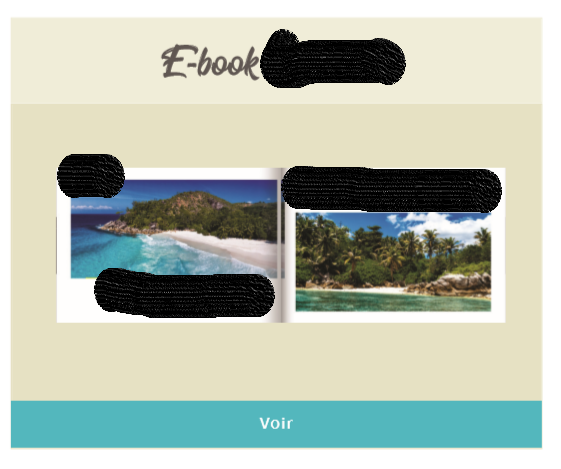
我使用了两个<div>,其中包含两个<h2>,必须替换父<div>的顶部和底部。这是我的代码:
.parent {
	 background: #eae8db;
	 margin: 20px;
	 border: 1px solid black;
	 position: relative;
	 height: 300px;
}

.top {
  background-color:#d6d1b1;
  height: 15%;
  width: 100%;
  position: absolute;
  top: -06%;
  left: -03.7%;
  line-height:100px;
  vertical-align:middle;
}

h2{ text-align: center;}

.center {
	position: absolute;
	margin: auto;
	top: 0;
	left: 0;
	right: 0;
	bottom: 0;
	}

.bottom{
  background-color:#24bfd1;
  height: 5%;
  width: 100%;
  position: absolute;
  bottom : 60%;
  left: -03.7%;
  line-height:100px;
  vertical-align:middle;
}<!DOCTYPE html>
<html>
<head>
</head>
<body>
<div class="parent" >
<div class="top">
<h2>E-book</h2>
</div>
<img class="center" src="https://picsum.photos/200">
<div class="bottom">
<h2>Voir</h2>
</div>
</div>
</body>
</html>
链接到JsFiddle
有人能帮我调整一下吗?
回答 3
Stack Overflow用户
回答已采纳
发布于 2019-06-27 08:50:26
我刚刚在你的CSS中做了一些修改,替换它应该会有帮助:
.parent {
  background: #eae8db;
  border: 1px solid black;
  display: flex;
  align-items:center;
  justify-content:center;
  height: 300px;
  position:relative;
}

.top {
  background-color:#d6d1b1;
  height: 15%;
  width: 100%;
  position:absolute;
  top:0;
  display:flex;
  justify-content:center;
  align-items:center;
}

.bottom{
  background-color:#24bfd1;
  height: 12%;
  width: 100%;
  position: absolute;
  bottom:0;
  display:flex;
  align-items:center;
  justify-content:center;
}Stack Overflow用户
发布于 2019-06-27 08:53:01
我创建了一个基于DOM的小提琴:https://jsfiddle.net/xy0zqsnt/1/
我还试图重用您的css类,但我抛出了一些东西,这对我来说没有意义。仍然有改进的余地,但我希望您能够认识到css的变化。
要点是在display:flex类中使用.parent。Flexbox对于这样的布局任务有很大帮助,请确保检查它(例如:https://css-tricks.com/snippets/css/a-guide-to-flexbox/ --但是有很多资源!)
HTML
 <div class="parent" >
    <div class="top">
      <h2>E-book</h2>
    </div>
    <img class="image" src="https://picsum.photos/200">
    <div class="bottom">
      <h2>Voir</h2>
    </div>
  </div>
CSS
h2{ text-align: center;}

.parent {
  background: #eae8db;
  margin: 20px;
  height: 300px;

  display: flex;
  flex-direction: column;
  align-items: center;
}

.top {
  background-color:#d6d1b1;
  width: 100%;
}

.bottom{
  background-color:#24bfd1;
  width: 100%;
}

.image{
  margin: 1em;

}Stack Overflow用户
发布于 2019-06-27 08:52:01
Solution: ->

No need to use absolute position for this layout...

Here is the solution: ->

<!DOCTYPE html>
<html>
<head>
</head>
<body>
  <div class="parent" >
    <div class="top">
      <h2>E-book</h2>
    </div>
    <p>
    <img class="center" src="https://picsum.photos/200">
    </p>
    <div class="bottom">
      <h2>Voir</h2>
    </div>
  </div>
</body>
</html>


CSS part->

.parent {
     background: #eae8db;
     margin: 20px;
}

.top {
  background-color:#d6d1b1;
  padding: 20px;

}
p{
  margin-top: 0;
  text-align: center;
  padding: 50px 0;
}
h2{ text-align: center;}


.bottom{
  background-color:#24bfd1;
  padding: 10px;
}页面原文内容由Stack Overflow提供。腾讯云小微IT领域专用引擎提供翻译支持
原文链接:
https://stackoverflow.com/questions/56787114
复制相关文章
相似问题
腾讯云开发者

Copyright © 2013 - 2026 Tencent Cloud. All Rights Reserved. 腾讯云 版权所有
深圳市腾讯计算机系统有限公司 ICP备案/许可证号:粤B2-20090059  粤公网安备44030502008569号
腾讯云计算(北京)有限责任公司 京ICP证150476号 | 京ICP备11018762号