
如何使用react本地地图更改mapView.callout的默认背景颜色?
如何使用react本地地图更改mapView.callout的默认背景颜色?
提问于 2019-06-25 07:58:37
我试图更改标注的背景色,但是背景色对整个视图没有影响。
下面是我的截图:
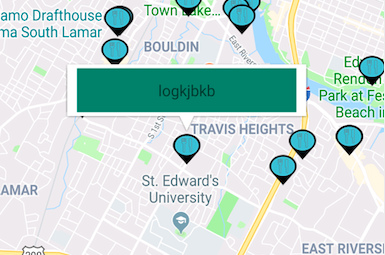
我希望backgroundColor包含完整的工具提示。
这是我的代码:
<MapView.Callout
            style={{
              width: 200,
              height: 40,
              backgroundColor: '#107B67',
              borderRadius: 10,
              zIndex: 10
            }}
          >
            <View
              style={{
                flex: 1,
                justifyContent: 'center',
                alignItems: 'center'
              }}
            >
              <Text>logkjbkb</Text>
            </View>
          </MapView.Callout>
如何将backgroundColor设置为整个标注?
回答 2
Stack Overflow用户
发布于 2019-10-01 02:16:01
您需要将标注组件上的“工具提示”支柱设置为true。
<MapView.Callout
    tooltip={true}
    style={{
        width: 200,
        height: 40,
        backgroundColor: '#107B67',
        borderRadius: 10,
        zIndex: 10
     }}
  >
</MapView.Callout>`道具:工具提示
类型:Boolean false
如果为false,则将在此标注子区域周围绘制默认的“工具提示”气泡窗口。如果为真,子视图可以完全自定义它们的外观,包括任何类似于“气泡”的样式。
以下是参考资料:https://github.com/react-native-community/react-native-maps/blob/master/docs/callout.md
Stack Overflow用户
发布于 2021-09-25 03:10:57
这对我有用(如果你想使用默认的泡泡)
- 使用样式
CustomCallout视图创建带有样式{margin: -30; padding: 30; backgroundColor: "Your favorite color"}的自定义标注 - 在标注
<Callout> <CustomCallout/> </Callout>中使用它
页面原文内容由Stack Overflow提供。腾讯云小微IT领域专用引擎提供翻译支持
原文链接:
https://stackoverflow.com/questions/56749392
复制相关文章
相似问题
腾讯云开发者

Copyright © 2013 - 2026 Tencent Cloud. All Rights Reserved. 腾讯云 版权所有
深圳市腾讯计算机系统有限公司 ICP备案/许可证号:粤B2-20090059  粤公网安备44030502008569号
腾讯云计算(北京)有限责任公司 京ICP证150476号 | 京ICP备11018762号